- Document Solutions for Excel .NET Overview
- Key Features
- Getting Started
-
Features
- Worksheet
- Workbook
- Comments
- Hyperlinks
- Sort
- Filter
- Group
- Conditional Formatting
- Data Validations
- Data Binding
- Import Data
- Digital Signatures
- Formulas
- Custom Functions
- Shapes
- Document Properties
- Styles
- Form Controls
- Barcodes
- Themes and Colors
- Chart
- Table
- Pivot Table
- Pivot Chart
- Sparkline
- Slicer
- Logging
- Defined Names
- AI Assistant
- Templates
- Formula Reference
- File Operations
- Tutorials
- Document Solutions Data Viewer
- API Reference
- Release Notes
Summary Row
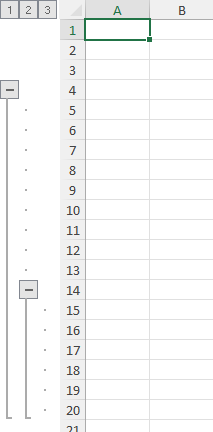
When grouping is performed in a spreadsheet, a summary row is automatically created corresponding to each group. Summary rows are group header rows that display the group name with the information about the group that is being created.
While working with DsExcel .NET, you modify and customize the summary row as per the requirement using the SummaryRow property of the IOutline interface.
Refer to the following example code to set summary row.
//summary
worksheet.Outline.SummaryRow = SummaryRow.Above;

//Summary row will be row 4.
worksheet.Range["5:20"].Group();
//Summary row will be row 14.
worksheet.Range["15:20"].Group();