- Document Solutions for Excel Java Overview
- Key Features
- Getting Started
-
Features
- Worksheet
- Workbook
- Comments
- Hyperlinks
- Sort
- Filter
- Group
- Conditional Formatting
- Data Validations
- Data Binding
- Import Data
- Digital Signatures
- Formulas
- Custom Functions
- Shapes
- Document Properties
- Styles
- Form Controls
- Barcodes
- Themes and Colors
- Chart
- Table
- Pivot Table
- Pivot Chart
- Sparkline
- Slicer
- Print Settings
- Logging
- Defined Names
- AI Assistant
- Templates
- Formula Reference
- File Operations
- Tutorials
- Use JDK 8 Date Time API
- Document Solutions Data Viewer
- API Reference
- Release Notes
AI.TEXTSENTIMENT
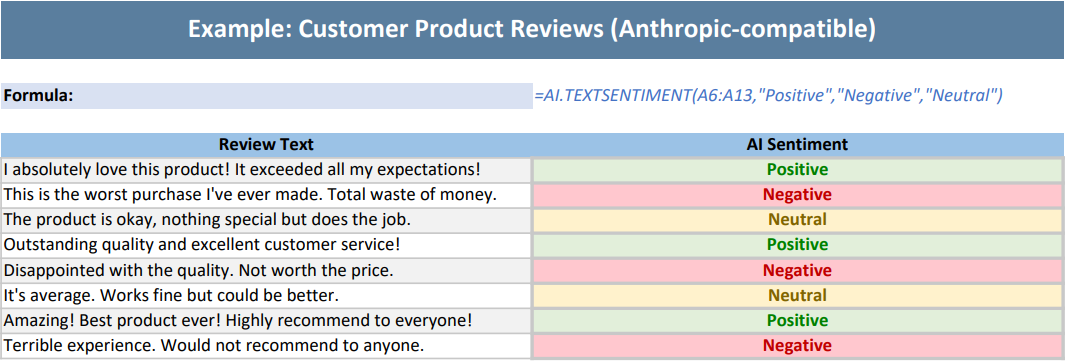
Users can use the AI.TEXTSENTIMENT function to analyze the sentiment of text in a cell, returning Positive, Negative, or Neutral results.
Syntax
AI.TEXTSENTIMENT(array, positive, negative, [neutral])
Arguments
This function has these arguments:
Argument | Description |
|---|---|
array | [Required] The array of data to be passed to the function, such as a range reference. |
positive | [Required] The value to return when the sentiment analysis result is positive. |
negative | [Required] The value to return when the sentiment analysis result is negative. |
neutral | [Optional] The value to return when the sentiment analysis result is neutral. |
Examples
Example 1: Customer Review Sentiment Analysis (OpenAI-compatible)
The following example shows how to invoke the OpenAI GPT-4.1 model and use the AI.TRANSLATE function for single sentence and batch text translation.
// To use this example, add the following dependency to your project: com.openai:openai-java:4.6.1
// Configure the model request handler and choose different large model providers as needed. Here the example uses OpenAI GPT-4.1; replace with your API key when using.
Workbook.setAIModelRequestHandler(new OpenAIModelRequestHandler("https://api.openai.com/v1", "sk-xxxx", "gpt-4.1"));
// DeepSeek model.
// Workbook.setAIModelRequestHandler(new OpenAIModelRequestHandler("https://api.deepseek.com/v1", "sk-xxxx", "deepseek-chat"));
// Qwen model.
// Workbook.setAIModelRequestHandler(new OpenAIModelRequestHandler("https://dashscope.aliyuncs.com/compatible-mode/v1", "sk-xxxx", "qwen-plus"));

// Initialize the workbook and set data.
Workbook workbook = new Workbook();
IWorksheet sheet = workbook.getWorksheets().get(0);
sheet.getColumns().get(0).setColumnWidth(55);
sheet.getColumns().get(1).setColumnWidth(55);
sheet.getRange("A1:B1").merge();
sheet.getRange("A1").setValue("Example: Customer Product Reviews");
sheet.getRange("A1").getFont().setBold(true);
sheet.getRange("A1").getFont().setSize(16);
sheet.getRange("A1").getFont().setColor(Color.GetWhite());
sheet.getRange("A1").getInterior().setColor(Color.FromArgb(90, 126, 158));
sheet.getRange("A1").setHorizontalAlignment(HorizontalAlignment.Center);
sheet.getRange("A1").setVerticalAlignment(VerticalAlignment.Center);
sheet.getRange("A1").setRowHeight(35);
sheet.getRange("A3").setValue("Formula:");
sheet.getRange("A3").getFont().setBold(true);
sheet.getRange("A3").getFont().setSize(11);
sheet.getRange("A3").getInterior().setColor(Color.FromArgb(217, 225, 242));
sheet.getRange("B3").setValue("=AI.TEXTSENTIMENT(A6:A13,\"Positive\",\"Negative\",\"Neutral\")");
sheet.getRange("B3").getFont().setItalic(true);
sheet.getRange("B3").getFont().setColor(Color.FromArgb(68, 114, 196));
sheet.getRange("B3").setWrapText(true);
sheet.getRange("A5:B5").setValue(new Object[][] {
        { "Review Text", "AI Sentiment" }
});
sheet.getRange("A5:B5").getFont().setBold(true);
sheet.getRange("A5:B5").getInterior().setColor(Color.FromArgb(155, 194, 230));
sheet.getRange("A5:B5").setHorizontalAlignment(HorizontalAlignment.Center);
sheet.getRange("A6:A13").setValue(new Object[][] {
        { "I absolutely love this product! It exceeded all my expectations!" },
        { "This is the worst purchase I've ever made. Total waste of money." },
        { "The product is okay, nothing special but does the job." },
        { "Outstanding quality and excellent customer service!" },
        { "Disappointed with the quality. Not worth the price." },
        { "It's average. Works fine but could be better." },
        { "Amazing! Best product ever! Highly recommend to everyone!" },
        { "Terrible experience. Would not recommend to anyone." }
});
for (int i = 6; i <= 13; i++) {
    if ((i - 6) % 2 == 0) {
        sheet.getRange("A" + i).getInterior().setColor(Color.FromArgb(242, 242, 242));
    }
    sheet.getRange("A" + i).getBorders().setLineStyle(BorderLineStyle.Thin);
    sheet.getRange("A" + i).getBorders().setColor(Color.FromArgb(200, 200, 200));
    sheet.getRange("A" + i).setWrapText(true);
}

// Define an AI sentiment analysis formula that classifies the contents of the range A6:A13 as Positive, Negative, or Neutral.
sheet.getRange("B6").setFormula2("=AI.TEXTSENTIMENT(A6:A13,\"Positive\",\"Negative\",\"Neutral\")");
for (int i = 6; i <= 13; i++) {
    sheet.getRange("B" + i).getFont().setBold(true);
    sheet.getRange("B" + i).getFont().setSize(11);
    sheet.getRange("B" + i).setHorizontalAlignment(HorizontalAlignment.Center);
    sheet.getRange("B" + i).getBorders().setLineStyle(BorderLineStyle.Medium);
    sheet.getRange("B" + i).getBorders().setColor(Color.FromArgb(200, 200, 200));
}

// Apply conditional formatting to the sentiment analysis results.
IFormatCondition positiveCondition = (IFormatCondition) sheet.getRange("B6:B13").getFormatConditions().add(
        FormatConditionType.CellValue,
        FormatConditionOperator.Equal,
        "=\"Positive\"",
        null);
positiveCondition.getInterior().setColor(Color.FromArgb(226, 239, 218));
positiveCondition.getFont().setColor(Color.FromArgb(0, 128, 0));
IFormatCondition negativeCondition = (IFormatCondition) sheet.getRange("B6:B13").getFormatConditions().add(
        FormatConditionType.CellValue,
        FormatConditionOperator.Equal,
        "=\"Negative\"",
        null);
negativeCondition.getInterior().setColor(Color.FromArgb(255, 199, 206));
negativeCondition.getFont().setColor(Color.FromArgb(192, 0, 0));
IFormatCondition neutralCondition = (IFormatCondition) sheet.getRange("B6:B13").getFormatConditions().add(
        FormatConditionType.CellValue,
        FormatConditionOperator.Equal,
        "=\"Neutral\"",
        null);
neutralCondition.getInterior().setColor(Color.FromArgb(255, 242, 204));
neutralCondition.getFont().setColor(Color.FromArgb(128, 100, 0));

// The AI function is executed as an asynchronous calculation, so you need to wait for the calculation to complete.
workbook.calculate();
workbook.waitForCalculationToFinish();

// Set the page to fit on a single page.
sheet.getPageSetup().setFitToPagesTall(1);
sheet.getPageSetup().setFitToPagesWide(1);
sheet.getPageSetup().setIsPercentScale(false);

// Save as a PDF file.
workbook.save("AITEXTSENTIMENT.pdf");
/**
* Implementation of IAIModelRequestHandler for OpenAI API.
*/
public class OpenAIModelRequestHandler implements IAIModelRequestHandler {
private String _apiEndpoint;
private String _apiKey;
private String _model;
public OpenAIModelRequestHandler(String apiEndpoint, String apiKey, String model) {
if (apiEndpoint == null || apiEndpoint.trim().isEmpty())
throw new IllegalArgumentException("API endpoint cannot be null or empty.");
if (apiKey == null || apiKey.trim().isEmpty())
throw new IllegalArgumentException("API key cannot be null or empty.");
_apiEndpoint = apiEndpoint.replaceAll("/$", "");
_apiKey = apiKey;
_model = model;
}
@Override
public CompletableFuture<AIModelResponse> sendRequestAsync(AIModelRequest request) {
CompletableFuture<AIModelResponse> result = new CompletableFuture<>();
if (request == null) {
AIModelResponse modelResponse = new AIModelResponse();
modelResponse.setSuccess(false);
System.err.println("Request cannot be null.");
result.complete(modelResponse);
return result;
}
OpenAIClientAsync openAIClient = OpenAIOkHttpClientAsync.builder()
.apiKey(_apiKey)
.baseUrl(_apiEndpoint)
.build();
ChatCompletionCreateParams.Builder builder = ChatCompletionCreateParams.builder();
for (AIMessage item : request.getMessages()) {
switch (item.getRole().toLowerCase()) {
case "system":
builder.addSystemMessage(item.getContent());
break;
case "user":
builder.addUserMessage(item.getContent());
break;
default:
throw new RuntimeException("Unknown message role:" + item.getRole());
}
}
builder.model(_model);
ChatCompletionCreateParams params = builder.build();
CompletableFuture<ChatCompletion> chatCompletion = openAIClient.chat().completions().create(params);
chatCompletion.whenComplete((response, exception) -> {
try {
if (exception != null) {
AIModelResponse errorResponse = new AIModelResponse();
errorResponse.setSuccess(false);
System.err.println("An error occurred: " + exception.getMessage());
result.complete(errorResponse);
} else {
if (response != null && !response.choices().isEmpty()) {
StringBuilder contentBuilder = new StringBuilder();
for (ChatCompletion.Choice choice : response.choices()) {
choice.message();
if (choice.message().content().isPresent()) {
contentBuilder.append(choice.message().content().get());
}
}
AIModelResponse successResponse = new AIModelResponse();
successResponse.setSuccess(true);
successResponse.setContent(contentBuilder.toString());
result.complete(successResponse);
} else {
AIModelResponse noContentResponse = new AIModelResponse();
noContentResponse.setSuccess(false);
System.err.println("No content received from the model.");
result.complete(noContentResponse);
}
}
} finally {
try {
openAIClient.close();
} catch (Exception e) {
System.err.println("Error closing OpenAI client: " + e.getMessage());
}
}
});
return result;
}
}The output is shown below:
Example 2: Customer Review Sentiment Analysis (Anthropic-compatible)
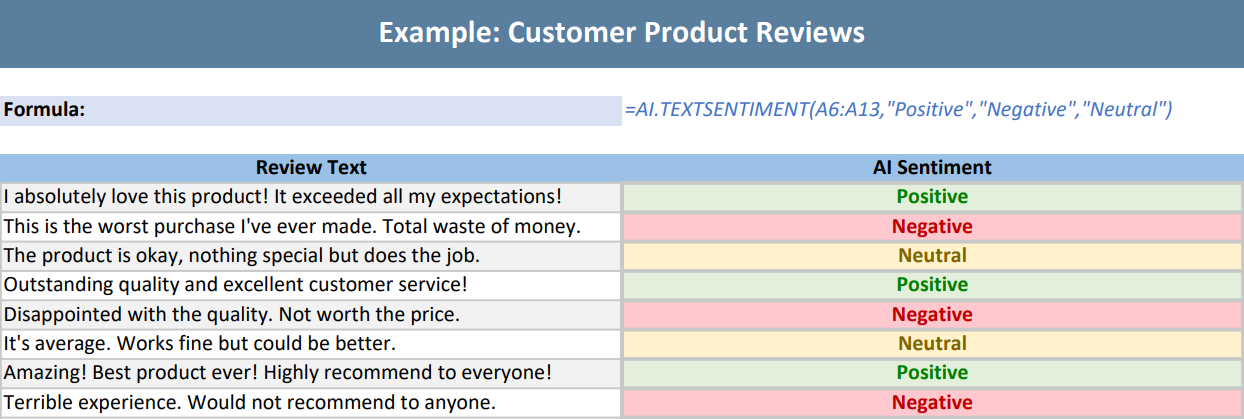
The following example uses the deepseek-v4-flash model to analyze the sentiment of customer reviews.
// To use this example, add the following dependency to your project: com.anthropic:anthropic-java:2.57.0
// Configure the model request handler and choose different large model providers as needed. Here the example uses deepseek-v4-flash; replace with your API key when using.
Workbook.setAIModelRequestHandler(new AnthropicModelRequestHandler("https://api.deepseek.com/anthropic", "sk-xxxx", "deepseek-v4-flash"));
// Anthropic Claude model.
// Workbook.setAIModelRequestHandler(new AnthropicModelRequestHandler("https://api.anthropic.com", "sk-xxxx", "claude-haiku-4-5"));

// Initialize the workbook and set data.
var workbook = new Workbook();
IWorksheet sheet = workbook.Worksheets[0];
sheet.Columns[0].ColumnWidth = 55;
sheet.Columns[1].ColumnWidth = 55;
sheet.Range["A1:B1"].Merge();
sheet.Range["A1"].Value = "Example: Customer Product Reviews (Anthropic-compatible)";
sheet.Range["A1"].Font.Bold = true;
sheet.Range["A1"].Font.Size = 16;
sheet.Range["A1"].Font.Color = Color.White;
sheet.Range["A1"].Interior.Color = Color.FromArgb(90, 126, 158);
sheet.Range["A1"].HorizontalAlignment = HorizontalAlignment.Center;
sheet.Range["A1"].VerticalAlignment = VerticalAlignment.Center;
sheet.Range["A1"].RowHeight = 35;
sheet.Range["A3"].Value = "Formula:";
sheet.Range["A3"].Font.Bold = true;
sheet.Range["A3"].Font.Size = 11;
sheet.Range["A3"].Interior.Color = Color.FromArgb(217, 225, 242);
sheet.Range["B3"].Value = "=AI.TEXTSENTIMENT(A6:A13,\"Positive\",\"Negative\",\"Neutral\")";
sheet.Range["B3"].Font.Italic = true;
sheet.Range["B3"].Font.Color = Color.FromArgb(68, 114, 196);
sheet.Range["B3"].WrapText = true;
sheet.Range["A5:B5"].Value = new object[,] {
    { "Review Text", "AI Sentiment" }
};
sheet.Range["A5:B5"].Font.Bold = true;
sheet.Range["A5:B5"].Interior.Color = Color.FromArgb(155, 194, 230);
sheet.Range["A5:B5"].HorizontalAlignment = HorizontalAlignment.Center;
sheet.Range["A6:A13"].Value = new object[,] {
    { "I absolutely love this product! It exceeded all my expectations!" },
    { "This is the worst purchase I've ever made. Total waste of money." },
    { "The product is okay, nothing special but does the job." },
    { "Outstanding quality and excellent customer service!" },
    { "Disappointed with the quality. Not worth the price." },
    { "It's average. Works fine but could be better." },
    { "Amazing! Best product ever! Highly recommend to everyone!" },
    { "Terrible experience. Would not recommend to anyone." }
};
for (int i = 6; i <= 13; i++)
{
    if ((i - 6) % 2 == 0)
    {
        sheet.Range["A" + i].Interior.Color = Color.FromArgb(242, 242, 242);
    }
    sheet.Range["A" + i].Borders.LineStyle = BorderLineStyle.Thin;
    sheet.Range["A" + i].Borders.Color = Color.FromArgb(200, 200, 200);
    sheet.Range["A" + i].WrapText = true;
}
// Define an AI sentiment analysis formula that classifies the contents of the range A6:A13 as Positive, Negative, or Neutral.
sheet.Range["B6"].Formula2 = "=AI.TEXTSENTIMENT(A6:A13,\"Positive\",\"Negative\",\"Neutral\")";
for (int i = 6; i <= 13; i++)
{
    sheet.Range["B" + i].Font.Bold = true;
    sheet.Range["B" + i].Font.Size = 11;
    sheet.Range["B" + i].HorizontalAlignment = HorizontalAlignment.Center;
    sheet.Range["B" + i].Borders.LineStyle = BorderLineStyle.Medium;
    sheet.Range["B" + i].Borders.Color = Color.FromArgb(200, 200, 200);
}
// Apply conditional formatting to the sentiment analysis results.
IFormatCondition positiveCondition = (IFormatCondition)sheet.Range["B6:B13"].FormatConditions.Add(
    FormatConditionType.CellValue,
    FormatConditionOperator.Equal,
    "=\"Positive\"",
    null
);
positiveCondition.Interior.Color = Color.FromArgb(226, 239, 218);
positiveCondition.Font.Color = Color.FromArgb(0, 128, 0);
IFormatCondition negativeCondition = (IFormatCondition)sheet.Range["B6:B13"].FormatConditions.Add(
    FormatConditionType.CellValue,
    FormatConditionOperator.Equal,
    "=\"Negative\"",
    null
);
negativeCondition.Interior.Color = Color.FromArgb(255, 199, 206);
negativeCondition.Font.Color = Color.FromArgb(192, 0, 0);
IFormatCondition neutralCondition = (IFormatCondition)sheet.Range["B6:B13"].FormatConditions.Add(
     FormatConditionType.CellValue,
     FormatConditionOperator.Equal,
     "=\"Neutral\"",
     null
);
neutralCondition.Interior.Color = Color.FromArgb(255, 242, 204);
neutralCondition.Font.Color = Color.FromArgb(128, 100, 0);

// The AI function is executed as an asynchronous calculation, so you need to wait for the calculation to complete.
workbook.Calculate();
workbook.WaitForCalculationToFinish();

// Set the page to fit on a single page.
sheet.PageSetup.FitToPagesTall = 1;
sheet.PageSetup.FitToPagesWide = 1;
sheet.PageSetup.IsPercentScale = false;

// Save as a PDF file.
workbook.Save("AITEXTSENTIMENT.pdf");
/** IAIModelRequestHandler implementation using the official Anthropic SDK. */
public class AnthropicModelRequestHandler implements IAIModelRequestHandler {
private final String apiEndpoint;
private final String apiKey;
private final String model;
public AnthropicModelRequestHandler(String apiEndpoint, String apiKey, String model) {
if (apiEndpoint == null || apiEndpoint.trim().isEmpty())
throw new IllegalArgumentException("API endpoint cannot be null or empty.");
if (apiKey == null || apiKey.trim().isEmpty())
throw new IllegalArgumentException("API key cannot be null or empty.");
if (model == null || model.trim().isEmpty())
throw new IllegalArgumentException("Model cannot be null or empty.");
this.apiEndpoint = apiEndpoint;
this.apiKey = apiKey;
this.model = model;
}
@Override public CompletableFuture<AIModelResponse> sendRequestAsync(AIModelRequest request) {
if (request == null) {
System.err.println("Request cannot be null.");
return CompletableFuture.completedFuture(failedResponse());
}
try {
MessageCreateParams.Builder builder = MessageCreateParams.builder()
.model(model)
.maxTokens(4096);
StringBuilder system = new StringBuilder();
int userMessageCount = 0;
for (AIMessage message : request.getMessages()) {
if ("system".equalsIgnoreCase(message.getRole())) {
if (system.length() > 0) system.append("\n\n");
system.append(message.getContent());
} else if ("user".equalsIgnoreCase(message.getRole())) {
builder.addUserMessage(message.getContent());
userMessageCount++;
} else {
throw new IllegalArgumentException("Unknown message role: " + message.getRole());
}
}
if (userMessageCount == 0)
throw new IllegalArgumentException("The request must contain at least one user message.");
if (system.length() > 0) builder.system(system.toString());
MessageCreateParams params = builder.build();
AnthropicClientAsync client = AnthropicOkHttpClientAsync.builder()
.apiKey(apiKey)
.baseUrl(apiEndpoint)
.build();
try {
return client.messages().create(params)
.thenApply(message -> {
StringBuilder content = new StringBuilder();
for (ContentBlock block : message.content())
if (block.isText()) content.append(block.asText().text());
if (content.length() == 0) {
System.err.println("No text content received from the model.");
return failedResponse();
}
AIModelResponse response = new AIModelResponse();
response.setSuccess(true);
response.setContent(content.toString());
return response;
})
.exceptionally(ex -> {
System.err.println(ex);
return failedResponse();
})
.whenComplete((response, ex) -> closeClient(client));
} catch (Exception ex) {
closeClient(client);
throw ex;
}
} catch (Exception ex) {
System.err.println(ex);
return CompletableFuture.completedFuture(failedResponse());
}
}
private static void closeClient(AnthropicClientAsync client) {
try {
client.close();
} catch (Exception ex) {
System.err.println("Error closing Anthropic client: " + ex.getMessage());
}
}
private static AIModelResponse failedResponse() {
AIModelResponse response = new AIModelResponse();
response.setSuccess(false);
return response;
}
} The output is shown below: