- Document Solutions for Excel Java Overview
- Key Features
- Getting Started
-
Features
- Worksheet
- Workbook
- Comments
- Hyperlinks
- Sort
- Filter
- Group
- Conditional Formatting
- Data Validations
- Data Binding
- Import Data
- Digital Signatures
- Formulas
- Custom Functions
- Shapes
- Document Properties
- Styles
- Form Controls
- Barcodes
- Themes and Colors
- Chart
- Table
- Pivot Table
- Pivot Chart
- Sparkline
- Slicer
- Print Settings
- Logging
- Defined Names
- AI Assistant
- Templates
- Formula Reference
- File Operations
- Tutorials
- Use JDK 8 Date Time API
- Document Solutions Data Viewer
- API Reference
- Release Notes
Quote Prefix
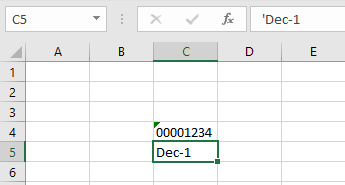
DsExcel library provides the Quote Prefix feature just like Microsoft Excel. You can add a single quote or an apostrophe as a prefix to handle the cell value as text. The quote prefix remains hidden and only the cell value is visible. The single quote prefix can be seen in the formula bar when the user selects the cell.
Refer to the following example code to see how the quote prefix works in an Excel spreadsheet using DsExcel.
worksheet.getRange("C4").setValue("00001234");
worksheet.getRange("C5").setValue("Dec-1");

worksheet.getRange("F4").setValue("'006438098");
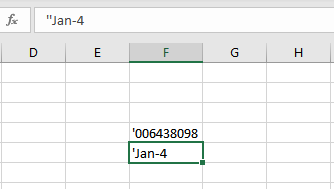
worksheet.getRange("F5").setValue("'Jan-4");
The below image shows the output of a prefixed quote. The quote is displayed in the formula bar whereas the cell hides it.
The below image shows the output of two prefixed quotes where both the quotes are displayed in the formula bar whereas the cell retains only one.