While sending your sensitive zip files over the internet, it is essential to secure the data using advanced password protection. Protecting your zip file with passwords can keep intruders at bay from the confidential information you share across the wire. The C1Zip library provides the Password property in C1ZipFile class to add password to each entry in the zip file prior to adding the file to the zip archive. The library also provides the CheckPassword method of C1ZipEntry class.
In order to extract the entry in the zip file, the user can set the Password property to the same value that was used while adding the entry.
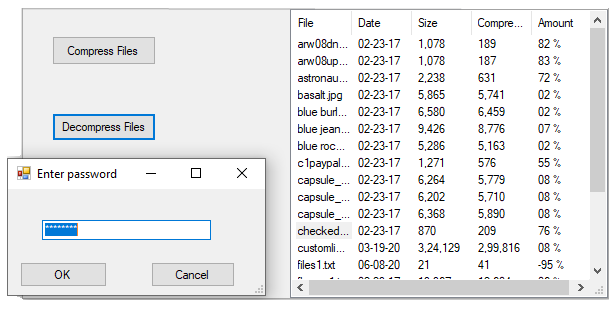
For adding a password to an entry, you have to create a zip file using the Create method of C1ZipFile class. Then, assign a password to each entry to be added in the zip file using the Password property of C1ZipFile class, and add the entry to the zip archive by passing the Add method on the Entries property of C1ZipEntryCollection class.
This is the C# Code for adding password to zip entry in WinForms applications:
| C# |
Copy Code
|
|---|---|
private void btnCompress_Click(object sender, EventArgs e) { // Create zip file zip.Create(@"C:\temp\txtfile.zip"); // Get app dir string s = Application.ExecutablePath; s = s.Substring(0, s.IndexOf(@"\bin")) + @"\resources"; // Populate zip file and list foreach (string f in Directory.GetFiles(s)) { string FileName = f.ToLower(); // Skip self if (FileName.EndsWith("zip")) continue; listView1.Items.Add(Path.GetFileName(FileName)); // Add password for each entry that is compressed zip.Password = "pass2808"; // Add to zip file zip.Entries.Add(FileName); // add to zip file } // Update display. UpdateDisplay(); } private void UpdateDisplay() { // Remove any existing items. listView1.Items.Clear(); // Add each entry. foreach (C1ZipEntry ze in zip.Entries) { // Calculate the compression amount. double pct = 0; if (ze.SizeUncompressed > 0) { pct = 1 - (((double)ze.SizeCompressed) / ((double)ze.SizeUncompressed)); } // Build ListView item. ListViewItem lvi = new ListViewItem(new string[] { ze.FileName, Microsoft.VisualBasic.Strings.Format(ze.Date, "MM/dd/yy"), Microsoft.VisualBasic.Strings.Format(ze.SizeUncompressed, "#,##0"), Microsoft.VisualBasic.Strings.Format(ze.SizeCompressed, "#,##0"), Microsoft.VisualBasic.Strings.Format(pct, "00 %") }); // Save ZipEntry into item tag. lvi.Tag = ze; // Add item to ListView. listView1.Items.Add(lvi); } // Update UI. bool hasEntries = (listView1.Items.Count > 0); } |
|
This is the VB Code for adding password to zip entry in WinForms applications:
| VB |
Copy Code
|
|---|---|
    Private Sub btnCompress_Click(sender As Object, e As EventArgs) Handles btnCompress.Click
        'Create Zip file
        zip.Create("C:\temp\txtfile.zip")
        Dim s As String = Application.ExecutablePath
        s = s.Substring(0, s.IndexOf("\bin")) & "\resources"
        For Each f As String In Directory.GetFiles(s)
            Dim FileName As String = f.ToLower()
            If FileName.EndsWith("zip") Then Continue For
            listView1.Items.Add(Path.GetFileName(FileName))
            zip.Password = "pass2808"
            'Add files
            zip.Entries.Add(FileName)
        Next
        ' Done.
        UpdateDisplay()
    End Sub
Private Sub UpdateDisplay()
        ' Remove any existing items.
        listView1.Items.Clear()
        ' Add each entry.
        For Each ze As C1ZipEntry In zip.Entries
            Dim pct As Double = 0
            ' Calculate the compression amount.
            If ze.SizeUncompressed > 0 Then
                pct = 1 - ((CDbl(ze.SizeCompressed)) / (CDbl(ze.SizeUncompressed)))
            End If
            ' Build ListView item.
            Dim lvi As ListViewItem = New ListViewItem(New String() {ze.FileName, Microsoft.VisualBasic.Strings.Format(ze.Date, "MM/dd/yy"), Microsoft.VisualBasic.Strings.Format(ze.SizeUncompressed, "#,##0"), Microsoft.VisualBasic.Strings.Format(ze.SizeCompressed, "#,##0"), Microsoft.VisualBasic.Strings.Format(pct, "00 %")})
            ' Save ZipEntry into item tag.
            lvi.Tag = ze
            ' Add item to ListView.
            listView1.Items.Add(lvi)
        Next
        ' Update UI.
        Dim hasEntries As Boolean = (listView1.Items.Count > 0)
    End Sub
|
|
This is the C# code for adding password to zip entry in WPF applications:
| C# |
Copy Code
|
|---|---|
       private void BtnCompress_Click(object sender, RoutedEventArgs e)
       {
           // Create the C1ZipFile member.
           zip = new C1ZipFile();
           // Create zip file
           zip.Create(@"C:\temp\txtfile.zip");
           // Get app dir
           string s = System.Reflection.Assembly.GetExecutingAssembly().Location;
           s = s.Substring(0, s.IndexOf(@"\bin")) + @"\resources";

           // Populate zip file and list
           foreach (string f in Directory.GetFiles(s))
           {
               string FileName = f.ToLower();
               // Skip self
               if (FileName.EndsWith("zip")) continue;
               listView1.Items.Add(System.IO.Path.GetFileName(FileName));
               // Add password for each entry that is compressed
               zip.Entries.Add(FileName); // add to zip file
           }
           // Done.
           UpdateDisplay();
       }
void UpdateDisplay()
       {
           var sel = listView1.SelectedItem;
           listView1.ItemsSource = null;
           if (zip == null)
           {
               return;
           }
           //_flex.ItemsSource = _zip.Entries;
           if (zip.Entries.Count == 0)
           {
               zip = null;
           }
           listView1.SelectedItem = sel;
       }
|
|
This is the VB code for adding password to zip entry in WPF applications:
| VB |
Copy Code
|
|---|---|
Private Sub BtnCompress_Click(ByVal sender As Object, ByVal e As RoutedEventArgs)
    ' Create the C1ZipFile member.
    zip = New C1ZipFile()
    ' Create zip file
    zip.Create("C:\temp\txtfile.zip")
    ' Get app dir
    Dim s As String = Assembly.GetExecutingAssembly().Location
    s = s.Substring(0, s.IndexOf("\bin")) & "\resources"
    ' Populate zip file and list
    For Each f As String In Directory.GetFiles(s)
        Dim FileName As String = f.ToLower()
        ' Skip self
        If FileName.EndsWith("zip") Then Continue For
        Me.listView1.Items.Add(IO.Path.GetFileName(FileName))
        ' Add password for each entry that is compressed
        zip.Entries.Add(FileName) ' add to zip file
    Next
    ' Done.
    UpdateDisplay()
End Sub
Private Sub UpdateDisplay()
    Dim sel = Me.listView1.SelectedItem
    Me.listView1.ItemsSource = Nothing
    If zip Is Nothing Then
        Return
    End If
    '_flex.ItemsSource = _zip.Entries;
    If zip.Entries.Count = 0 Then
        zip = Nothing
    End If
    Me.listView1.SelectedItem = sel
End Sub
|
|
Further, you can validate the password while extracting each entry by initializing a UserInputDialog form to validate the password using the if-else statement.
This is the C# Code for UserInputDialog form in WinForms applications:
| C# |
Copy Code
|
|---|---|
public partial class UserInputDialog : Form { public UserInputDialog() { InitializeComponent(); } // show dialog and return value to the user public string GetString(string caption) { return GetString(caption, string.Empty); } public string GetString(string caption, string defValue) { // initialize dialog Text = caption; _txtUser.Text = defValue; _txtUser.SelectAll(); //Password masking for added security _txtUser.PasswordChar = '*'; // show dialog var dr = ShowDialog(); // return user input or null if user cancelled return dr == DialogResult.OK ? _txtUser.Text : null; } } |
|
This is the VB Code for UserInputDialog in WinForms applications:
| VB |
Copy Code
|
|---|---|
Public Class UserInputDialog
    'Show dialog and return value to the user
    Public Function GetString(ByVal caption As String) As String
        Return GetString(caption, String.Empty)
    End Function
    Public Function GetString(ByVal caption As String, ByVal defValue As String) As String
        Text = caption
        _txtUser.Text = defValue
        _txtUser.SelectAll()
        Dim dr = ShowDialog()
        Return If(dr = DialogResult.OK, _txtUser.Text, Nothing)
    End Function
End Class
|
|
This is the C# code for UserInputDialog form in WPF applications:
| C# |
Copy Code
|
|---|---|
public partial class UserInputDialog : Window { public UserInputDialog() { InitializeComponent(); } public string GetString(string caption) { return GetString(caption, string.Empty); } public string GetString(string caption, string defValue) { // initialize dialog Title = caption; _txtUser.Text = defValue; _txtUser.SelectAll(); // show dialog Nullable<bool> dr = ShowDialog(); // return user input or null if user cancelled return (dr == DialogResult.HasValue) ? _txtUser.Text : null; } private void BtnOK_Click(object sender, RoutedEventArgs e) { this.DialogResult = true; } } |
|
This is the VB code for UserInputDialog form in WPF applications:
| VB |
Copy Code
|
|---|---|
Public Class UserInputdialog
    Public Function GetString(ByVal caption As String) As String
        Return GetString(caption, String.Empty)
    End Function
    Public Function GetString(ByVal caption As String, ByVal defValue As String) As String
        ' initialize dialog
        Title = caption
        Me._txtUser.Text = defValue
        Me._txtUser.SelectAll()
        ' show dialog
        Dim dr As Boolean? = ShowDialog()

        ' return user input or null if user cancelled
        Return If(dr = DialogResult.HasValue, Me._txtUser.Text, Nothing)
    End Function
    Private Sub BtnOK_Click(ByVal sender As Object, ByVal e As RoutedEventArgs)
        DialogResult = True
    End Sub
End Class
|
|
Then, extract the selected entries by using the Extract method of C1ZipEntryCollection class.
This is the C# Code for extracting entries in WinForms applications:
| C# |
Copy Code
|
|---|---|
private void btnDecompress_Click(object sender, EventArgs e) { // Make sure we have some selected entries. int cnt = listView1.SelectedIndices.Count; if (cnt == 0) { MessageBox.Show("Sorry, no files to extract...", "C1Zip"); return; } // Confirm with user. DialogResult dr; string msg; msg = "Please confirm that you want to extract " + cnt.ToString() + " entries."; dr = MessageBox.Show(msg, "C1Zip", MessageBoxButtons.OKCancel, MessageBoxIcon.Question); if (dr != DialogResult.OK) return; // Extract all selected entries. C1ZipEntry ze; foreach (ListViewItem lvi in listView1.SelectedItems) { ze = (C1ZipEntry)lvi.Tag; if (ze.SizeCompressed > 0) { // Validate password before extracting an entry var dlg = new UserInputDialog(); dlg.Font = this.Font; string new_password = dlg.GetString("Enter password", zip.Password); if (new_password == "pass2808") { zip.Password = new_password; MessageBox.Show("Extracting your file..."); zip.Entries.Extract(ze.FileName); } else { MessageBox.Show("The specified password is incorrect. Cannot extract the file."); } } // Done. UpdateDisplay(); } |
|
This is the VB Code for extracting entries in WinForms applications:
| VB |
Copy Code
|
|---|---|
Private Sub btnDecompress_Click(sender As Object, e As EventArgs) Handles btnDecompress.Click
    ' Make sure we have some selected entries.
    Dim cnt As Integer = listView1.SelectedIndices.Count
    If cnt = 0 Then
        MessageBox.Show("Sorry, no files to extract...", "C1Zip")
        Return
    End If
    'Confirm with user.
    Dim dr As DialogResult
    Dim msg As String
    msg = "Please confirm that you want to extract " & cnt.ToString() & " entries."
    dr = MessageBox.Show(msg, "C1Zip", MessageBoxButtons.OKCancel, MessageBoxIcon.Question)
    If dr <> DialogResult.OK Then Return
    'Extract all selected entries.
    Dim ze As C1ZipEntry
    For Each lvi As ListViewItem In listView1.SelectedItems
        ze = CType(lvi.Tag, C1ZipEntry)
        If ze.SizeCompressed > 0 Then
            Dim dlg = New UserInputDialog()
            dlg.Font = Me.Font
            'Validate password before extracting an entry
            Dim new_password As String = dlg.GetString("Enter password", zip.Password)
            If new_password = "pass2808" Then
                zip.Password = new_password
                MessageBox.Show("Extracting your file...")
                zip.Entries.Extract(ze.FileName)
            Else
                MessageBox.Show("The specified password is incorrect. Cannot extract the file.")
            End If
        End If
        UpdateDisplay()
    Next
End Sub
|
|
This is the C# code for extracting entries in WPF applications:
| C# |
Copy Code
|
|---|---|
private void BtnDecompress_Click(object sender, RoutedEventArgs e) { //Make sure we have some selected entries. int cnt = listView1.SelectedItems.Count; if (cnt == 0) { MessageBox.Show("Sorry, no files to extract...", "C1Zip"); return; } // Confirm with user. MessageBoxResult dr; string msg; msg = "Please confirm that you want to extract " + cnt.ToString() + " entries."; dr = MessageBox.Show(msg, "C1Zip", MessageBoxButton.OKCancel, MessageBoxImage.Question); if (dr != MessageBoxResult.OK) return; //Extract all selected entries. C1ZipEntry ze; foreach (string lvi in listView1.SelectedItems) { ze = (C1ZipEntry)zip.Entries[lvi]; if (ze.SizeCompressed > 0) { // Validate password before extracting an entry var dlg = new UserInputDialog(); string new_password = dlg.GetString("Enter password", zip.Password); if (new_password == "pass2808") { zip.Password = new_password; MessageBox.Show("Extracting your file..."); zip.Entries.Extract(ze.FileName); } else { MessageBox.Show("The specified password is incorrect. Cannot extract the file."); } } } // Done. UpdateDisplay(); } |
|
This is the VB code for extracting entries in WPF applications:
| VB |
Copy Code
|
|---|---|
Private Sub BtnDecompress_Click(ByVal sender As Object, ByVal e As RoutedEventArgs)
    'Make sure we have some selected entries.
    Dim cnt As Integer = Me.listView1.SelectedItems.Count

    If cnt = 0 Then
        MessageBox.Show("Sorry, no files to extract...", "C1Zip")
        Return
    End If
    ' Confirm with user.
    Dim dr As MessageBoxResult
    Dim msg As String
    msg = "Please confirm that you want to extract " & cnt.ToString() & " entries."
    dr = MessageBox.Show(msg, "C1Zip", MessageBoxButton.OKCancel, MessageBoxImage.Question)
    If dr <> MessageBoxResult.OK Then Return
    'Extract all selected entries.
    Dim ze As C1ZipEntry
    For Each lvi As String In Me.listView1.SelectedItems
        ze = zip.Entries(lvi)
        If ze.SizeCompressed > 0 Then
            ' Validate password before extracting an entry
            Dim dlg = New UserInputdialog()
            Dim new_password As String = dlg.GetString("Enter password", zip.Password)
            If Equals(new_password, "pass2808") Then
                zip.Password = new_password
                MessageBox.Show("Extracting your file...")
                zip.Entries.Extract(ze.FileName)
            Else
                MessageBox.Show("The specified password is incorrect. Cannot extract the file.")
            End If
        End If
    Next
    ' Done.
    UpdateDisplay()
End Sub
|
|

