# Popup Dialogs
Learn how to create dialogs with Wijmo's Popup component in this tutorial
## Content
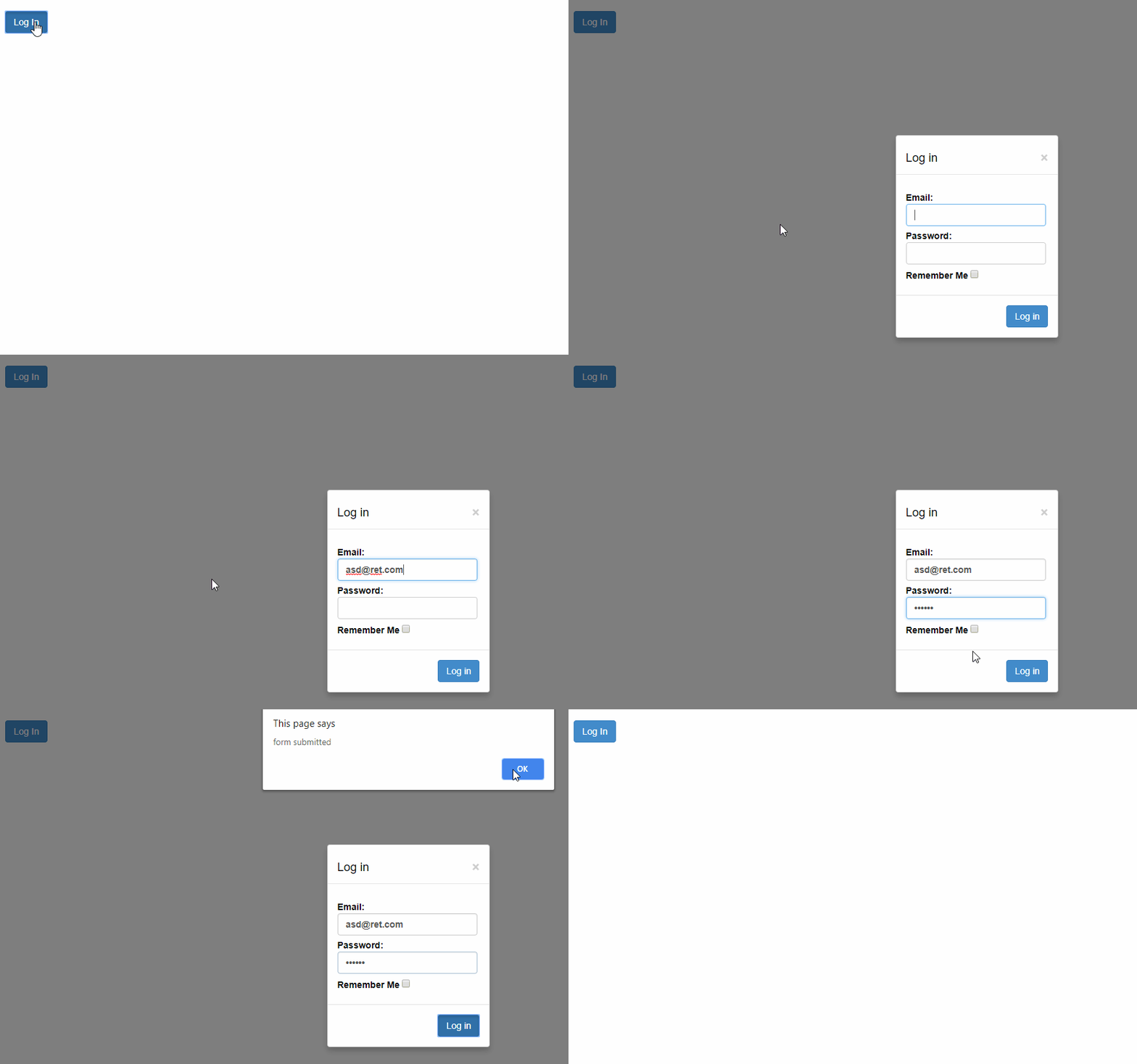
__Dialogs__ are __Popup__ controls without owner elements. They allow users to enter or edit information without switching to a new page or view. They can be modal or modeless, and are usually centered on the screen.
Dialogs are displayed using the __show__ method, which has optional arguments to define whether the dialog should be modal or modeless, and a callback function invoked when the dialog is closed.
Dialogs are dismissed when the user presses the Escape key or when the dialog loses focus. They are also dismissed when the user clicks an element with a class that starts with __"wj-hide"__ (e.g. "wj-hide", "wj-hide-ok", or "wj-hide-cancel"). In the latter case, the class name is assigned to the dialog's dialogResult property, and can be used by the callback function or by the hidden event handler to decide how to process the dialog's content.
Example: Creates a login form and opens it as a Popup dialog on button click.
##### HTML
```html
```
##### Javascript
```javascript
import * as wijmo from '@mescius/wijmo';
import * as input from '@mescius/wijmo.input';
function init() {
// create forms
let frmLogin = new input.Popup('#frmLogin');
// show forms
document.querySelector('#btnLogin').addEventListener('click', () => {
frmLogin.show(true, (sender) => {
switch (sender.dialogResult) {
case 'submit':
alert('form submitted');
break;
case 'wj-hide-create':
document.getElementById('btnCreateAccount').click(); // open the Create Account form
break;
}
});
});
// validate the form but don't submit
document.body.addEventListener('submit', e => {
e.preventDefault(); // don't submit
//
if (e.target.checkValidity()) {
let dlg = wijmo.Control.getControl(e.target);
dlg.hide('submit'); // close the dialog passing a dialogResult
}
});
}
```
You may refer to the [demo](https://demos.wijmo.com/5/PureJS/LearnWijmo/LearnWijmo/#1ctsagyd "demo") which simulate a complete user authorization UI by defining three dialogs.
Further, the __PopUp__ control can help create [Pop-Up editors](https://demos.wijmo.com/5/PureJS/LearnWijmo/LearnWijmo/#05s8w5fz "Pop-Up editors") and [Pop-Up dialogs](https://demos.wijmo.com/5/PureJS/LearnWijmo/LearnWijmo/#k2zsjon8 "Pop-Up dialogs") as depicted in the linked demos.