# Line Markers in FlexChart
Learn how to add a line marker to Wijmo's FlexChart in this documentation topic
## Content
The __LineMarker__ class allows you to add a mouse-driven cursor to your charts. The cursor consists of a text element used to display information about the point under the mouse and optional lines (crosshairs) to indicate the exact position of the mouse.
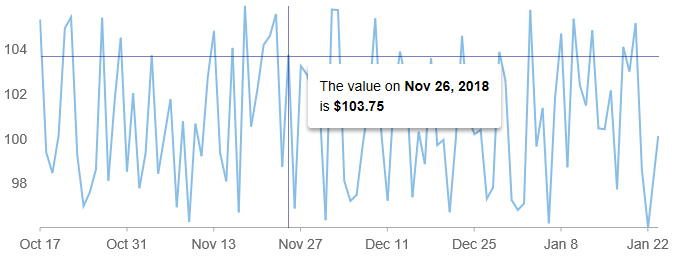
You can customize the __LineMarker__ behavior using properties including __content__, __interaction__, and __lines__.
The __interaction__ property determines how the user interacts with the line marker. It can be static (interaction = None), follow the mouse or touch position (interaction = Move), or move when the user drags the line (interaction = Drag).
Example:
```JavaScript
import * as chart from '@mescius/wijmo.chart';
// create an interactive marker with a horizontal line and y-value
var lineMarker = new chart.LineMarker($myChart, {
lines: wijmo.chart.LineMarkerLines.Horizontal,
interaction: wijmo.chart.LineMarkerInteraction.Move,
alignment : wijmo.chart.LineMarkerAlignment.Top
});
lineMarker.content = function (ht) {
// show y-value
return ht.y.toFixed(2);
}
```
Display rich formatted content within the line marker by using the _wijmo.format_ method.
```JavaScript
lineMarker.content = function (ht) {
return ht.item ? wijmo.format('The value on {date:MMM d, yyyy}
is {value:c}', ht.item) : 'No items here...';
}
});
```
You can customize the appearance of the __LineMarker__ using CSS.
```CSS
.wj-flexchart .wj-chart-linemarker {
background: transparent;
}
.wj-chart-linemarker-content {
padding: 12px;
margin: 6px;
background: white;
border-radius: 3px;
box-shadow: 0 3px 6px rgba(0,0,0,0.16), 0 3px 6px rgba(0,0,0,0.23);
}
.wj-flexchart .wj-chart-linemarker .wj-chart-linemarker-hline,
.wj-flexchart .wj-chart-linemarker .wj-chart-linemarker-vline {
height: 1px;
width: 1px;
opacity: .5;
background: navy;
}
```