# Using Wijmo in PureJS

Learn how to use Wijmo components in JavaScript using this QuickStart Tutorial

## Content

<span style="font-family:Aptos,sans-serif;
mso-fareast-font-family:Yu Gothic Light;mso-fareast-theme-font:major-fareast;
mso-bidi-font-family:Segoe UI;color:black;mso-ansi-language:EN-US" lang="EN-US">This quick start covers the step-by-step instructions to add Wijmo controls to your application. </span><span style="font-family:Aptos,sans-serif;
mso-fareast-font-family:Yu Gothic Light;mso-fareast-theme-font:major-fareast;
mso-bidi-font-family:Segoe UI;color:black"> </span>

1. [<span style="font-family:Aptos,sans-serif;mso-fareast-font-family:Yu Gothic Light;
    mso-fareast-theme-font:major-fareast;mso-bidi-font-family:Segoe UI;
    color:black;mso-ansi-language:EN-US" lang="EN-US">Referencing Wijmo</span><span style="font-family:Aptos,sans-serif;mso-fareast-font-family:
    Yu Gothic Light;mso-fareast-theme-font:major-fareast;mso-bidi-font-family:
    Segoe UI;color:black"> </span>](/wijmo/docs/GettingStarted/QuickStart/QuickStart-PureJS#span-stylecolor-181818referencing-wijmonbspspan)
2. [<span style="font-family:Aptos,sans-serif;mso-fareast-font-family:Yu Gothic Light;
    mso-fareast-theme-font:major-fareast;mso-bidi-font-family:Segoe UI;
    color:black;mso-ansi-language:EN-US" lang="EN-US">Adding a Host Element</span><span style="font-family:Aptos,sans-serif;mso-fareast-font-family:
    Yu Gothic Light;mso-fareast-theme-font:major-fareast;mso-bidi-font-family:
    Segoe UI;color:black"> </span>](/wijmo/docs/GettingStarted/QuickStart/QuickStart-PureJS#span-stylecolor-181818adding-a-host-elementnbspspan)
3. [<span style="font-family:Aptos,sans-serif;mso-fareast-font-family:Yu Gothic Light;
    mso-fareast-theme-font:major-fareast;mso-bidi-font-family:Segoe UI;
    color:black;mso-ansi-language:EN-US" lang="EN-US">Adding Wijmo Package</span>](/wijmo/docs/GettingStarted/QuickStart/QuickStart-PureJS#span-stylecolor-181818adding-wijmo-packagenbspspan)<span style="font-family:Aptos,sans-serif;mso-fareast-font-family:
    Yu Gothic Light;mso-fareast-theme-font:major-fareast;mso-bidi-font-family:
    Segoe UI;color:black"> </span>
4. [<span style="font-family:Aptos,sans-serif;mso-fareast-font-family:Yu Gothic Light;
    mso-fareast-theme-font:major-fareast;mso-bidi-font-family:Segoe UI;
    color:black;mso-ansi-language:EN-US" lang="EN-US">Adding Wijmo CSS</span><span style="font-family:Aptos,sans-serif;mso-fareast-font-family:
    Yu Gothic Light;mso-fareast-theme-font:major-fareast;mso-bidi-font-family:
    Segoe UI;color:black"> </span>](/wijmo/docs/GettingStarted/QuickStart/QuickStart-PureJS#span-stylecolor-181818adding-wijmo-cssnbspspan)
5. [<span style="font-family:Aptos,sans-serif;
    mso-fareast-font-family:Yu Gothic Light;mso-fareast-theme-font:major-fareast;
    mso-bidi-font-family:Segoe UI;color:black">Populating Data in the Grid</span>](/wijmo/docs/GettingStarted/QuickStart/QuickStart-PureJS#span-stylecolor-181818populating-data-in-the-gridnbspspan)

<span style="font-family:Aptos,sans-serif;
mso-fareast-font-family:Yu Gothic Light;mso-fareast-theme-font:major-fareast;
mso-bidi-font-family:Segoe UI;color:black;mso-ansi-language:EN-US" lang="EN-US">In this topic, we are taking a PureJS application backed by TypeScript (ES2015 + ESM) to explain how to add the FlexGrid control to it.</span><span style="font-family:Aptos,sans-serif;mso-fareast-font-family:Yu Gothic Light;
mso-fareast-theme-font:major-fareast;mso-bidi-font-family:Segoe UI;
color:black"> </span>
![PureJS](https://cdn.mescius.io/document-site-files/images/3c7113e2-10b3-45ed-8f3b-9fb1e0af2b74/PureJS.11688e.png)

## <span style="color: #181818">Referencing Wijmo</span>

<span style="font-family:Aptos,sans-serif;
mso-fareast-font-family:Yu Gothic Light;mso-fareast-theme-font:major-fareast;
mso-bidi-font-family:Segoe UI;color:black;mso-ansi-language:EN-US" lang="EN-US">Add a Wijmo reference to your application. In this example, we are adding a specific package for FlexGrid using npm. This step automatically installs the required dependencies into your application. </span><span style="font-family:Aptos,sans-serif;mso-bidi-font-family:Segoe UI;
color:black"> </span>

```auto
npm install @mescius/wijmo.grid  
```

<span style="font-family:Aptos,sans-serif;
mso-fareast-font-family:Yu Gothic Light;mso-fareast-theme-font:major-fareast;
mso-bidi-font-family:Segoe UI;color:black;mso-ansi-language:EN-US" lang="EN-US">You can also deploy Wijmo through CDN or locally. For more information, see </span>[<span style="font-family:Aptos,sans-serif;
mso-fareast-font-family:Yu Gothic Light;mso-fareast-theme-font:major-fareast;
mso-bidi-font-family:Segoe UI;color:#467886;mso-ansi-language:EN-US" lang="EN-US">Reference Wijmo Packages</span><span style="font-family:Aptos,sans-serif;mso-fareast-font-family:Yu Gothic Light;
mso-fareast-theme-font:major-fareast;mso-bidi-font-family:Segoe UI;
color:black;mso-ansi-language:EN-US" lang="EN-US">.</span>](/wijmo/docs/GettingStarted/Referencing-Wijmo)<span style="font-family:Aptos,sans-serif;mso-fareast-font-family:Yu Gothic Light;
mso-fareast-theme-font:major-fareast;mso-bidi-font-family:Segoe UI;
color:black;mso-ansi-language:EN-US" lang="EN-US"> </span><span style="font-family:Aptos,sans-serif;mso-bidi-font-family:Segoe UI;
color:black"> </span>

## <span style="color: #181818">Adding a Host Element </span>

<span style="font-family:Aptos,sans-serif;
mso-fareast-font-family:Yu Gothic Light;mso-fareast-theme-font:major-fareast;
mso-bidi-font-family:Segoe UI;color:black;mso-ansi-language:EN-US" lang="EN-US">Add a host element to your application and give it an ID. This is the HTML element that gets converted to a Wijmo control.</span><span style="font-family:Aptos,sans-serif;mso-bidi-font-family:Segoe UI;
color:black"> </span>

```auto
 <div id="hostElement"></div> 
```

<span style="font-family:Aptos,sans-serif;
mso-fareast-font-family:Yu Gothic Light;mso-fareast-theme-font:major-fareast;
mso-bidi-font-family:Segoe UI;color:black;mso-ansi-language:EN-US" lang="EN-US">Here, we are adding the host element for FlexGrid in the </span>**<span style="font-family:Aptos,sans-serif;
mso-fareast-font-family:Yu Gothic Light;mso-fareast-theme-font:major-fareast;
mso-bidi-font-family:Segoe UI;color:black;mso-ansi-language:EN-US" lang="EN-US">index.html</span>**<span style="font-family:Aptos,sans-serif;
mso-fareast-font-family:Yu Gothic Light;mso-fareast-theme-font:major-fareast;
mso-bidi-font-family:Segoe UI;color:black;mso-ansi-language:EN-US" lang="EN-US"> file. </span><span style="font-family:Aptos,sans-serif;mso-fareast-font-family:
Yu Gothic Light;mso-fareast-theme-font:major-fareast;mso-bidi-font-family:
Segoe UI;color:black"> </span>

```auto
 <div id="theGrid"></div> 
```

## <span style="color: #181818">Adding Wijmo Package </span>

<span style="font-family:Aptos,sans-serif;
mso-fareast-font-family:Yu Gothic Light;mso-fareast-theme-font:major-fareast;
mso-bidi-font-family:Segoe UI;color:black;mso-ansi-language:EN-US" lang="EN-US">Add Wijmo modules to your application. We are using the following </span>**<span style="font-family:Aptos,sans-serif;
mso-fareast-font-family:Yu Gothic Light;mso-fareast-theme-font:major-fareast;
mso-bidi-font-family:Segoe UI;color:black;mso-ansi-language:EN-US" lang="EN-US">ES2015</span>**<span style="font-family:Aptos,sans-serif;
mso-fareast-font-family:Yu Gothic Light;mso-fareast-theme-font:major-fareast;
mso-bidi-font-family:Segoe UI;color:black;mso-ansi-language:EN-US" lang="EN-US"> import statements in the </span>**<span style="font-family:Aptos,sans-serif;
mso-fareast-font-family:Yu Gothic Light;mso-fareast-theme-font:major-fareast;
mso-bidi-font-family:Segoe UI;color:black;mso-ansi-language:EN-US" lang="EN-US">app.js</span>**<span style="font-family:Aptos,sans-serif;
mso-fareast-font-family:Yu Gothic Light;mso-fareast-theme-font:major-fareast;
mso-bidi-font-family:Segoe UI;color:black;mso-ansi-language:EN-US" lang="EN-US"> file for our example. </span><span style="font-family:Aptos,sans-serif;mso-fareast-font-family:
Yu Gothic Light;mso-fareast-theme-font:major-fareast;mso-bidi-font-family:
Segoe UI;color:black"> </span>

```auto
import * as wjGrid from '@mescius/wijmo.grid'; 
var theGrid = new wjGrid.FlexGrid('#theGrid'),  
```

<span style="font-family:Aptos,sans-serif;
mso-fareast-font-family:Yu Gothic Light;mso-fareast-theme-font:major-fareast;
mso-bidi-font-family:Segoe UI;color:black;mso-ansi-language:EN-US" lang="EN-US">It imports the "wijmo.grid" module and creates an instance of the FlexGrid control.</span><span style="font-family:Aptos,sans-serif;
mso-fareast-font-family:Yu Gothic Light;mso-fareast-theme-font:major-fareast;
mso-bidi-font-family:Segoe UI;color:black"> </span>
<span style="font-family:Aptos,sans-serif;
mso-fareast-font-family:Yu Gothic Light;mso-fareast-theme-font:major-fareast;
mso-bidi-font-family:Segoe UI;color:black;mso-ansi-language:EN-US" lang="EN-US">To learn more about adding Wijmo packages, see </span>[<span style="font-family:
Aptos,sans-serif;mso-fareast-font-family:Yu Gothic Light;mso-fareast-theme-font:
major-fareast;mso-bidi-font-family:Segoe UI;color:#467886;mso-ansi-language:
EN-US" lang="EN-US">Reference Wijmo Packages</span>]()<span style="font-family:Aptos,sans-serif;
mso-fareast-font-family:Yu Gothic Light;mso-fareast-theme-font:major-fareast;
mso-bidi-font-family:Segoe UI;color:black;mso-ansi-language:EN-US" lang="EN-US">.</span><span style="background:yellow"> </span><span style="font-family:Aptos,sans-serif;mso-fareast-font-family:Yu Gothic Light;
mso-fareast-theme-font:major-fareast;mso-bidi-font-family:Segoe UI;
color:black"> </span>

## <span style="color: #181818">Adding Wijmo CSS </span>

<span style="font-family:Aptos,sans-serif;
mso-fareast-font-family:Yu Gothic Light;mso-fareast-theme-font:major-fareast;
mso-bidi-font-family:Segoe UI;color:black;mso-ansi-language:EN-US" lang="EN-US">Load wijmo.css style file into your application. Here, we are adding styles by using the ESM</span><span style="font-family:Arial,sans-serif;mso-fareast-font-family:Yu Gothic Light;
mso-fareast-theme-font:major-fareast;color:black;mso-ansi-language:EN-US" lang="EN-US"> </span><span style="font-family:Aptos,sans-serif;
mso-fareast-font-family:Yu Gothic Light;mso-fareast-theme-font:major-fareast;
mso-bidi-font-family:Segoe UI;color:black;mso-ansi-language:EN-US" lang="EN-US">import</span><span style="font-family:Arial,sans-serif;
mso-fareast-font-family:Yu Gothic Light;mso-fareast-theme-font:major-fareast;
color:black;mso-ansi-language:EN-US" lang="EN-US"> </span><span style="font-family:Aptos,sans-serif;mso-fareast-font-family:Yu Gothic Light;
mso-fareast-theme-font:major-fareast;mso-bidi-font-family:Segoe UI;
color:black;mso-ansi-language:EN-US" lang="EN-US">statement at the top of the app.js file:</span><span style="font-family:Aptos,sans-serif;mso-fareast-font-family:
Yu Gothic Light;mso-fareast-theme-font:major-fareast;mso-bidi-font-family:
Segoe UI;color:black"> </span>

```auto
import '@mescius/wijmo.styles/wijmo.css'; 
```

<span style="font-family:Aptos,sans-serif;
mso-fareast-font-family:Yu Gothic Light;mso-fareast-theme-font:major-fareast;
mso-bidi-font-family:Segoe UI;color:black;mso-ansi-language:EN-US" lang="EN-US">For more information on adding styles to the Wijmo controls, see </span>[<span style="font-family:Aptos,sans-serif;
mso-fareast-font-family:Yu Gothic Light;mso-fareast-theme-font:major-fareast;
mso-bidi-font-family:Segoe UI;color:black;mso-ansi-language:EN-US" lang="EN-US">Style Controls.</span>](/wijmo/docs/GettingStarted/Styling-Controls)

## <span style="color: #181818">Populating Data in the Grid </span>

<span style="font-family:Aptos,sans-serif;
mso-fareast-font-family:Yu Gothic Light;mso-fareast-theme-font:major-fareast;
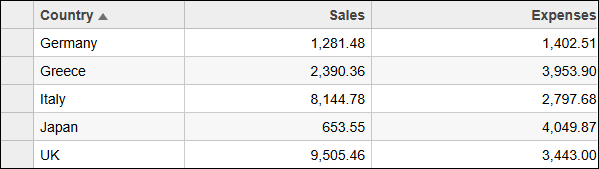
mso-bidi-font-family:Segoe UI;mso-ansi-language:EN-US" lang="EN-US">To bind and populate data in the grid, you can bind your data source using the itemsSource property. For our example, let us add “Country,” “Sales,” and “Expenses” columns to the grid. </span><span style="font-family:Aptos,sans-serif;
mso-fareast-font-family:Yu Gothic Light;mso-fareast-theme-font:major-fareast;
mso-bidi-font-family:Segoe UI"> </span>

```auto
//create some random data 
   var countries = 'Germany,UK,Japan,Italy,Greece'.split(','); 
   var data = []; 
   for (var i = 0; i < countries.length; i++) 
    { 
       data.push({          
           id: i, 
           country: countries[i], 
           sales: Math.random() * 10000, 
           expenses: Math.random() * 5000 
       }); 
   } 

    // bind a grid to the raw data 
       var theGrid = new FlexGrid('#theGrid', { 
       autoGenerateColumns: false, 
       columns: [ 
           { binding: 'country', header: 'Country', width: '2*' }, 
           { binding: 'sales', header: 'Sales', width: '*', format: 'n2' }, 
           { binding: 'expenses', header: 'Expenses', width: '*', format: 'n2' } 
       ], 
       itemsSource: data 
    }); 
```

<span style="font-family:Aptos,sans-serif;
mso-fareast-font-family:Yu Gothic Light;mso-fareast-theme-font:major-fareast;
mso-bidi-font-family:Segoe UI;color:black;mso-ansi-language:EN-US" lang="EN-US">You have successfully added the </span>**<span style="font-family:Aptos,sans-serif;
mso-fareast-font-family:Yu Gothic Light;mso-fareast-theme-font:major-fareast;
mso-bidi-font-family:Segoe UI;color:black;mso-ansi-language:EN-US" lang="EN-US">FlexGrid</span>**<span style="font-family:Aptos,sans-serif;
mso-fareast-font-family:Yu Gothic Light;mso-fareast-theme-font:major-fareast;
mso-bidi-font-family:Segoe UI;color:black;mso-ansi-language:EN-US" lang="EN-US"> control to a PureJS application and populated it with data. Similarly, you can add other controls to your JavaScript applications. To see all of these controls in action, see </span>[<span style="font-family:Aptos,sans-serif;
mso-fareast-font-family:Yu Gothic Light;mso-fareast-theme-font:major-fareast;
mso-bidi-font-family:Segoe UI;color:#467886;mso-ansi-language:EN-US" lang="EN-US">Wijmo Demos</span>](https://developer.mescius.com/wijmo/demos/)<span style="font-family:Aptos,sans-serif;mso-fareast-font-family:Yu Gothic Light;
mso-fareast-theme-font:major-fareast;mso-bidi-font-family:Segoe UI;
color:black;mso-ansi-language:EN-US" lang="EN-US">. To learn the functioning of Wijmo controls in other frameworks, see framework specific quick starts. </span><span style="font-family:Aptos,sans-serif;mso-fareast-font-family:
Yu Gothic Light;mso-fareast-theme-font:major-fareast;mso-bidi-font-family:
Segoe UI;color:black"> </span>