Conditional Formatting Dialog
In This Topic
You can create conditional formatting with the Conditional Formatting dialog. This dialog is located under the Home menu and appears as follows:
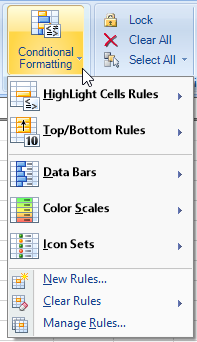
This dialog has the following items:
|
Item |
Description |
|---|---|
|
Highlight Cells Rules |
Rules used to apply formatting options to values that meet specific conditions |
|
Top Bottom Rules |
Rules used to apply formatting options to top or bottom values |
|
Data Bars |
Rules used to apply color bars to values |
|
Color Scales |
Rules used to apply color or color gradients to values |
|
Icon Sets |
Rules used to apply icons to values |
| New Rules |
Additional rule options |
| Clear Rules | Clear all rules or rules for selected cells |
| Manage Rules | Rules manager used to create, edit, or delete rules |
For more information about conditional formatting, refer to Using Conditional Formatting of Cells.
See Also