'Declaration

Public Property ScrollTipPolicy As ScrollTipPolicy
'Usage

Dim instance As SpreadView
Dim value As ScrollTipPolicy

instance.ScrollTipPolicy = value

value = instance.ScrollTipPolicy
public ScrollTipPolicy ScrollTipPolicy {get; set;}
'Declaration Public Property ScrollTipPolicy As ScrollTipPolicy
'Usage Dim instance As SpreadView Dim value As ScrollTipPolicy instance.ScrollTipPolicy = value value = instance.ScrollTipPolicy
public ScrollTipPolicy ScrollTipPolicy {get; set;}
This property allows the user to see the row number (for vertical scrolling) or column number (for horizontal scrolling). By holding the pointer on the scroll bar, the number appears in a ToolTip window.
Here is a typical scroll bar tip with the row number displayed next to the vertical scroll bar:
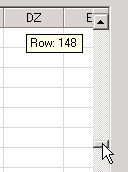
Scroll bar tips are not displayed automatically by default.
Of course, the scroll bars must be displayed for the scroll bar tips to be displayed.
The appearance of the default scroll bar tips is determined by your system settings and other default settings. The appearance is also set by the TextTipAppearance property and the members of the TipAppearance class.
FarPoint.Win.Spread.SpreadView sv = fpSpread1.GetRootWorkbook();
sv.ScrollTipPolicy = FarPoint.Win.Spread.ScrollTipPolicy.Both;
Dim sv As FarPoint.Win.Spread.SpreadView = FpSpread1.GetRootWorkbook
sv.ScrollTipPolicy = FarPoint.Win.Spread.ScrollTipPolicy.Both
SpreadView Class
SpreadView Members
TipAppearance Class
ScrollTipPolicy Enum