# Auto Updating Filters in Table
Using table auto update filter will allow the user to update table's filter automatically whenever the cell of table is edited manually or data source is changed.
## Content
Spread allows the table's filter feature to be updated automatically when a user edits a cell in the table or the datasource bound to the table is changed. To do this, you can use the [AutoUpdate](/spreadnet/api/latest/online-win/GrapeCity.Spreadsheet/GrapeCity.Spreadsheet.IAutoFilter.AutoUpdate.html) property of the [IAutoFilter](/spreadnet/api/latest/online-win/GrapeCity.Spreadsheet/GrapeCity.Spreadsheet.IAutoFilter.html) interface. By default, this property is set to false.
The [AutoUpdate](/spreadnet/api/latest/online-win/GrapeCity.Spreadsheet/GrapeCity.Spreadsheet.IAutoFilter.AutoUpdate.html) property takes its value from the [AutoUpdateFilter](/spreadnet/api/latest/online-win/GrapeCity.Spreadsheet/GrapeCity.Spreadsheet.IWorksheet.AutoUpdateFilter.html) property of the [IWorksheet](/spreadnet/api/latest/online-win/GrapeCity.Spreadsheet/GrapeCity.Spreadsheet.IWorksheet.html) interface in the beginning when a new auto filter is created.
> !type=note
> **Note:**
>
> * If [IWorkSheet.AutoUpdateFilter](/spreadnet/api/latest/online-win/GrapeCity.Spreadsheet/GrapeCity.Spreadsheet.IWorksheet.AutoUpdateFilter.html) property is set to true, after the auto filter is created, it will be updated automatically when the table values change.
> * If [IWorksheet.AutoUpdateFilter](/spreadnet/api/latest/online-win/GrapeCity.Spreadsheet/GrapeCity.Spreadsheet.IWorksheet.AutoUpdateFilter.html) property is set to false, after the auto filter is created, it will not be updated automatically when the table values change.
Afterwards, the automatic updating of the **AutoFilter** is completely dependent upon the **AutoUpdate** property of the **IAutoFilter** interface without relying on **AutoUpdateFilter.**
> !type=info
> **Tip:**
> If the value in the table is changed through code, then the user must invoke [IAutoFilter.ApplyFilter](/spreadnet/api/latest/online-win/GrapeCity.Spreadsheet/GrapeCity.Spreadsheet.IAutoFilter.ApplyFilter.html) method.
Let's consider an example to understand the behavior of the AutoUpdate property at runtime.
1. Create a table and bind it with a data source.
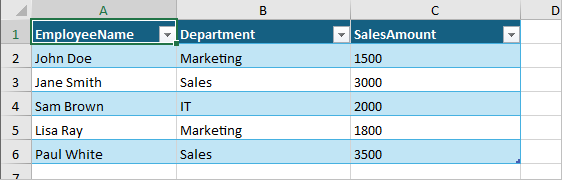
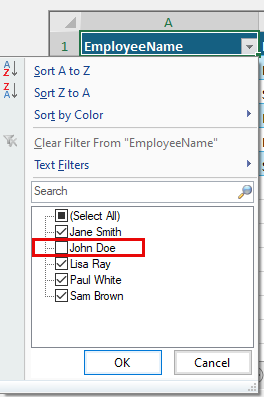
2. Click the Filter button on column A.
3. Exclude ‘John Doe’ from the list and click OK.
|  | .png) |
| --- | --- |
|
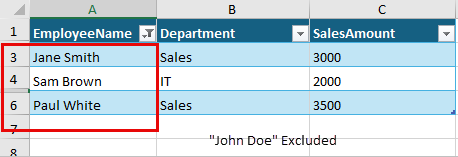
4. Input “John Doe” in any of the cell in column A at runtime.
**Observe:** After you stop editing, the row will be filtered out.
> !type=note
> **Note:**
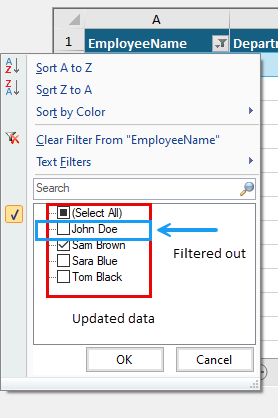
> You can edit the cell value manually or by pressing F1 to update the bound table with some new data.
> **Observe:** The updated table will filter out the previously excluded value.
|  | 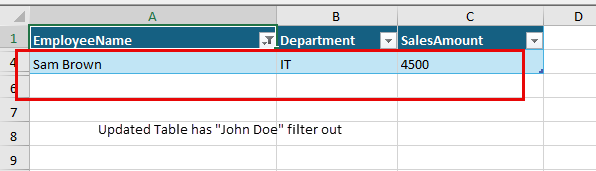 |
| --- | --- |
|
5. Click on ‘Disable\_AutoUpd’ button to set **AutoFilter.AutoUpdate** to false.
6. Edit any value in visible row with the excluded value ‘John Doe’.
.png)
The following code shows how **AutoUpdate** is controlled by the **AutoUpdateFilter** property initially and then how it works independently afterwards.
```csharp
private ITable table;
private Button btn_disable_Autoupdate;
IWorksheet sheet;
fpSpread1.LegacyBehaviors = FarPoint.Win.Spread.LegacyBehaviors.None;
sheet = fpSpread1.AsWorkbook().ActiveSheet;
// Create a DataTable
DataTable dt = new DataTable();
dt.Columns.AddRange(new[]
{
new DataColumn("EmployeeName"),
new DataColumn("Department"),
new DataColumn("SalesAmount")
});
dt.Rows.Add("John Doe", "Marketing", 1500);
dt.Rows.Add("Jane Smith", "Sales", 3000);
dt.Rows.Add("Sam Brown", "IT", 2000);
dt.Rows.Add("Lisa Ray", "Marketing", 1800);
dt.Rows.Add("Paul White", "Sales", 3500);
dt.AcceptChanges();
// Enable the AutoUpdateFilter option
sheet.AutoUpdateFilter = true;
// Create a table and bound with DataTable
table = sheet.Range($"A1:C{dt.Rows.Count}").CreateTable(true);
table.AutoGenerateColumns = true; // Set AutoGenerateColumns property to true
table.DataSource = dt;
this.KeyPreview = true;
this.KeyDown += (s, ea) =>
{
if (ea.KeyCode == Keys.F1)
{
// Modify the DataTable
dt.Clear();
dt.Rows.Add("John Doe", "Marketing", 4000);
dt.Rows.Add("Sara Blue", "IT", 2200);
dt.Rows.Add("Sam Brown", "IT", 4500);
dt.Rows.Add("Tom Black", "Sales", 3200);
}
};
}
private void Btn_disable_Autoupdate_Click(object sender, EventArgs e)
{
// Disable the AutoUpdate Option
table.AutoFilter.AutoUpdate = false;
}
```
```vbnet
Private table As ITable
Private btn_disable_Autoupdate As Button
Private sheet As IWorksheet
FpSpread1.LegacyBehaviors = FarPoint.Win.Spread.LegacyBehaviors.None
sheet = FpSpread1.AsWorkbook().ActiveSheet
' Create a DataTable
Dim dt As DataTable = New DataTable()
dt.Columns.AddRange({New DataColumn("EmployeeName"), New DataColumn("Department"), New DataColumn("SalesAmount")})
dt.Rows.Add("John Doe", "Marketing", 1500)
dt.Rows.Add("Jane Smith", "Sales", 3000)
dt.Rows.Add("Sam Brown", "IT", 2000)
dt.Rows.Add("Lisa Ray", "Marketing", 1800)
dt.Rows.Add("Paul White", "Sales", 3500)
dt.AcceptChanges()
' Enable the AutoUpdateFilter option
sheet.AutoUpdateFilter = True
' Create a table and bound with DataTable
table = sheet.Range($"A1:C{dt.Rows.Count}").CreateTable(True)
table.AutoGenerateColumns = True ' Set AutoGenerateColumns property to True
table.DataSource = dt
Me.KeyPreview = True
AddHandler Me.KeyDown, Sub(s, ea)
If ea.KeyCode = Keys.F1 Then
' Modify the DataTable
dt.Clear()
dt.Rows.Add("John Doe", "Marketing", 4000)
dt.Rows.Add("Sara Blue", "IT", 2200)
dt.Rows.Add("Sam Brown", "IT", 4500)
dt.Rows.Add("Tom Black", "Sales", 3200)
End If
End Sub
End Sub
Private Sub Btn_disable_Autoupdate_Click(ByVal sender As Object, ByVal e As EventArgs)
' Disable the AutoUpdate option
table.AutoFilter.AutoUpdate = False
End Sub
```
**Limitation**
This feature only works when **LegacyBehaviors.Style** is excluded from [LegacyBehaviors](/spreadnet/api/latest/online-win/FarPoint.Win.Spread/FarPoint.Win.Spread.LegacyBehaviors.html) enum.
## See Also
[Tables](/spreadnet/docs/latest/online-win/overview/spwin-devguide/spwin-tables)
[Adding a Table](/spreadnet/docs/latest/online-win/overview/spwin-devguide/spwin-tables/spwin-tableadd)
[Using Table Filters](/spreadnet/docs/latest/online-win/overview/spwin-devguide/spwin-tables/spwin-tablefilter)
[Resizing a Table](/spreadnet/docs/latest/online-win/overview/spwin-devguide/spwin-tables/spwin-tableresize)
[Sorting a Table](/spreadnet/docs/latest/online-win/overview/spwin-devguide/spwin-tables/spwin-tablesort)
[Setting Table Styles](/spreadnet/docs/latest/online-win/overview/spwin-devguide/spwin-tables/spwin-tablestyle)
[Adding a Table Formula](/spreadnet/docs/latest/online-win/overview/spwin-devguide/spwin-tables/tableformula)
[Understanding Structured References](/spreadnet/docs/latest/online-win/overview/spwin-devguide/spwin-tables/spwin-structref)
[Binding a Table](/spreadnet/docs/latest/online-win/overview/spwin-devguide/spwin-tables/spwin-tablebind)