# Customizing Split Boxes
Discover how to use the Spread Designer to set the values for ColumnSplitBoxAlignment, RowSplitBoxAlignment, ColumnSplitBoxPolicy, or RowSplitBoxPolicy properties.
## Content
By default, the split boxes are shown and appear at the leading edge of each of the scroll bars, as shown in the figure below. When the end user clicks and drags the split box, the view is split into separate viewports. For more information on viewports, refer to [Customizing Viewports](/spreadnet/docs/latest/online-win/overview/spwin-devguide/spwin-ssojbects/spwin-sheetviewports).
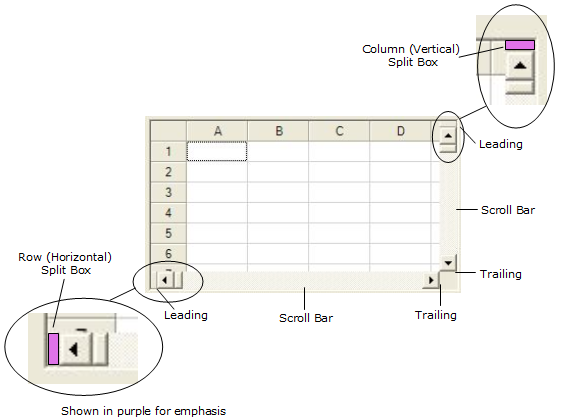
You can customize the display and placement of the split boxes by using the following properties of the [FpSpread](/spreadnet/api/latest/online-win/FarPoint.Win.Spread/FarPoint.Win.Spread.FpSpread.html) class.
| **Property** | **Description** |
| -------- | ----------- |
| [ColumnSplitBoxAlignment](/spreadnet/api/latest/online-win/FarPoint.Win.Spread/FarPoint.Win.Spread.FpSpread.ColumnSplitBoxAlignment.html) property
[RowSplitBoxAlignment](/spreadnet/api/latest/online-win/FarPoint.Win.Spread/FarPoint.Win.Spread.FpSpread.RowSplitBoxAlignment.html) property | Placement of split box relative to the scroll bar.Sets the value of [SplitBoxAlignment](/spreadnet/api/latest/online-win/FarPoint.Win.Spread/FarPoint.Win.Spread.SplitBoxAlignment.html) enumeration. |
| [ColumnSplitBoxPolicy](/spreadnet/api/latest/online-win/FarPoint.Win.Spread/FarPoint.Win.Spread.FpSpread.ColumnSplitBoxPolicy.html) property
[RowSplitBoxPolicy](/spreadnet/api/latest/online-win/FarPoint.Win.Spread/FarPoint.Win.Spread.FpSpread.RowSplitBoxPolicy.html) property | Whether or when to display the split box.Sets the value of [SplitBoxPolicy](/spreadnet/api/latest/online-win/FarPoint.Win.Spread/FarPoint.Win.Spread.SplitBoxPolicy.html) enumeration. |
## Sample Code
In this example, the split box for the columns is at the leading edge of the scroll bar and is displayed as needed; for the rows, the split box is at the trailing edge of the scroll bar and is always displayed.
```csharp
fpSpread1.ColumnSplitBoxAlignment = FarPoint.Win.Spread.SplitBoxAlignment.Leading;
fpSpread1.RowSplitBoxAlignment = FarPoint.Win.Spread.SplitBoxAlignment.Trailing;
fpSpread1.ColumnSplitBoxPolicy = FarPoint.Win.Spread.SplitBoxPolicy.AsNeeded;
fpSpread1.RowSplitBoxPolicy = FarPoint.Win.Spread.SplitBoxPolicy.Always;
```
```vbnet
FpSpread1.ColumnSplitBoxAlignment = FarPoint.Win.Spread.SplitBoxAlignment.Leading
FpSpread1.RowSplitBoxAlignment = FarPoint.Win.Spread.SplitBoxAlignment.Trailing
FpSpread1.ColumnSplitBoxPolicy = FarPoint.Win.Spread.SplitBoxPolicy.AsNeeded
FpSpread1.RowSplitBoxPolicy = FarPoint.Win.Spread.SplitBoxPolicy.Always
```
## Using the Spread Designer
1. From the **Settings** menu, select **SplitBox**.
2. In the **Split Box** tab, set the values for the **ColumnSplitBoxAlignment**, **RowSplitBoxAlignment**, **ColumnSplitBoxPolicy**, or **RowSplitBoxPolicy** property.
3. Click **OK**.
4. From the **File** menu choose **Apply and Exit** to apply your changes to the component and exit Spread Designer.
or
1. Select the Spread component (or select Spread from the pull-down menu).
2. In the property list for the component (in the **Splitters** category), select the **ColumnSplitBoxAlignment**, **RowSplitBoxAlignment**, **ColumnSplitBoxPolicy**, or **RowSplitBoxPolicy** property.
3. Click the drop-down arrow to display the choices and select the value. Repeat this for each property.
4. From the **File** menu choose **Apply and Exit** to apply your changes to the component and exit Spread Designer.
## See Also
[Spreadsheet Objects](/spreadnet/docs/latest/online-win/overview/spwin-devguide/spwin-ssojbects)
[Understanding Parts of the Component](/spreadnet/docs/latest/online-win/overview/spwin-devguide/spwin-ssojbects/spwin-useinterface)
[Object Parentage](/spreadnet/docs/latest/online-win/overview/spwin-devguide/spwin-ssojbects/spwin-knowobjparentage)
[Resetting Parts of the Interface](/spreadnet/docs/latest/online-win/overview/spwin-devguide/spwin-ssojbects/spwin-cntrlresets)
[Improving Performance by Suspending the Layout](/spreadnet/docs/latest/online-win/overview/spwin-devguide/spwin-ssojbects/spwin-complayout)
[Allowing User Functionality](/spreadnet/docs/latest/online-win/overview/spwin-devguide/spwin-ssojbects/spwin-useritems)
[Allowing the User to Zoom the Display of the Component](/spreadnet/docs/latest/online-win/overview/spwin-devguide/spwin-ssojbects/spwin-cntrlzoom)
[Working with Scroll Bars](/spreadnet/docs/latest/online-win/overview/spwin-devguide/spwin-ssojbects/spwin-scroll)
[Adding a Status Bar](/spreadnet/docs/latest/online-win/overview/spwin-devguide/spwin-ssojbects/spwin-statusbar)
[Customizing Viewports](/spreadnet/docs/latest/online-win/overview/spwin-devguide/spwin-ssojbects/spwin-sheetviewports)
[Ways to Improve Performance](/spreadnet/docs/latest/online-win/overview/spwin-devguide/spwin-ssojbects/spwin-perfimprovements)