# Showing or Hiding Headers
Learn how to show or hide headers in Spread with simple step-by-step instructions.
## Content
By default, Spread displays column headers and row headers. If you prefer, you can turn them off, and hide from view the row headers or column headers or both. The following figure shows a sheet that displays only column headers and hides the row headers.
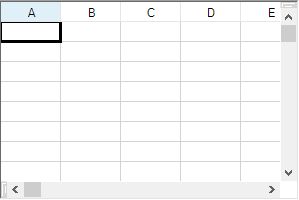
If the sheet has multiple headers, using these instructions to hide the headers hides all header rows or header columns or both. If you want to hide specific rows or columns within a header, you must specify the row or column. For more details on hiding specific rows or columns, refer to [Showing or Hiding a Row or Column](/spreadnet/docs/latest/online-win/overview/spwin-devguide/spwin-ssobject-rowcol/spwin-rowcolhide).
The display of headers is done by simply setting a visible property of the header. This can be done in code with any of these properties:
| **Property** | **Descriptions** |
| -------- | ------------ |
| [Visible](/spreadnet/api/latest/online-win/FarPoint.Win.Spread/FarPoint.Win.Spread.RowHeader.Visible.html) property of [RowHeader](/spreadnet/api/latest/online-win/FarPoint.Win.Spread/FarPoint.Win.Spread.RowHeader.html) class
or
[RowHeaderVisible](/spreadnet/api/latest/online-win/FarPoint.Win.Spread/FarPoint.Win.Spread.SheetView.RowHeaderVisible.html) property of [SheetView](/spreadnet/api/latest/online-win/FarPoint.Win.Spread/FarPoint.Win.Spread.SheetView.html)class | Set True to show the row header and False to hide the row header. |
| [Visible](/spreadnet/api/latest/online-win/FarPoint.Win.Spread/FarPoint.Win.Spread.ColumnHeader.Visible.html) property of [ColumnHeader](/spreadnet/api/latest/online-win/FarPoint.Win.Spread/FarPoint.Win.Spread.ColumnHeader.html) class
or
[ColumnHeaderVisible](/spreadnet/api/latest/online-win/FarPoint.Win.Spread/FarPoint.Win.Spread.SheetView.ColumnHeaderVisible.html) property of [SheetView](/spreadnet/api/latest/online-win/FarPoint.Win.Spread/FarPoint.Win.Spread.SheetView.html) class | Set True to show the column header and False to hide the column header. |
## Using the Properties Window
1. At design time, in the **Properties** window, select the Spread component.
2. Select the **Sheets** property.
3. Click the button to display the **SheetView Collection Editor**.
4. Click the sheet for which you want to change the header display.
5. Set the **ColumnHeaderVisible** or **RowHeaderVisible** property to false to turn off the display of the header.
6. Click **OK** to close the editor.
## Using a Shortcut
Set the [ColumnHeaderVisible](/spreadnet/api/latest/online-win/FarPoint.Win.Spread/FarPoint.Win.Spread.SheetView.ColumnHeaderVisible.html) or [RowHeaderVisible](/spreadnet/api/latest/online-win/FarPoint.Win.Spread/FarPoint.Win.Spread.SheetView.RowHeaderVisible.html) property for a Sheets object or the [Visible](/spreadnet/api/latest/online-win/FarPoint.Win.Spread/FarPoint.Win.Spread.ColumnHeader.Visible.html) property of the ColumnHeader or RowHeader object.
## Example
This example turns off the display of the column header. You can use either line of code.
```csharp
// Turn off the display of column headers.
fpSpread1.Sheets[0].ColumnHeaderVisible = false;
fpSpread1.Sheets[0].ColumnHeader.Visible = false;
```
```vbnet
' Turn off the display of column headers.
fpSpread1.Sheets(0).ColumnHeaderVisible = False
fpSpread1.Sheets(0).ColumnHeader.Visible = False
```
## Using the Spread Designer
1. Select the sheet tab for the sheet for which you want to turn off header display.
2. In the properties list, in the **Appearance** category, double-click the **ColumnHeader** or **RowHeader** property to display the properties for the column or row header.
3. Set the **Visible** property to False to turn off the header display.
4. From the **File** menu choose **Apply and Exit** to apply your changes to the component and exit Spread Designer.
## See Also
[Headers](/spreadnet/docs/latest/online-win/overview/spwin-devguide/spwin-ssobject-header)
[Understanding Headers](/spreadnet/docs/latest/online-win/overview/spwin-devguide/spwin-ssobject-header/spwin-headerparts)
[Setting the Height or Width of Header](/spreadnet/docs/latest/online-win/overview/spwin-devguide/spwin-ssobject-header/spwin-headersize)
[Setting the Header Text](/spreadnet/docs/latest/online-win/overview/spwin-devguide/spwin-ssobject-header/spwin-headertext)
[Customizing the Appearance of Headers](/spreadnet/docs/latest/online-win/overview/spwin-devguide/spwin-ssobject-header/spwin-appearheader)
[Creating a Header with Multiple Rows or Columns](/spreadnet/docs/latest/online-win/overview/spwin-devguide/spwin-ssobject-header/spwin-headermulti)
[Creating a Span in a Header](/spreadnet/docs/latest/online-win/overview/spwin-devguide/spwin-ssobject-header/spwin-headerspan)
[Customizing the Sheet Corner Appearance](/spreadnet/docs/latest/online-win/overview/spwin-devguide/spwin-ssobject-header/spwin-sheetcorner)