# Pivot Table Style Options
## Content
A PivotTable style is composed of multiple table style elements, with each element defining the formatting for a specific part of the PivotTable. The supported element types are listed in the [TableStyleElementType](/spreadnet/api/latest/online-win/GrapeCity.Spreadsheet/GrapeCity.Spreadsheet.TableStyleElementType.html) enumeration. The `PivotTable` object provides properties to configure style options according to the selected style.
Spread WinForms supports four key style options: **Row Headers**, **Column Headers**, **Banded Rows**, and **Banded Columns**. These settings control whether headers are displayed and whether alternating rows or columns are formatted with banded styles, based on the applied PivotTable style.
## Apply Row Header Formatting
Spread WinForms provides the [IPivotTable.ShowTableStyleRowHeaders](/spreadnet/api/latest/online-win/GrapeCity.Spreadsheet/GrapeCity.Spreadsheet.PivotTables.IPivotTable.ShowTableStyleRowHeaders.html) property to apply the pivot table style to row headers. Enabling this option ensures that row headers are clearly highlighted according to the applied style.
| Row Header Formatting Enabled | Row Header Formatting Disabled |
| ----------------------------- | ------------------------------ |
| 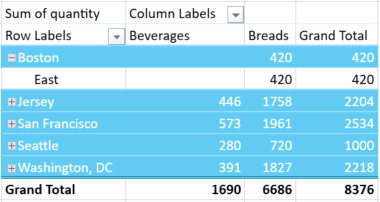 | 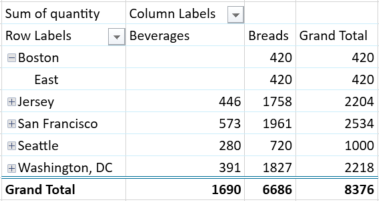 |
The following example demonstrates how to show row header formatting in the pivot table.
```csharp
pvTable.ShowTableStyleRowHeaders = true;
```
```vbnet
pvTable.ShowTableStyleRowHeaders = True
```
## Apply Column Header Formatting
You can use the [IPivotTable.ShowTableStyleColumnHeaders](/spreadnet/api/latest/online-win/GrapeCity.Spreadsheet/GrapeCity.Spreadsheet.PivotTables.IPivotTable.ShowTableStyleColumnHeaders.html) property to apply the selected pivot table style to column headers. This enhances the visibility of column groupings and provides a more organized structure for the presented data.
| Column Header Formatting Enabled | Column Header Formatting Disabled |
| -------------------------------- | --------------------------------- |
| 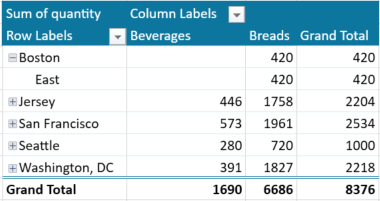 | 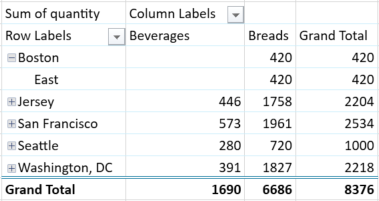 |
The following example demonstrates how to show column header formatting in the pivot table.
```csharp
pvTable.ShowTableStyleColumnHeaders = true;
```
```vbnet
pvTable.ShowTableStyleColumnHeaders = True
```
## Apply Banded Row Formatting
Banded rows use alternating background colors or styles to distinguish between adjacent rows. You can enable this option using the [IPivotTable.ShowTableStyleRowStripes](/spreadnet/api/latest/online-win/GrapeCity.Spreadsheet/GrapeCity.Spreadsheet.PivotTables.IPivotTable.ShowTableStyleRowStripes.html) property.
| Banded Row Formatting Enabled | Banded Row Formatting Disabled |
| ----------------------------- | ------------------------------ |
| 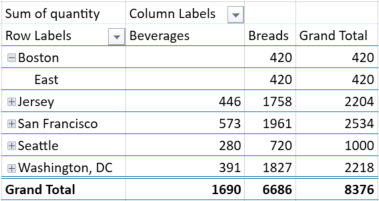 | 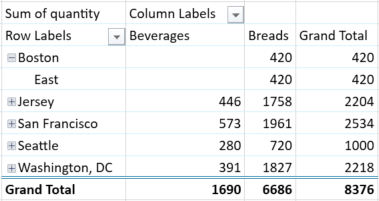 |
The following example demonstrates how to show banded row formatting in the pivot table.
```csharp
pvTable.ShowTableStyleRowStripes = true;
```
```vbnet
pvTable.ShowTableStyleRowStripes = True
```
## Apply Banded Column Formatting
Banded columns work similarly to banded rows, but apply alternating formatting to columns instead. Use the [IPivotTable.ShowTableStyleColumnStripes](/spreadnet/api/latest/online-win/GrapeCity.Spreadsheet/GrapeCity.Spreadsheet.PivotTables.IPivotTable.ShowTableStyleColumnStripes.html) property to enable this feature.
| Banded Column Formatting Enabled | Banded Column Formatting Disabled |
| -------------------------------- | --------------------------------- |
| 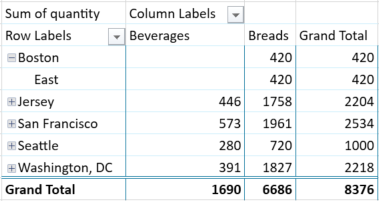 | 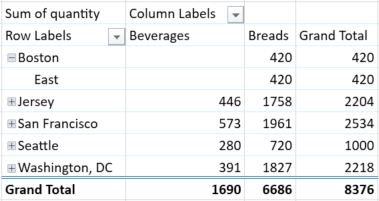 |
The following example demonstrates how to show banded column formatting in the pivot table.
```csharp
pvTable.ShowTableStyleColumnStripes = true;
```
```vbnet
pvTable.ShowTableStyleColumnStripes = True
```