# Sheet Tab
Explore the features of the Pagination tab for precise page and cell range printing.
## Content
The **Sheet** tab of the **Page Setup** dialog provides the following items:
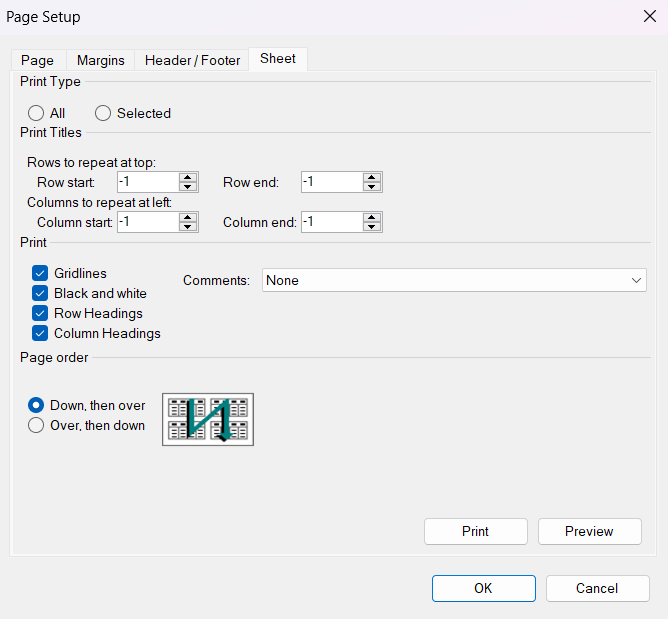
This tab provides the following items:
| **Item** | **Description** |
| ---- | ----------- |
| Print Type | Select **All** to print the entire document, or **Selected** to print only the chosen content. |
| Print Titles | - Set **Rows to repeat at top** if you want specific rows as your horizontal title for each page.
- Row Start: Set the first row to print when printing a cell range.
- Row End: Set the last row to print when printing a cell range.
- Set **Columns to repeat at left** if you want vertical titles on each page.
- Column Start: Set the first column to print when printing a cell range.
- Column End: Set the last column to print when printing a cell range.
|
| Print | Set what is printed from the worksheet, whether the printout is in color or black and white, and what the print quality is.- Gridlines: Set whether to print the grid lines.
- Black and white: Set whether to print in black and white or in color (requires a color printer for color output).
- Row Headings: Set whether to print the row headers.
- Column Headings: Set whether to print the column headers.
- Comments: Set where to print cell comments:
- At end of sheet: All comments on a separate page.
- As displayed on sheet: Comments shown in their positions.
- None (default): Don't print comments.
|
| Page order | Set the order in which pages print. |
For more information on these settings, refer to the members of the [PrintInfo](/spreadnet/api/latest/online-win/FarPoint.Win.Spread/FarPoint.Win.Spread.PrintInfo.html) class.