# Pivot Table Layout
An explanation of the three different layouts for SpreadJS Pivot Tables: compact, outline, and tabular, with UI and code examples of each
## Content
SpreadJS allows you to choose a pivot table layout and apply it using the `PivotTableLayoutType` enumeration.
* Compact Form
* Outline Form
* Tabular Form
## Compact Form
The compact form is the default report layout of a pivot table which displays each Row label in a separate row but in the same column. This layout, as the name suggests, presents data in a compact form by reducing the pivot table width. The following image depicts the compact form layout of a pivot table.
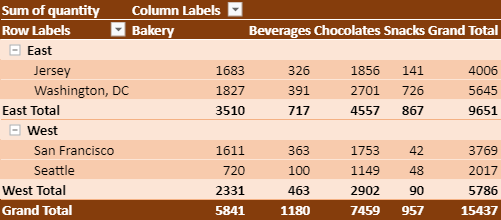
The following table explains the behavior and positioning of Row Labels, Row Fields, and Subtotals while using the compact form layout:
| **Row Labels** | **Row Fields** | **Subtotals** |
| ---------- | ---------- | --------- |
| Row Field Label is always above the inner fields labels. | All the Row Fields are in a single column. | Subtotals can be shown at the Top or Bottom of each group. |
| To understand the fields easily, each Row Label is slightly indented, from the above field. | | When you set Subtotals, the row fields are altered as explained below:- Top: Subtotals are added to the existing row against the row label item
- Bottom: Subtotals are added to a new row at the bottom
|
| Row Labels cannot be repeated. | | For Column Fields, Subtotals are always shown at the Bottom. |
| You can change the indentation of the fields in this report layout only. | | The Row Label remains at the top, even if Subtotals are at the bottom. |
The following code sample sets the compact form layout for the pivot table.
```javascript
myPivotTable.layoutType(GC.Spread.Pivot.PivotTableLayoutType.compact);
```
You can customize the indentation level of row fields using the `rowLabelIndent` option in compact form layout.
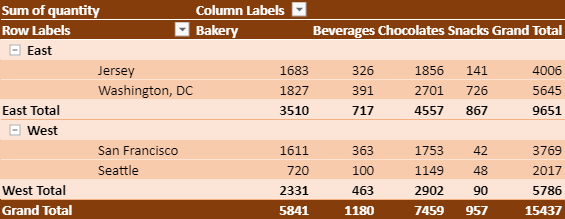
The following code sample sets the indentation in the compact form of a pivot table.
```javascript
myPivotTable.options.rowLabelIndent = 12;
```
## Outline Form
The outline form layout shows each Row Field in a separate column. This layout is useful when you want to show all the field names as heading labels and are not concerned about the width of the pivot table. The following image depicts the outline form layout of a pivot table.
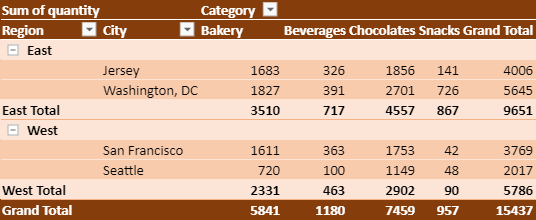
The following table explains the behavior and positioning of Row Labels, Row Fields, and Subtotals while using the outline form layout:
| **Row Labels** | **Row Fields** | **Subtotals** |
| ---------- | ---------- | --------- |
| Each Row Label is defined in a separate row. | All the Row Fields are in a separate column. | Subtotals can be shown at the Top or Bottom of each group. |
| Row Field Label is always above the inner fields labels. | Each Row Field shows its name in the column heading. | When you set Subtotals, the row fields are altered as explained below:- Top: Subtotals are added to the existing row against the row label item
- Bottom: Subtotals are added to a new row at the bottom
|
| Row Labels can be repeated. | | For Column Fields, Subtotals are always shown at the Bottom. |
The following code sample sets the outline form layout for a pivot table.
```javascript
myPivotTable.layoutType(GC.Spread.Pivot.PivotTableLayoutType.outline);
```
## Tabular Form
The tabular form layout is similar to the outline form layout except for the difference that the row label for the outer field is on the same row as the first label for the related inner field. Hence, it reduces the number of rows in the pivot table. The following image depicts the tabular form layout of the pivot table.
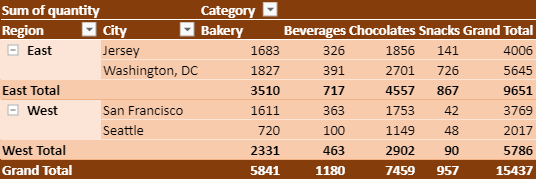
The following table explains the behavior and positioning of Row Labels, Row Fields, and Subtotals while using the tabular form layout:
| **Row Labels** | **Row Fields** | **Subtotals** |
| ---------- | ---------- | --------- |
| Row Labels for the outer fields are on the same row as the first label for the related inner fields. | All the Row Fields are in a separate column. | Subtotals can only be shown at the bottom of each group. |
| Row Labels can be repeated. | Each Row Field shows its name in the column heading. | When you set Subtotals at the bottom, a new row is added at the bottom. |
| | | For Column Fields, Subtotals are always shown at the Bottom. |
The following code sample sets the tabular form layout for the pivot table.
```javascript
myPivotTable.layoutType(GC.Spread.Pivot.PivotTableLayoutType.tabular);
```
## Additional Settings
### Set Subtotals and GrandTotals
You can set the position of subtotals and grand totals using the `subtotalsPosition` and `grandTotalPosition` options respectively. The `subtotalsPosition` can be set to none, top, or bottom values (as applicable to the layouts mentioned above) whereas the grandTotalPosition can be set to all values (such as none, both, col, or row) for all layouts. By default, the `subtotalsPosition` option is set to “bottom” and the `grandTotalPosition` option is set to “both”.
The following code sample sets the position of subtotals and grand totals in the pivot table.
```javascript
// Set SubtotalsPosition to none
myPivotTable.options.subtotalsPosition = GC.Spread.Pivot.SubtotalsPosition.none;
// Set grandTotalPosition to col
myPivotTable.options.grandTotalPosition = GC.Spread.Pivot.GrandTotalPosition.col;
```
Additionally, SpreadJS also enables you to improve the appearance of the subtotal by adjusting its position to a single field. Currently, the field subtotal position only supports **subtotalsPosition.top** and **subtotalsPosition.bottom**
```javascript
pivotTable.add("Date","Date",GC.Spread.Pivot.PivotTableFieldType.rowField);
pivotTable.subtotalPosition("Date", GC.Spread.Pivot.SubtotalsPosition.top);
```
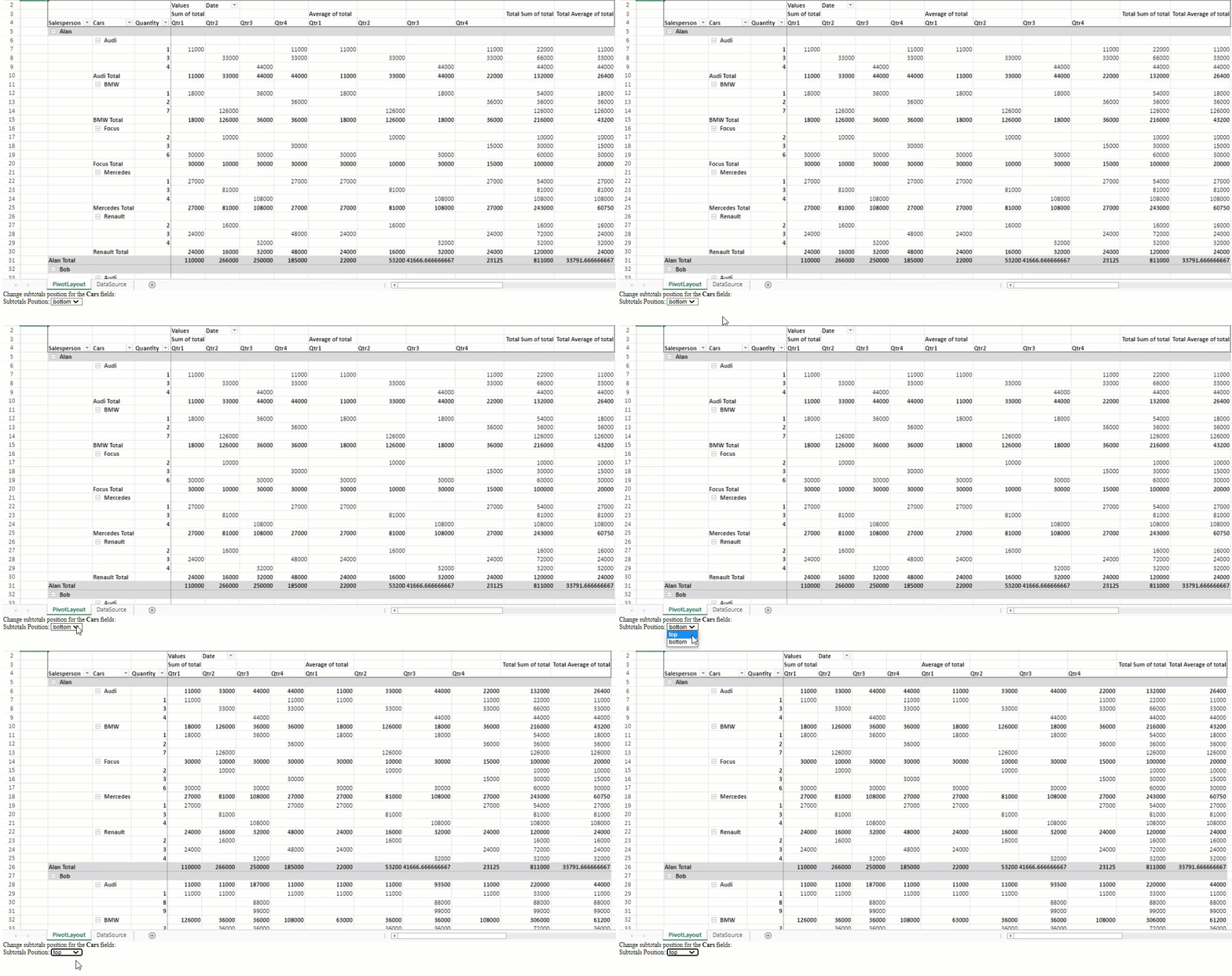
>In SpreadJS Designer, you can use the current field’s **Field Settings**dialog to set subtotals position at the top of the pivot table’s field. However, the default subtotals position in the pivot table is bottom.<
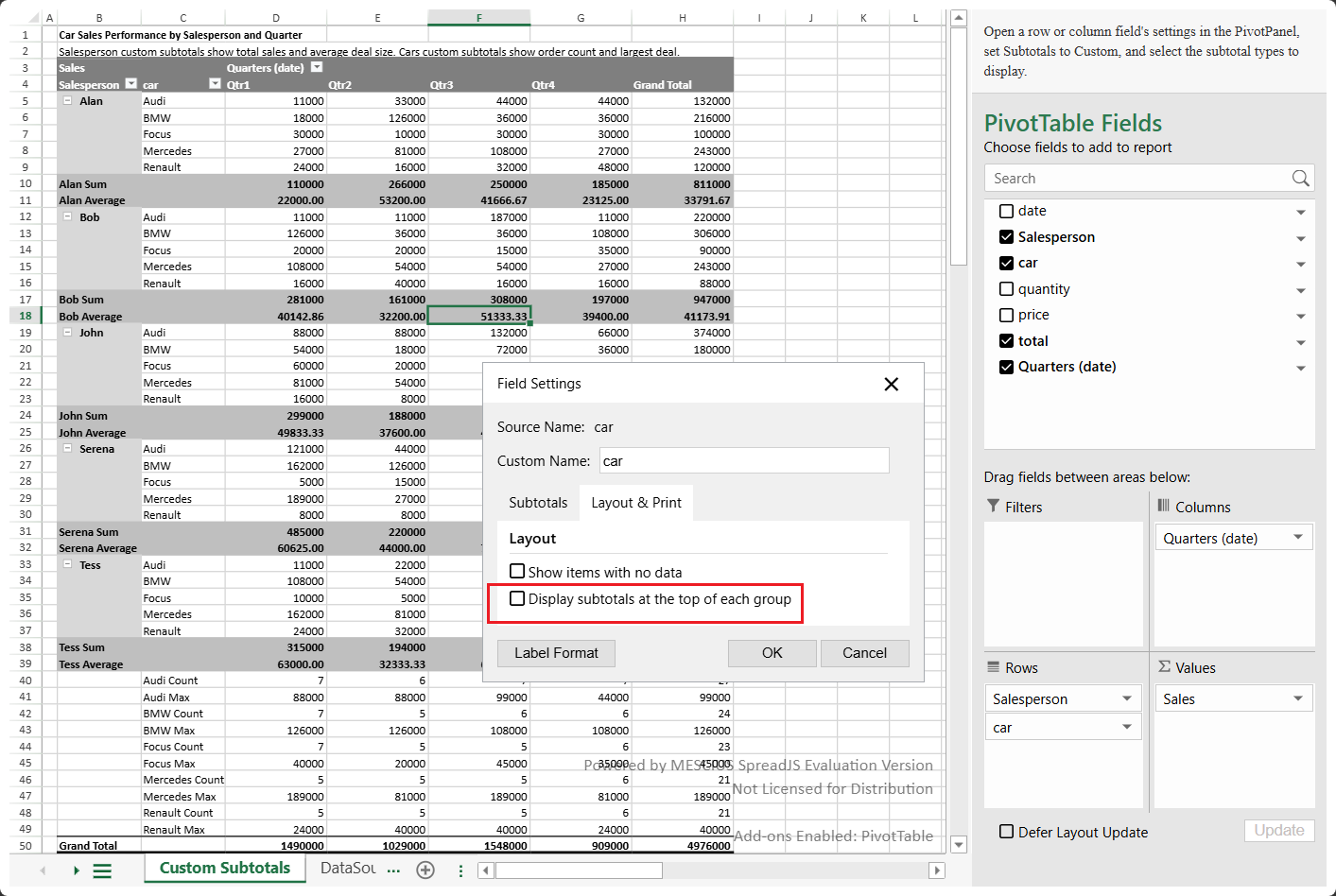
Dimension Subtotals can display multiple subtotal functions for a row or column field. When multiple Dimension Subtotals are enabled, the existing subtotal position expands into multiple subtotal rows or columns. For more information, see [Dimension Subtotals](/spreadjs/docs/v19/features/pivot-table/dimension-subtotals).
>type=note
> **Notes:**
>
> * PivotTable’s Compact and Outline layouts list the subtotal at the bottom by default, whereas the "Tabular" layout simply displays it at the bottom and doesn’t allow changing the position.
> * Resetting the PivotTable’s layout resets the field's **subtotalPosition** status to the global pivot table subtotal position. In contrast, resetting the PivotTable’s subtotal position resets the **subtotalPosition** status for each field to the same global value.
> * Currently, SpreadJS does not support rearranging a single field.
### Show Subtotal for Individual Fields
You can control whether subtotal information is displayed for individual fields in a pivot table, similar to Excel.
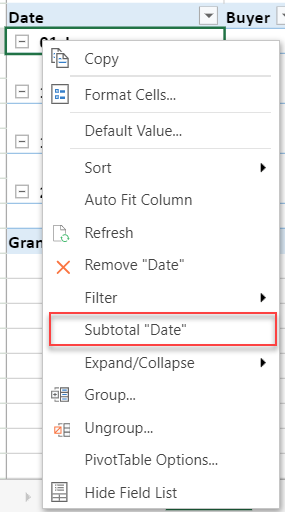
To manage the visibility of subtotals for specific fields, you can use the `subtotalVisible` method. The following code sample shows subtotals in a pivot table for the "Date" field.
```javascript
pivotTable.subtotalVisible("Date", true); // Value can be true or false
```
> **Notes**:
>
> * Changing the grandTotalPosition will reset the visibility settings for all fields.
> * Hiding a field’s subtotal does not affect its position (e.g., whether it is displayed at the top or bottom).
> Similarly, the subtotal position does not impact whether the subtotal is displayed or hidden.
> * Subtotals on a field can be hidden or displayed separately.
### Set Repeat Label Items
For the outline and tabular form layouts, you can enable repeating item labels in the outer row fields using the `fillDownLabels` option.
The following code sample sets the repeat label items to true in the tabular form layout.
```Javascript
// Set repeat label items
myPivotTable.options.fillDownLabels = true;
```
> **Note:** This option cannot be applied to Compact form.
### Set Blank Rows
You can add a blank row after each item using the `insertBlankLineAfterEachItem` option that helps to understand the data easily.
The following code sample sets the blank rows after each item in the pivot table.
```javascript
// Set blank rows with layout
myPivotTable.options.insertBlankLineAfterEachItem = true;
```
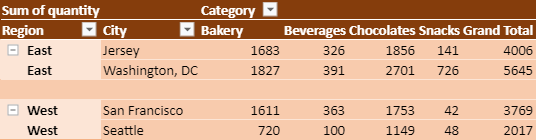
The following image shows the tabular form layout of the pivot table with all the additional settings as explained above.