# Row Action
An explanation of the row actions of TableSheets in SpreadJS, which are special columns in the row header that allow users to perform special row operations in the UI
## Content
TableSheet provides special columns on the row header to show status and perform row operations from the UI.
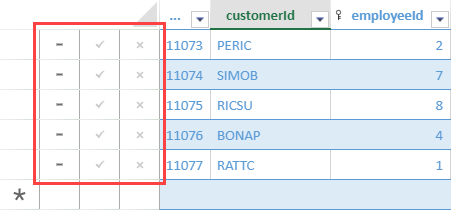
The following built-in row actions from the **BuiltInRowActions** class can be enabled using the [TableSheet.rowActionOptions](/spreadjs/api/v18/classes/GC.Spread.Sheets.TableSheet.TableSheet#rowActionOptions) method -
| Name | Description |
| ---- | ----------- |
| `pinRow` | Pin a row. |
| `dirtyStatus` | Show the data changes in a row. |
| `warningInfo` | Show warning information in a row. |
| `removeRow` | Remove a row. |
| `saveRow` | Save the data changes in a row. |
| `resetRow` | Reset the data changes in a row. |
The following code sample shows how to enable row actions in a TableSheet.
```javascript
//init a tablesheet
var sheet = spread.addSheetTab(0, "TableSheet1", GC.Spread.Sheets.SheetType.tableSheet);
// Initialize and row actions
var rowActions = GC.Spread.Sheets.TableSheet.BuiltInRowActions;
let options = sheet.rowActionOptions();
options.push(
rowActions.removeRow,
rowActions.saveRow,
rowActions.resetRow,
);
sheet.rowActionOptions(options);
```
## Custom Actions
You can customize row actions by passing self-defined options in the rowActionsOptions method. For example, the following GIF illustrates custom row actions such as a checkbox and a comment popup.
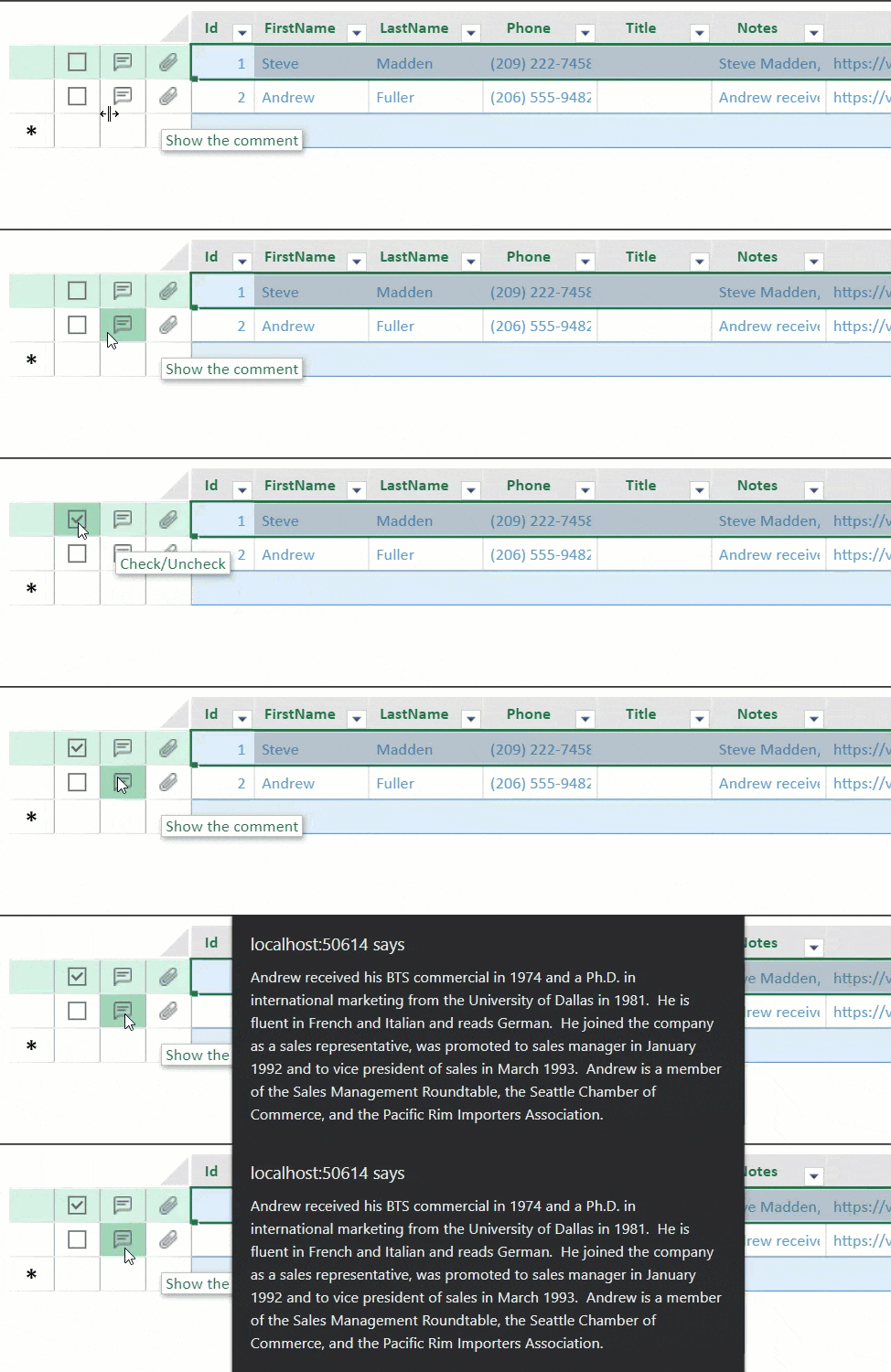
The following properties are available and can be used to customize row actions.
| Property | Description |
| -------- | ----------- |
| name
*string* | The name of the option. |
| icons
*\(string \| GC\.Spread\.Sheets\.ButtonImageType\)* | A series of icons indicate the different statuses. |
| iconSelector
*\(item: any\, index: number\) =\> number \| boolean* | Select an icon according to a different status. |
| tooltip
*String* | The tooltip for the row action. |
| command
*string* | The name of the command when clicking the row action. |
| shortcutKey
*GC.Spread.Sheets.TableSheet.IShortcutKey* | The shortcut key of the command for the row action. |
The following code sample shows how to create a custom row action in tablesheet.
```javascript
function addCustomActions(sheet){
var options = sheet.rowActionOptions();
//add a action of check/uncheck
options.push({
name: 'check',
icons: ["data:image/svg+xml;base64,PHN2ZyB3aWR0aD0iMTIiIGhlaWdodD0iMTIiIHZpZXdCb3g9IjAgMCAxMiAxMiIgZmlsbD0ibm9uZSIgeG1sbnM9Imh0dHA6Ly93d3cudzMub3JnLzIwMDAvc3ZnIj4KPHJlY3Qgd2lkdGg9IjEyIiBoZWlnaHQ9IjEyIiBmaWxsPSJ0cmFuc3BhcmVudCIvPgo8cmVjdCB3aWR0aD0iMTIiIGhlaWdodD0iMTIiIGZpbGw9InRyYW5zcGFyZW50Ii8+CjxwYXRoIGZpbGwtcnVsZT0iZXZlbm9kZCIgY2xpcC1ydWxlPSJldmVub2RkIiBkPSJNMTIgMEgwVjEySDEyVjBaTTEgMTFWMUgxMVYxMUgxWiIgZmlsbD0iIzY2NjY2NiIvPgo8L3N2Zz4K", "data:image/svg+xml;base64,PHN2ZyB3aWR0aD0iMTIiIGhlaWdodD0iMTIiIHZpZXdCb3g9IjAgMCAxMiAxMiIgZmlsbD0ibm9uZSIgeG1sbnM9Imh0dHA6Ly93d3cudzMub3JnLzIwMDAvc3ZnIj4KPHJlY3Qgd2lkdGg9IjEyIiBoZWlnaHQ9IjEyIiBmaWxsPSJ0cmFuc3BhcmVudCIvPgo8cmVjdCB3aWR0aD0iMTIiIGhlaWdodD0iMTIiIGZpbGw9InRyYW5zcGFyZW50Ii8+CjxwYXRoIGZpbGwtcnVsZT0iZXZlbm9kZCIgY2xpcC1ydWxlPSJldmVub2RkIiBkPSJNMTIgMEgwVjEySDEyVjBaTTEgMTFWMUgxMVYxMUgxWiIgZmlsbD0iIzY2NjY2NiIvPgo8cGF0aCBkPSJNNS4yNSA5TDIgNS42MTI5TDMuMDA3MTQgNC41NjMyOEw1LjI1IDYuODkzM0w4Ljk4NTcxIDNMMTAgNC4wNDk2M0w1LjI1IDlINS4yNVoiIGZpbGw9IiM2NjY2NjYiLz4KPC9zdmc+Cg=="],
tooltip: "Check/Uncheck",
iconSelector: function (item) {
return !!checkMap[item.id];
},
command: CheckRow
});
//show the comment flag if the data has a comment
options.push({
name: 'comment',
icons: ["data:image/png;base64,iVBORw0KGgoAAAANSUhEUgAAAAwAAAAMCAYAAABWdVznAAAABmJLR0QA/wD/AP+gvaeTAAAAqklEQVQokZWPLQ7CUBCEv759lkMggAMQPAKN5QLNpj0BZ+gJ2tSiuAUag4ZKEi6ApW8xUAhJfxi3m29mMpGqpkAGjOjWHdh6IBORRZ7n5y46TdNZXddHVNV6khupqvmv4wJMWtiqLMspQGN4P/rU11D9Bv3d4IZAL0XAZ3Qcx3MRWbXRZjYGTh4gSZJlCGFvZjsze7R4biKy9gAhhL1zblMUxWHIhutQGOAJuws9bfdnMH0AAAAASUVORK5CYII="],
tooltip: "Show the comment",
iconSelector: function (item) {
return item.notes ? item.notes.length > 0 : false;
},
shortcutKey: { key: 65 /* A */, ctrl: true, alt: true },
command: ShowComment
});
//show the attachment flag if the data has a attachment
options.push({
name: 'attachment',
icons: ["data:image/png;base64,iVBORw0KGgoAAAANSUhEUgAAAAwAAAAMCAQAAAD8fJRsAAAAAmJLR0QA/4ePzL8AAADYSURBVBgZVcEtS4NhGIbha7KyGZZMZifIDA4/GCgWP7pYRQTv834MhoFhYnmwW4ZJmEwQRCxaDIaBNs268b4q6j9xKmPuODTI13nli5oGeeApjJK3xzCrPtvzBwrq4sZW1UO0OytuL0i+y33M6lfGjuzaJ2j7su3TsqKdqStjdS6YJLElIrc74zz7muKQn/uJzZB6xep2FUp0WJFEjVOvkFKmQTNMkTCvH7xvDJNS9kuOmSP1af3ho5qjxSfRFklCST0c0qjmyLNJx8fUF7Mc8MIbza0R/fMNfN1QmAjSSbsAAAAASUVORK5CYII="],
tooltip: "Attachment",
iconSelector: function (item) {
return item.photoUrl ? item.photoUrl.length > 0 : false;
}
});
sheet.rowActionOptions(options);
}
```