# Cell Threaded Comments
## Content
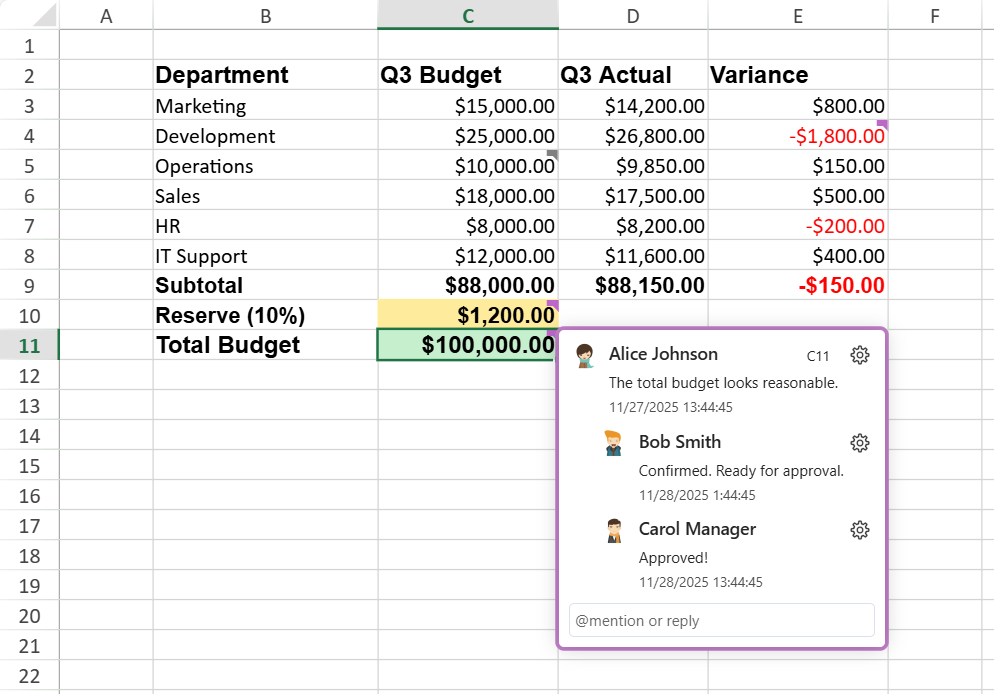
Threaded Comments enable users to add contextual discussions to specific cells and reply to comments in threads. Each thread serves as a conversation container composed of replies, helping teams discuss, review, and resolve issues efficiently.
The example below shows how team members can use threaded comments to review a quarterly budget.
## Key Benefits
* Enables collaboration and contextual feedback.
* Supports user mentions and hyperlinks in replies.
* Provides event-based integration and undo/redo support.
* Maintains compatibility with SpreadJS APIs and Excel export.
## Dependencies
You can include the Threaded Comments either by referencing the all‑in‑one bundle or by loading the required sub‑modules individually.
**Option 1 – Use the full package**
If you reference the complete library file, such as:
```html
```
**Option 2 – Use modular packages**
When you choose to include individual modules, make sure to load the following packages to enable the Threaded Comments feature:
```html
```
>type=note
> **Note:**
> This feature is available starting from SpreadJS v19.0 or later.
Threaded Comments rely on the `GC.Spread.Common.UserManager` component to identify the current user who creates or replies to a comment.
If no user is explicitly configured, a default *Guest* user is generated automatically.
To learn how to configure and manage users globally, see [User Management Feature](/spreadjs/docs/features/user-management).
## Comment vs. Threaded Comment
Before diving into the structure and APIs, let’s clarify how threaded comments differ from the traditional cell comments (notes) in SpreadJS.
| **Type** | **Description** | **Typical Use** | **Icon** | **Example** |
| ---- | ----------- | ----------- | ---- | ------- |
| Comment | A single text note attached to a cell. It does not support replies or mentions. Similar to Excel’s “Note.” | Quick annotation or developer hint | 
(Icon color/size customizable via API) | 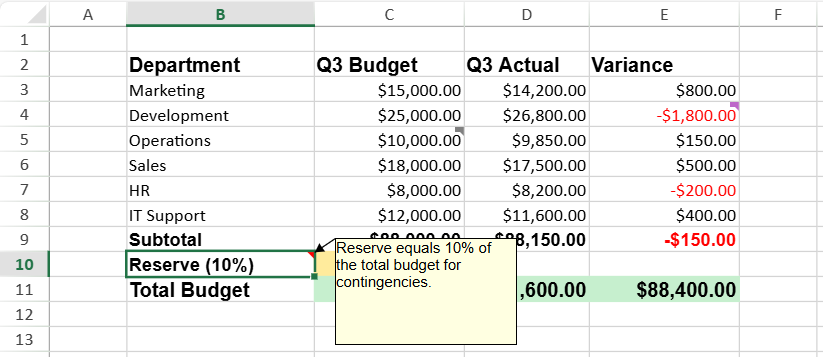 |
| Threaded Comment | A discussion thread attached to a cell that supports multiple replies, mentions (`@user`), and status tracking (resolved/open). Equivalent to Excel’s “Comment.” | Collaboration, review, or multi‑user discussion | - Unresolved:
- Resolved:
(Fixed style, auto status color) | 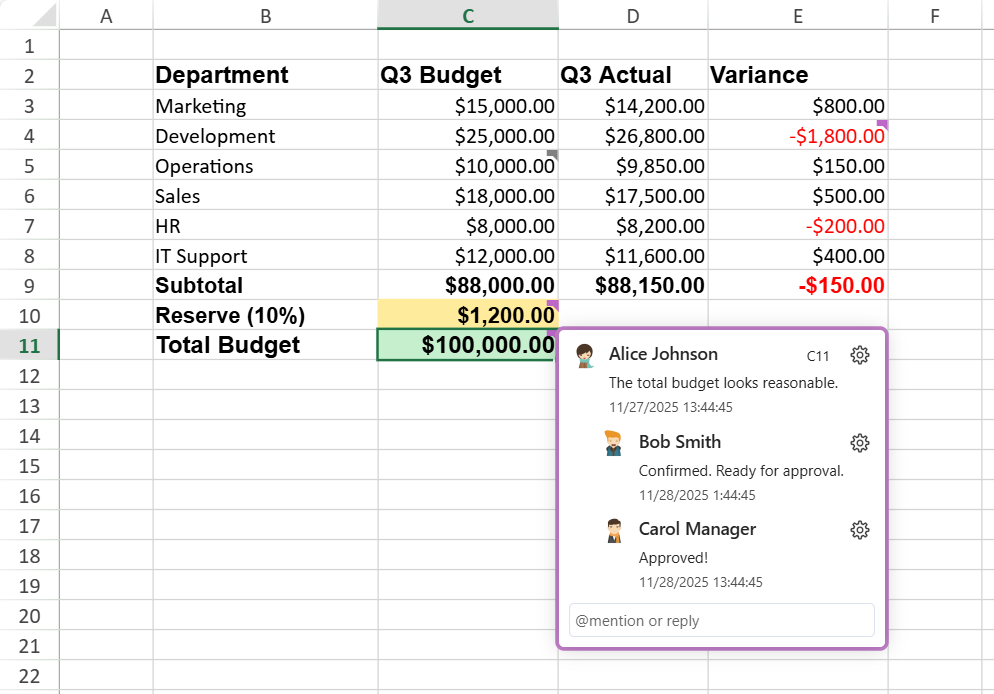 |
>type=note
> **Notes:**
>
> * Both Comment and Threaded Comment types can exist within the same workbook, but they are managed by different APIs and modules.
> * A cell can contain only one type of comment — adding one automatically replaces the other.
## Architecture Overview
The following table summarizes the core components of the threaded comment architecture.
| **Component** | **Description** | **Illustration** |
| --------- | ----------- | ------------ |
| Comment Manager | Manages all threaded comments in a sheet. Acts as the entry point for thread creation and lookup. | 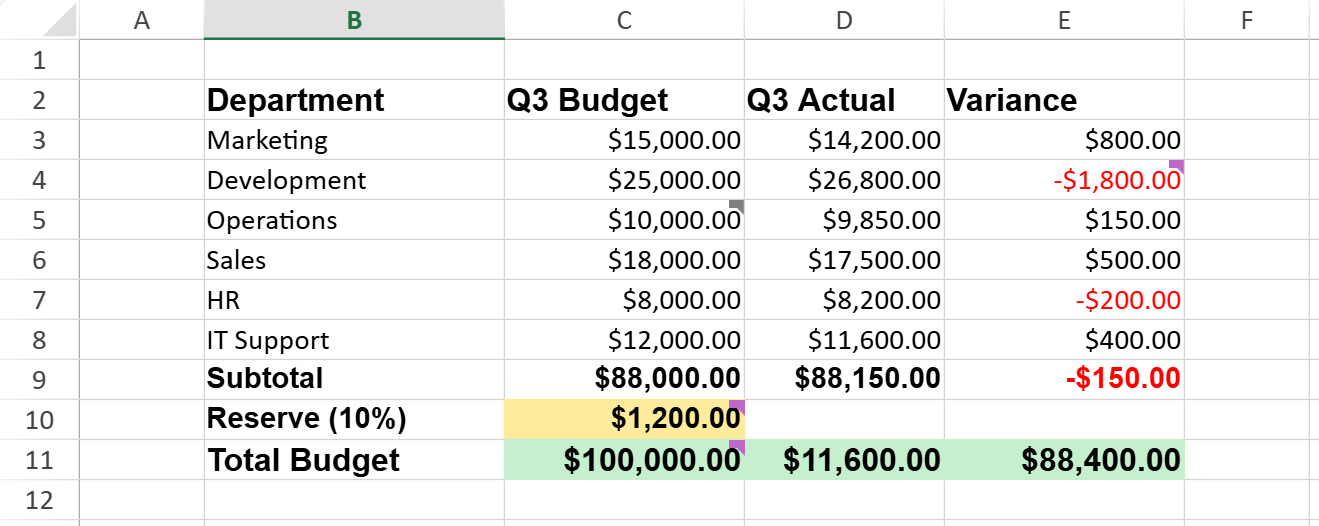 |
| Thread | A comment thread bound to a specific cell. Holds multiple comments and tracks the resolved state. | 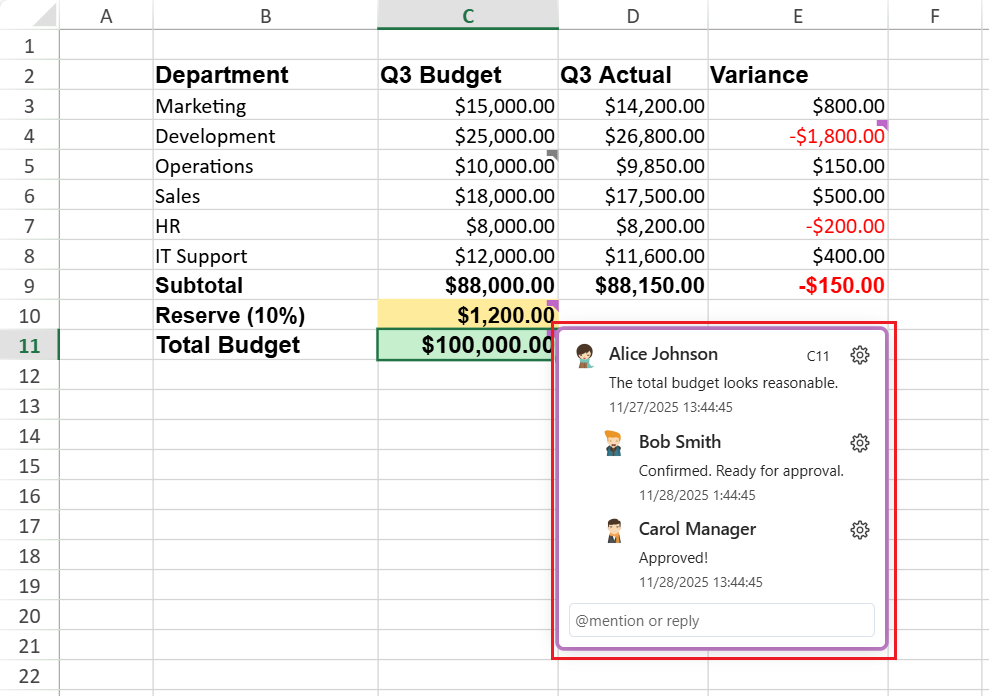 |
| Comment | A single message within a thread, including message, createdAt, and author.
The author supports id, first name, last name, email, and avatar. | 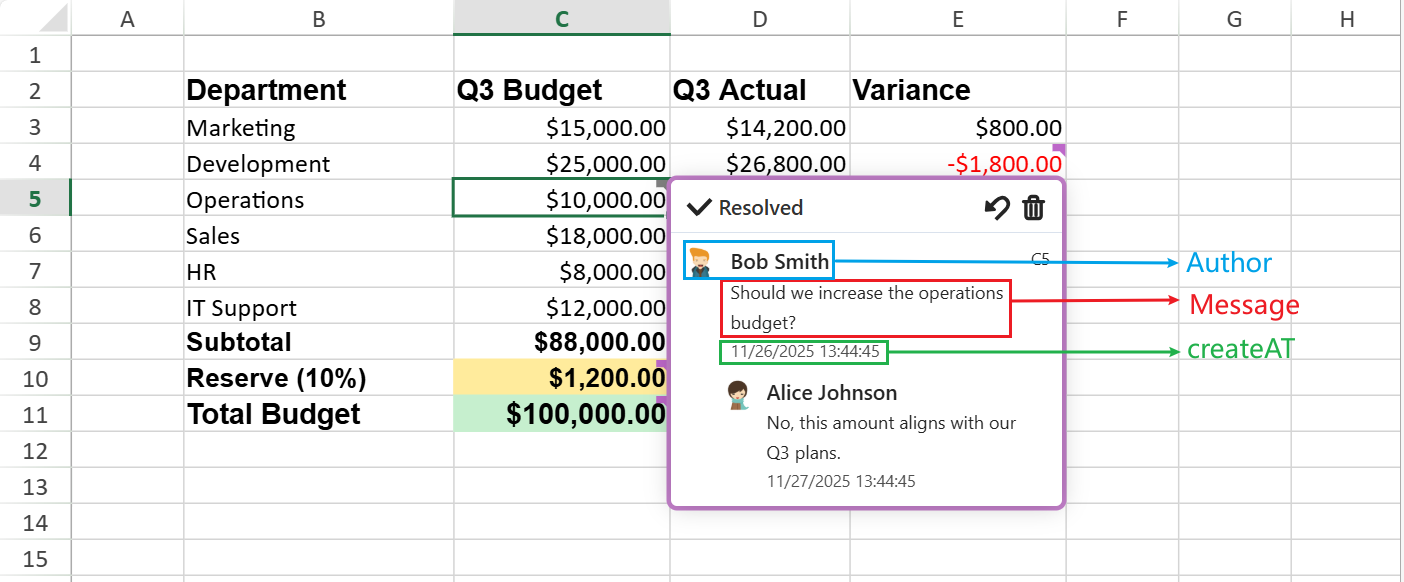 |
| Content Blocks | Define the internal structure of message content: text, mention (@), and link blocks. | 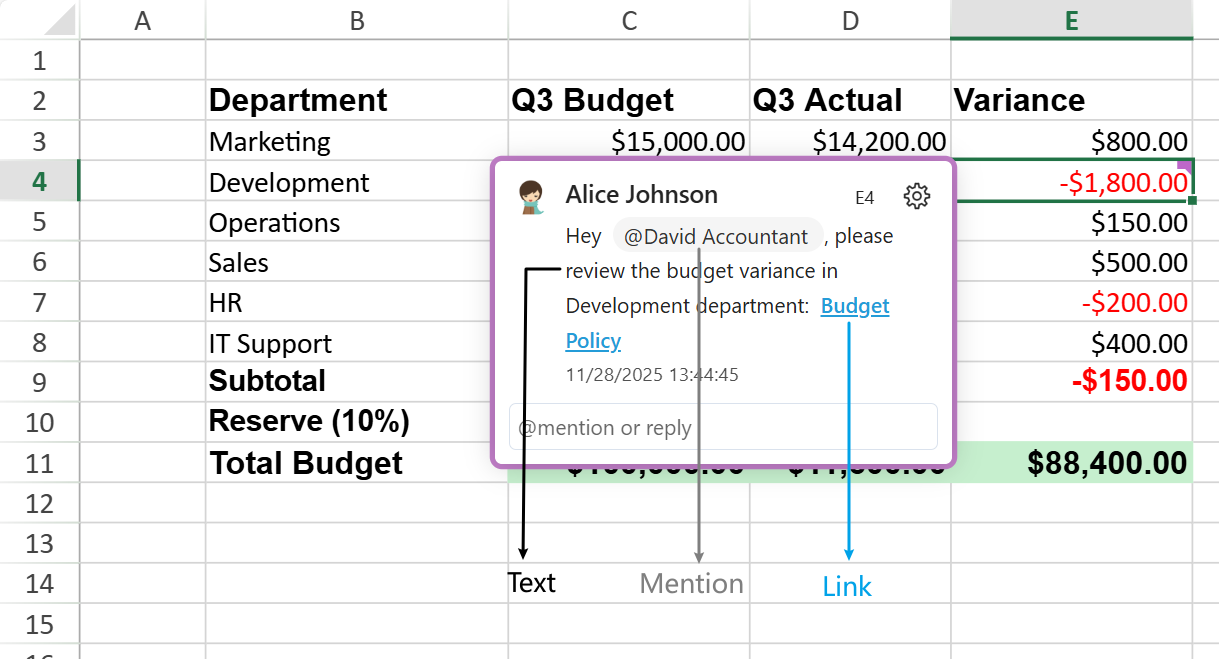 |
## User Interface Operations
These operations are available through the UI and are also accessible via the related APIs.
| **Action** | **Description** |
| ------ | ----------- |
| Add Threaded Comment | Creates a new comment thread in the selected cell.
The thread includes author information and timestamp. |
| Reply | Adds a response inside an existing thread. Replies are appended in chronological order. |
| Edit/Update | Modifies an existing comment or reply.
Edited messages preserve their original timestamps. |
| Delete | Removes a comment or reply.
Authorized users can delete others’ entries when permitted. |
| Resolve/Reopen | Marks a thread as resolved (disables new replies) or reopens it for further discussion. |
| Copy/Cut/Paste | Keeps threaded comments when copying, cutting, or pasting cells. |
| Undo/Redo | Reverses or reapplies the last add, edit, or delete operations. |
## Detailed Functionality
### Events
| Event | Trigger |
| ----- | ------- |
| `ThreadedCommentChanging` | Fires before a thread or reply is updated. |
| `ThreadedCommentChanged` | Fires after a thread or reply is updated. |
| `UserMentioning` | Occurs when a mention is about to be triggered. Supports cancellation.
Available since v19.1.0. |
| `UserMentioned` | Fires after a reply containing mentions is submitted. |
### Collaboration Model
* **Editors** can add, edit, delete, and resolve threaded comments.
* **Viewers** have read‑only access (no operator buttons or reply editor).
### Mentions (@)
**Activation Requirement**
The mention feature requires `GC.Spread.Common.UserManage`r to be configured.
* If `UserManager` is not configured, the mention feature is disabled.
* Typing `@` inserts the character as plain text and does not trigger the mention user‑list popup. No mention block is created, and mention‑related events will not fire.
* If `UserManager` is configured, the mention feature becomes available in the threaded comment editor.
**Interaction Flow**
Users can mention collaborators in replies by typing `@` in the threaded comment editor.
When `@` is typed:
* The `UserMentioning` event fires synchronously before the mention user‑list popup is displayed.
* Developers can set `args.cancel = true` to suppress the popup and treat `@` as plain text.
* If the mention is cancelled, no mention block is created and the `UserMentioned` event will not fire.
When a reply containing one or more mentions is submitted:
* The `UserMentioned` event is triggered.
The mention list displays up to 20 users.
If more matches are available, a prompt indicates additional results.
### Resolved State
Threads include a *resolved* flag.
* **Purple Flag:** Unresolved
* **Gray Flag:** Resolved
## Comment Behavior & Limitations
**Editing Rules**
* Multiple threaded comments can be edited at the same time.
* Unsaved edits are discarded when the comment is hidden.
* No explicit editing‑state flag is maintained.
**Mentions and Links**
* Clicking a mention (**@user**) does not open a user information card.
* Hyperlink editing behavior varies by browser:
* **Safari:** Automatically converts a pasted or typed URL to a hyperlink after posting.
* **Other browsers:** Convert text to hyperlinks when **Space** or **Enter** is pressed.
**Export and Compatibility Limits**
* When exporting to Excel, user IDs must comply with the **UUID** format:
`{XXXXXXXX‑XXXX‑XXXX‑XXXX‑XXXXXXXXXXXX}`
* If a user ID does not meet this format, SpreadJS adjusts it to fit Excel’s specification.
This may result in loss of edit permissions after re‑import because the user ID changes.
**Structural Limitation**
Threaded comments currently do **not** support nested structures; all replies remain at a single (flat) level.
**Presence Limitation**
Threaded comments do not support real‑time presence or live editing indicators.
## Keyboard Shortcuts
The following keyboard shortcuts are available when working with threaded comments:
| **Shortcut** | **Function** |
| -------- | -------- |
| Ctrl + Alt + M | Insert a new threaded comment on the selected cell. |
| Ctrl + Enter | Submit the reply being edited. |
| Enter | Expand or collapse the selected comment thread. |
| Esc | Cancel reply editing without saving changes. |
>type=note
> **Note**: On macOS, use **Command** (**⌘**) instead of **Ctrl**.
## Underlying APIs
Threaded Comments rely on several key classes and events within SpreadJS.
**Core Objects**
| **Class** | **Purpose** |
| ----- | ------- |
| `GC.Spread.Sheets.ThreadedComments` | Manage all comment threads linked to worksheet cells. |
| `GC.Spread.Sheets.ThreadedComments.ThreadedComment` | Represent a single threaded comment or reply; edit content and mark as resolved. |
| `GC.Spread.Sheets.Events` | Expose comment‑related events such as `ThreadedCommentChanging`, `ThreadedCommentChanged`, `UserMentioning`, and `UserMentioned`. |
| `GC.Spread.Common.UserManager` | Configure and track the current user for comment authorship. |
**Additional Support**
`GC.Spread.Sheets.Search` and `GC.Spread.Sheets` classes extend common operations—search, copy, cut, clear, and used range—to include threaded‑comment data.
## Using Code Examples
This section demonstrates several basic operations for threaded comments using the SpreadJS API.
**Basic Example — Add a Comment**
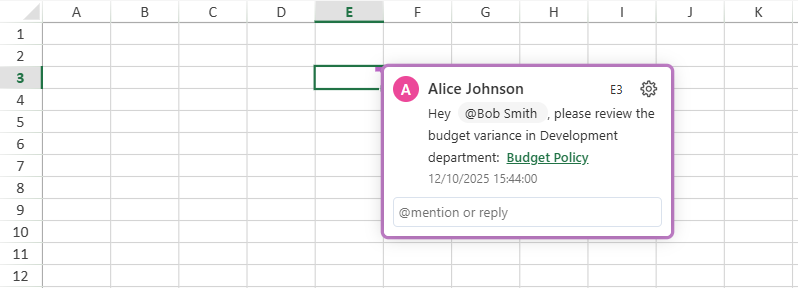
This creates a new threaded comment in cell E3 authored by the current user.
The comment indicator automatically appears on the cell.
```javascript
// Initialize workbook
const spread = new GC.Spread.Sheets.Workbook("ss");
const sheet = spread.getActiveSheet();
// Define user info
var users = [
{ id: "user1", name: "Alice Johnson", email: "alice.johnson@company.com",},
{ id: "user2", name: "Bob Smith", email: "bob.smith@company.com",}
];
GC.Spread.Common.UserManager.configure({
get: async (userId) => {
if (userId === undefined) {
return;
}
return new Promise((resolve) => {
const user = users.find(u => u.id === userId);
resolve(user);
});
},
search: async (query) => {
return new Promise((resolve) => {
resolve(users.filter(u =>
u.name.toLowerCase().includes(query.toLowerCase()) ||
u.email.toLowerCase().includes(query.toLowerCase())
));
});
}
});
// Set current user
GC.Spread.Common.UserManager.current("user1");
// Create a comment
const comment_1 = {
message: [
{ type: GC.Spread.Sheets.ThreadedComments.ContentType.text, value: "Hey " },
{ type: GC.Spread.Sheets.ThreadedComments.ContentType.mention, userId: "user2" },
{ type: GC.Spread.Sheets.ThreadedComments.ContentType.text, value: ", please review the budget variance in Development department: " },
{ type: GC.Spread.Sheets.ThreadedComments.ContentType.link, href: "https://example.com/budget-policy", text: "Budget Policy" }
],
authorId: "user1",
createdAt: new Date("2025-12-10T15:44:00")
};
// Add a threaded comment to cell B4
const threadedCommentManager = sheet.threadedComments;
const threadedComment = threadedCommentManager.add(2, 4);
threadedComment.add(comment_1);
```
**Example — Update, Reply, Change Status, or Delete a Threaded Comment**
This example builds on the previous sample.
```javascript
// Get a specific thread
const thread = threadedCommentManager.get(2, 4);
console.log(thread.row()); // Output: 2
// Create a reply
const reply_1 = {
message: [
{type: GC.Spread.Sheets.ThreadedComments.ContentType.text,
value: "Confirmed. "
}],
authorId: "user2",
createdAt: new Date("2025-12-12T11:47:00")
};
// Add a reply
thread.add(reply_1);
// Edit an existing reply
thread.set(0,{ message: [{ type: GC.Spread.Sheets.ThreadedComments.ContentType.text, value: 'Please verify this value.' }] });
// Delete a reply
thread.remove(1);
// Resolve / reopen
thread.resolved(true)
```
**Example — Handling Threaded Comment Events**
Subscribe to events to trigger custom logic.
```javascript
sheet.bind(GC.Spread.Sheets.Events.ThreadedCommentChanging, function (e, info) {
// Handle threaded comment property or reply changes
});
// UserMentioning fires when the user types @, before the popup appears.
// Set args.cancel = true to block the popup and treat @ as plain text.
sheet.bind(GC.Spread.Sheets.Events.UserMentioning, function (e, args) {
args.cancel = true; // suppress the mention user-list popup
});
// UserMentioned fires after a reply containing mentions is submitted.
sheet.bind(GC.Spread.Sheets.Events.UserMentioned, function (e, info) {
console.log(info.userId); // array of mentioned user IDs
});
```