# QuickStart
## Content
The steps below describe how to create a simple ASP.NET Core web application that uses DsImageViewer to view image files.
1. Open Microsoft Visual Studio and select **Create a new project \| ASP\.NET Core Web App** and name it. In this example, we have named it as “**DsImageViewerApp**”.
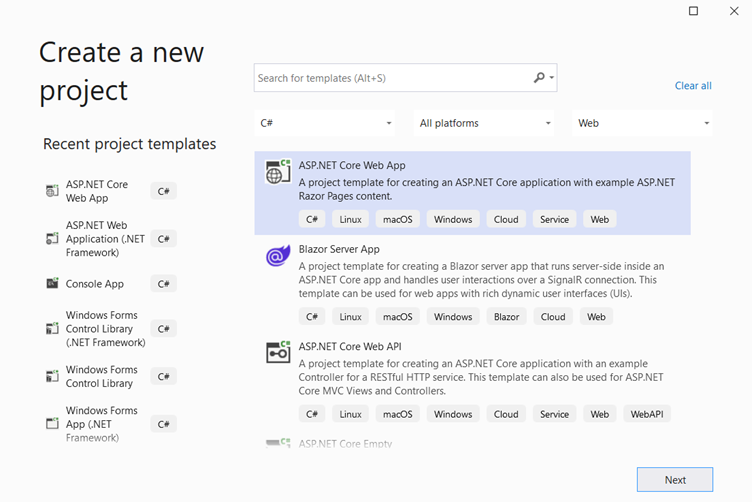
2. Open the project in File Explorer and locate the **wwwroot > lib** directory.
3. Open command prompt and run the following command to install **DsImageViewer**. Make sure that directory location in command prompt is set to lib folder.
```command
npm install @mescius/dsimageviewer
```
4. Observe that **DsImageViewer** gets installed at following location:
`DsImageViewerApp\wwwroot\lib\node_modules\@mescius\dsimageviewer`
5. In Solution Explorer, right click **wwwroot** folder of the project and select **Add > New** Item to add a new HTML file named '**index.html**'.
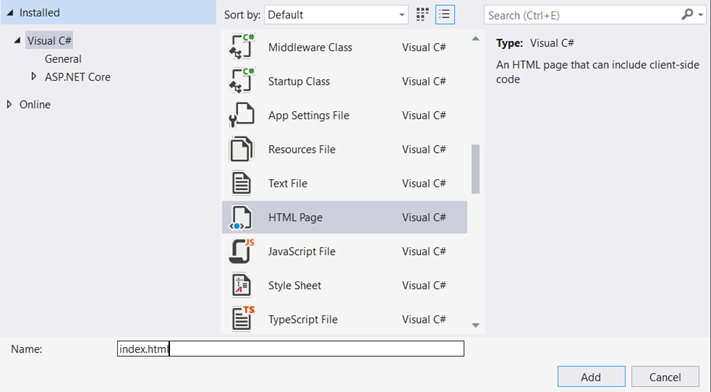
6. To initialize **DsImageViewer** and to open an image in the viewer, add the following code to index.html and place the image file to be loaded in the **wwwroot** folder. In this example, we are using image named sample.jpg.
```html
DsImageViewer Demo
```
7. To start the application with **index.html** by default, in **Program.cs** file, replace the default methods with following code.
```csharp
var builder = WebApplication.CreateBuilder(args);
// Add services to the container.
builder.Services.AddRazorPages();
var app = builder.Build();
// Configure the HTTP request pipeline.
if (!app.Environment.IsDevelopment())
{
app.UseExceptionHandler("/Error");
}
app.UseHttpsRedirection();
app.UseDefaultFiles();
app.UseStaticFiles();
app.UseRouting();
app.UseAuthorization();
app.MapRazorPages();
app.Run();
```
8. Build and run the application. A page displaying image in **DsImageViewer** opens in your default browser.