# Alternative Text

## Content

<span style="color: rgb(41, 42, 46); font-family: Atlassian Sans, ui-sans-serif, -apple-system, BlinkMacSystemFont, Segoe UI, Ubuntu, Helvetica Neue, sans-serif; font-size: 16px; font-style: normal; font-variant-ligatures: normal; font-variant-caps: normal; font-weight: 400; letter-spacing: normal; orphans: 2; text-align: start; text-indent: 0px; text-transform: none; widows: 2; word-spacing: 0px; -webkit-text-stroke-width: 0px; white-space: pre-wrap; background-color: rgb(255, 255, 255); text-decoration-thickness: initial; text-decoration-style: initial; text-decoration-color: initial; display: inline !important; float: none;">To assist visually impaired individuals in understanding the content of shapes, users can add alternative text (alt text) to shapes. When content is accessed using a screen reader, this associated alternative text is identified and read aloud, enabling users to better understand the shape’s purpose or meaning.</span>
<span style="color: rgb(41, 42, 46); font-family: Atlassian Sans, ui-sans-serif, -apple-system, BlinkMacSystemFont, Segoe UI, Ubuntu, Helvetica Neue, sans-serif; font-size: 16px; font-style: normal; font-variant-ligatures: normal; font-variant-caps: normal; font-weight: 400; letter-spacing: normal; orphans: 2; text-align: start; text-indent: 0px; text-transform: none; widows: 2; word-spacing: 0px; -webkit-text-stroke-width: 0px; white-space: pre-wrap; background-color: rgb(255, 255, 255); text-decoration-thickness: initial; text-decoration-style: initial; text-decoration-color: initial; display: inline !important; float: none;">DsExcel </span>Java<span style="color: rgb(41, 42, 46); font-family: Atlassian Sans, ui-sans-serif, -apple-system, BlinkMacSystemFont, Segoe UI, Ubuntu, Helvetica Neue, sans-serif; font-size: 16px; font-style: normal; font-variant-ligatures: normal; font-variant-caps: normal; font-weight: 400; letter-spacing: normal; orphans: 2; text-align: start; text-indent: 0px; text-transform: none; widows: 2; word-spacing: 0px; -webkit-text-stroke-width: 0px; white-space: pre-wrap; background-color: rgb(255, 255, 255); text-decoration-thickness: initial; text-decoration-style: initial; text-decoration-color: initial; display: inline !important; float: none;"> provides the </span>[setTitle](/document-solutions/java-excel-api/api/online/com/grapecity/documents/excel/drawing/IShape.html#settitle)<span style="color: rgb(41, 42, 46); font-family: Atlassian Sans, ui-sans-serif, -apple-system, BlinkMacSystemFont, Segoe UI, Ubuntu, Helvetica Neue, sans-serif; font-size: 16px; font-style: normal; font-variant-ligatures: normal; font-variant-caps: normal; font-weight: 400; letter-spacing: normal; orphans: 2; text-align: start; text-indent: 0px; text-transform: none; widows: 2; word-spacing: 0px; -webkit-text-stroke-width: 0px; white-space: pre-wrap; background-color: rgb(255, 255, 255); text-decoration-thickness: initial; text-decoration-style: initial; text-decoration-color: initial; display: inline !important; float: none;">,</span>[ setAlternativeText](/document-solutions/java-excel-api/api/online/com/grapecity/documents/excel/drawing/IShape.html#setalternativetext)<span style="color: rgb(41, 42, 46); font-family: Atlassian Sans, ui-sans-serif, -apple-system, BlinkMacSystemFont, Segoe UI, Ubuntu, Helvetica Neue, sans-serif; font-size: 16px; font-style: normal; font-variant-ligatures: normal; font-variant-caps: normal; font-weight: 400; letter-spacing: normal; orphans: 2; text-align: start; text-indent: 0px; text-transform: none; widows: 2; word-spacing: 0px; -webkit-text-stroke-width: 0px; white-space: pre-wrap; background-color: rgb(255, 255, 255); text-decoration-thickness: initial; text-decoration-style: initial; text-decoration-color: initial; display: inline !important; float: none;">, </span>**<span style="color: rgb(41, 42, 46); font-family: Atlassian Sans, ui-sans-serif, -apple-system, BlinkMacSystemFont, Segoe UI, Ubuntu, Helvetica Neue, sans-serif; font-size: 16px; font-style: normal; font-variant-ligatures: normal; font-variant-caps: normal; font-weight: 400; letter-spacing: normal; orphans: 2; text-align: start; text-indent: 0px; text-transform: none; widows: 2; word-spacing: 0px; -webkit-text-stroke-width: 0px; white-space: pre-wrap; background-color: rgb(255, 255, 255); text-decoration-thickness: initial; text-decoration-style: initial; text-decoration-color: initial; display: inline !important; float: none;">and</span>**<span style="color: rgb(41, 42, 46); font-family: Atlassian Sans, ui-sans-serif, -apple-system, BlinkMacSystemFont, Segoe UI, Ubuntu, Helvetica Neue, sans-serif; font-size: 16px; font-style: normal; font-variant-ligatures: normal; font-variant-caps: normal; font-weight: 400; letter-spacing: normal; orphans: 2; text-align: start; text-indent: 0px; text-transform: none; widows: 2; word-spacing: 0px; -webkit-text-stroke-width: 0px; white-space: pre-wrap; background-color: rgb(255, 255, 255); text-decoration-thickness: initial; text-decoration-style: initial; text-decoration-color: initial; display: inline !important; float: none;"> </span>[setDecorative](/document-solutions/java-excel-api/api/online/com/grapecity/documents/excel/drawing/IShape.html#setdecorative)<span style="color: rgb(41, 42, 46); font-family: Atlassian Sans, ui-sans-serif, -apple-system, BlinkMacSystemFont, Segoe UI, Ubuntu, Helvetica Neue, sans-serif; font-size: 16px; font-style: normal; font-variant-ligatures: normal; font-variant-caps: normal; font-weight: 400; letter-spacing: normal; orphans: 2; text-align: start; text-indent: 0px; text-transform: none; widows: 2; word-spacing: 0px; -webkit-text-stroke-width: 0px; white-space: pre-wrap; background-color: rgb(255, 255, 255); text-decoration-thickness: initial; text-decoration-style: initial; text-decoration-color: initial; display: inline !important; float: none;"> methods of the </span>[IShape](/document-solutions/java-excel-api/api/online/com/grapecity/documents/excel/drawing/IShape.html)<span style="color: rgb(41, 42, 46); font-family: Atlassian Sans, ui-sans-serif, -apple-system, BlinkMacSystemFont, Segoe UI, Ubuntu, Helvetica Neue, sans-serif; font-size: 16px; font-style: normal; font-variant-ligatures: normal; font-variant-caps: normal; font-weight: 400; letter-spacing: normal; orphans: 2; text-align: start; text-indent: 0px; text-transform: none; widows: 2; word-spacing: 0px; -webkit-text-stroke-width: 0px; white-space: pre-wrap; background-color: rgb(255, 255, 255); text-decoration-thickness: initial; text-decoration-style: initial; text-decoration-color: initial; display: inline !important; float: none;"> interface, which are used to set the title and content of a shape’s alternative text, or to indicate whether the shape is decorative.</span>

| **Method** | **Description** |
| ------ | ----------- |
| [setTitle](/document-solutions/java-excel-api/api/online/com/grapecity/documents/excel/drawing/IShape.html#settitle) | <span style="color: rgb(41, 42, 46); font-family: Atlassian Sans, ui-sans-serif, -apple-system, BlinkMacSystemFont, Segoe UI, Ubuntu, Helvetica Neue, sans-serif; font-size: 16px; font-style: normal; font-variant-ligatures: normal; font-variant-caps: normal; font-weight: 400; letter-spacing: normal; orphans: 2; text-align: left; text-indent: 0px; text-transform: none; widows: 2; word-spacing: 0px; -webkit-text-stroke-width: 0px; white-space: pre-wrap; background-color: rgb(255, 255, 255); text-decoration-thickness: initial; text-decoration-style: initial; text-decoration-color: initial; display: inline !important; float: none;">Sets the title for the alternative text of a shape.</span> |
| [setAlternativeText](/document-solutions/java-excel-api/api/online/com/grapecity/documents/excel/drawing/IShape.html#setalternativetext) | <span style="color: rgb(41, 42, 46); font-family: Atlassian Sans, ui-sans-serif, -apple-system, BlinkMacSystemFont, Segoe UI, Ubuntu, Helvetica Neue, sans-serif; font-size: 16px; font-style: normal; font-variant-ligatures: normal; font-variant-caps: normal; font-weight: 400; letter-spacing: normal; orphans: 2; text-align: left; text-indent: 0px; text-transform: none; widows: 2; word-spacing: 0px; -webkit-text-stroke-width: 0px; white-space: pre-wrap; background-color: rgb(255, 255, 255); text-decoration-thickness: initial; text-decoration-style: initial; text-decoration-color: initial; display: inline !important; float: none;">Sets the main content for the shape's alternative text.</span> |
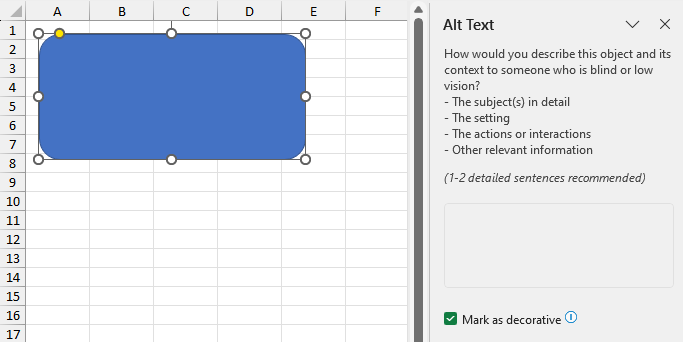
| [setDecorative](/document-solutions/java-excel-api/api/online/com/grapecity/documents/excel/drawing/IShape.html#setdecorative) | Indicates whether the shape is decorative. When set to **true**, the shape is marked as decorative and will generally be ignored by screen readers.<ul><li>Setting the [setAlternativeText](/document-solutions/java-excel-api/api/online/com/grapecity/documents/excel/drawing/IShape.html#setalternativetext) method to a non-empty string automatically sets **Decorative** to **false**.</li><li>Setting the [setDecorative](/document-solutions/java-excel-api/api/online/com/grapecity/documents/excel/drawing/IShape.html#setdecorative) method to **true** clears the alternative text.</li></ul>Default value: **false**. |

>type=info
> * Shapes, as well as pictures, charts, slicers, group shapes, linked pictures, and controls support alternative text.
> * SpreadJS does not support the [setDecorative](/document-solutions/java-excel-api/api/online/com/grapecity/documents/excel/drawing/IShape.html#setdecorative) method. If a file has the [setDecorative](/document-solutions/java-excel-api/api/online/com/grapecity/documents/excel/drawing/IShape.html#setdecorative) method set and is exported to SJS or SSJSON format, the **Decorative** setting will not be retained.

## Add Alternative Text

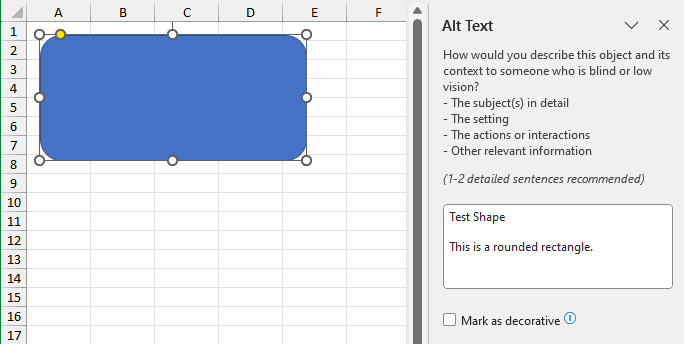
<span style="color: rgb(41, 42, 46); font-family: Atlassian Sans, ui-sans-serif, -apple-system, BlinkMacSystemFont, Segoe UI, Ubuntu, Helvetica Neue, sans-serif; font-size: 16px; font-style: normal; font-variant-ligatures: normal; font-variant-caps: normal; font-weight: 400; letter-spacing: normal; orphans: 2; text-align: start; text-indent: 0px; text-transform: none; widows: 2; word-spacing: 0px; -webkit-text-stroke-width: 0px; white-space: pre-wrap; background-color: rgb(255, 255, 255); text-decoration-thickness: initial; text-decoration-style: initial; text-decoration-color: initial; display: inline !important; float: none;">Refer to the following sample code to add alternative text to a shape.</span>

```java
// Create a new workbook.
Workbook workbook = new Workbook();
IWorksheet worksheet = workbook.getActiveSheet();

// Add a rounded rectangle shape.
IShape shape = worksheet.getShapes().addShape(AutoShapeType.RoundedRectangle, 10, 10, 200, 100);

// Set alternative text.
shape.setTitle("Test Shape");
shape.setAlternativeText("This is a rounded rectangle.");

// Save to an excel file.
workbook.save("SetShapeAltText.xlsx");
```

<span style="color: rgb(41, 42, 46); font-family: Atlassian Sans, ui-sans-serif, -apple-system, BlinkMacSystemFont, Segoe UI, Ubuntu, Helvetica Neue, sans-serif; font-size: 16px; font-style: normal; font-variant-ligatures: normal; font-variant-caps: normal; font-weight: 400; letter-spacing: normal; orphans: 2; text-align: start; text-indent: 0px; text-transform: none; widows: 2; word-spacing: 0px; -webkit-text-stroke-width: 0px; white-space: pre-wrap; background-color: rgb(255, 255, 255); text-decoration-thickness: initial; text-decoration-style: initial; text-decoration-color: initial; display: inline !important; float: none;">The output is shown in the figure below:</span>
![image-20250430-020659](https://cdn.mescius.io/document-site-files/images/170bb0ea-fe04-4acd-847e-99010e83d677/image-20250430-020659.3fe25e.png)

## Mark as Decorative

<span style="color: rgb(41, 42, 46); font-family: Atlassian Sans, ui-sans-serif, -apple-system, BlinkMacSystemFont, Segoe UI, Ubuntu, Helvetica Neue, sans-serif; font-size: 16px; font-style: normal; font-variant-ligatures: normal; font-variant-caps: normal; font-weight: 400; letter-spacing: normal; orphans: 2; text-align: start; text-indent: 0px; text-transform: none; widows: 2; word-spacing: 0px; -webkit-text-stroke-width: 0px; white-space: pre-wrap; background-color: rgb(255, 255, 255); text-decoration-thickness: initial; text-decoration-style: initial; text-decoration-color: initial; display: inline !important; float: none;">Refer to the following sample code to mark the shape as decorative.</span>

```java
// Create a new workbook.
Workbook workbook = new Workbook();
IWorksheet worksheet = workbook.getActiveSheet();

// Add a rounded rectangle shape.
IShape shape = worksheet.getShapes().addShape(AutoShapeType.RoundedRectangle, 10, 10, 200, 100);

// Set alternative text.
shape.setTitle("Test Shape");
shape.setAlternativeText("This is a rounded rectangle.");

// When a shape is marked as decorative, the alternative text will be cleared.
shape.setDecorative(true); 

// Save to an excel file.
workbook.save("SetShapeAltText.xlsx");
```

<span style="color: rgb(41, 42, 46); font-family: Atlassian Sans, ui-sans-serif, -apple-system, BlinkMacSystemFont, Segoe UI, Ubuntu, Helvetica Neue, sans-serif; font-size: 16px; font-style: normal; font-variant-ligatures: normal; font-variant-caps: normal; font-weight: 400; letter-spacing: normal; orphans: 2; text-align: start; text-indent: 0px; text-transform: none; widows: 2; word-spacing: 0px; -webkit-text-stroke-width: 0px; white-space: pre-wrap; background-color: rgb(255, 255, 255); text-decoration-thickness: initial; text-decoration-style: initial; text-decoration-color: initial; display: inline !important; float: none;">The output is shown in the figure below:</span>
![image-20250430-013735](https://cdn.mescius.io/document-site-files/images/170bb0ea-fe04-4acd-847e-99010e83d677/image-20250430-013735.498bfa.png)

<br>