# Auto Merge Cells
DsExcel Java is a MESCIUS Documents product that offers a comprehensive library to create, manipulate, convert, and share Microsoft Excel-compatible spreadsheets.
## Content
DsExcel allows you to add auto-merge information for a range that needs the merging of neighboring cells containing identical text using [autoMerge](/document-solutions/java-excel-api/api/online/com/grapecity/documents/excel/IWorksheet.html#autoMerge) method of [IWorksheet](/document-solutions/java-excel-api/api/online/com/grapecity/documents/excel/IWorksheet.html) interface. autoMerge method initiates an automatic merging operation that only takes effect at the moment of exporting the workbook to PDF, HTML, Image, .xlsx, .sjs, or Json with **setIncludeAutoMergedCells** method of [XlsxSaveOptions](/document-solutions/java-excel-api/api/online/com/grapecity/documents/excel/XlsxSaveOptions.html), [SjsSaveOptions](/document-solutions/java-excel-api/api/online/com/grapecity/documents/excel/SjsSaveOptions.html), [SerializationOptions](/document-solutions/java-excel-api/api/online/com/grapecity/documents/excel/SerializationOptions.html), [PdfSaveOptions](/document-solutions/java-excel-api/api/online/com/grapecity/documents/excel/PdfSaveOptions.html), [ImageSaveOptions](/document-solutions/java-excel-api/api/online/com/grapecity/documents/excel/ImageSaveOptions.html), and [HtmlSaveOptions](/document-solutions/java-excel-api/api/online/com/grapecity/documents/excel/drawing/HtmlSaveOptions.html) classes set to true.
autoMerge method has the following parameters that help in adding and customizing the auto-merge operation:
| **Parameter Name** | **Description** |
| -------------- | ----------- |
| range | The range for the auto-merge. |
| direction | The direction for the auto-merge. The default value is Column.
[AutoMergeDirection](/document-solutions/java-excel-api/api/online/com/grapecity/documents/excel/AutoMergeDirection.html) provides the following auto-merge directions:- **Row**: Applies the auto-merge in row direction.
- **Column**: Applies the auto-merge in column direction.
- **ColumnRow**: Applies the auto-merge in column direction, preferentially, then in row direction.
- **RowColumn**: Applies the auto-merge in row direction, preferentially, then in column direction.
- **None**: Cancels the auto-merge.
|
| mode | The mode for the auto-merge. The default value is Free.
[AutoMergeMode](/document-solutions/java-excel-api/api/online/com/grapecity/documents/excel/AutoMergeMode.html) provides the following auto-merge modes:- **Free**: Applies the auto-merge when neighboring cells have the same value.
- **Restricted**: Applies the auto-merge when neighboring cells have the same value and the corresponding cells in the previous row or column are merged automatically.
|
| selectionMode | The selection mode for the auto-merge. The default value is Source.
[AutoMergeSelectionMode](/document-solutions/java-excel-api/api/online/com/grapecity/documents/excel/AutoMergeSelectionMode.html) provides the following auto-merge selection modes:- **Source**: Selects individual cell when the auto-merge is applied. This will take effect only when setIncludeAutoMergedCells is false.
- **Merged**: Selects all cells that have the same value when the auto-merge is applied.
**Note**: selectionMode parameter is only applicable to SpreadJS. |
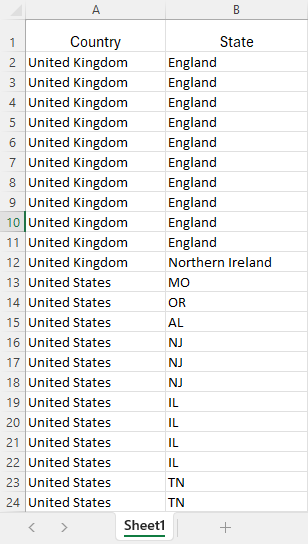
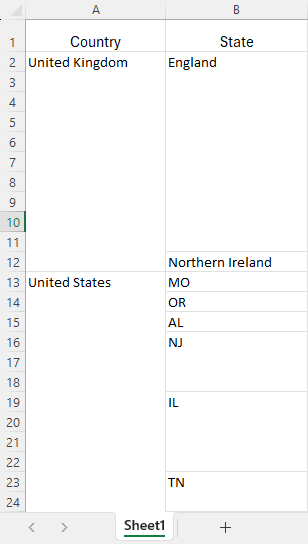
Refer to the following example code to add auto-merge information for a range and export the workbook as .xlsx, .sjs, .pdf, and .png files:
```Java
// Create a new workbook.
var workbook = new Workbook();
// Open existing workbook.
workbook.open("Regional_Product_List.xlsx");
// Get active worksheet.
var worksheet = workbook.getActiveSheet();
// Add auto-merge range with restricted mode and merged selection mode.
worksheet.autoMerge(worksheet.getUsedRange(), AutoMergeDirection.Column, AutoMergeMode.Restricted, AutoMergeSelectionMode.Merged);
// Set IncludeAutoMergedCells to true to include the automatically merged cells.
// Set XlsxSaveOptions to export workbook as XLSX file.
XlsxSaveOptions xlsxOptions = new XlsxSaveOptions();
xlsxOptions.setIncludeAutoMergedCells(true);
// Set SjsSaveOptions to export workbook as .sjs file.
SjsSaveOptions sjsOptions = new SjsSaveOptions();
sjsOptions.setIncludeAutoMergedCells(true);
// Set PdfSaveOptions to export workbook as PDF file.
PdfSaveOptions pdfOptions = new PdfSaveOptions();
pdfOptions.setIncludeAutoMergedCells(true);
// Set ImageSaveOptions to export workbook as PNG file.
ImageSaveOptions pngOptions = new ImageSaveOptions();
pngOptions.setIncludeAutoMergedCells(true);
// Save workbook as XLSX file.
workbook.save("AutoMerge.xlsx", xlsxOptions);
// Save workbook as .sjs file.
workbook.save("AutoMerge.sjs", sjsOptions);
// Save workbook as PDF file.
workbook.save("AutoMerge.pdf", pdfOptions);
// Save workbook as PNG file.
worksheet.toImage("AutoMerge.png", pngOptions);
```
| **Without Auto Merge** | **With Auto Merge** |
| ------------------ | --------------- |
|  |  |
> !type=note
> **Note**:
>
> * The auto-merge operation will throw an exception if the ranges intersect with each other. For example, "A1:C3, B2:D4".
> * The auto-merge operation will throw an exception if the range intersects an existing auto-merge range.
> * The auto-merge information is added for each area if the range has multiple areas. For example, "A1:B2, D3:E4".
> * Inserting or deleting rows or columns will affect the auto-merge range. Any other API operations will not affect the auto-merge range.
> * The auto-merge operation will not change the workbook, so [getMergeCells](/document-solutions/java-excel-api/api/online/com/grapecity/documents/excel/IRange.html#getMergeCells) and [getMergeArea](/document-solutions/java-excel-api/api/online/com/grapecity/documents/excel/IRange.html#getMergeArea) methods of [IRange](/document-solutions/java-excel-api/api/online/com/grapecity/documents/excel/IRange.html) interface cannot obtain the results of the auto-merge operation.
> * The auto-merged cells will be stored as normal span ranges in .xlsx, .sjs, and .json files if setIncludeAutoMergedCells is true.