# AI Assistant
## Content
The integration of AI into PDF document management is revolutionizing how people and organizations interact with digital content. Traditionally, extracting key information from lengthy PDFs, like contracts, research papers, or reports, was a manual and time-consuming process. AI-powered tools now automate this task by summarizing documents, extracting relevant data, and even building document outline trees.
DsPdf offers AI capabilities via the [GrapeCity.Documents.Pdf.AI](https://developer.mescius.com/document-solutions/dot-net-pdf-api/api/online/DS.Documents.Pdf.AI/GrapeCity.Documents.Pdf.AI.html) namespace, provided in a separate package named Document Solutions for PDF AI Assistant (DsPdfAI). This package uses OpenAI services and includes two classes that implement its AI functionality:
* [OpenAIDocumentAssistant](https://developer.mescius.com/document-solutions/dot-net-pdf-api/api/online/DS.Documents.Pdf.AI/GrapeCity.Documents.Pdf.AI.OpenAIDocumentAssistant.html) \- which uses the OpenAI \.NET package to interact with the OpenAI REST API
* [AzureOpenAIDocumentAssistant](https://developer.mescius.com/document-solutions/dot-net-pdf-api/api/online/DS.Documents.Pdf.AI/GrapeCity.Documents.Pdf.AI.AzureOpenAIDocumentAssistant.html) \- which uses the Azure\.AI\.OpenAI package to connect with Azure OpenAI services
Currently, DsPdf supports the following three AI-powered features:
1. [Generating a document summary and abstract](https://developer.mescius.com/document-solutions/dot-net-pdf-api/docs/online/Features/ai-assistant#generating-a-document-summary-and-abstract)
2. [Building a document outline tree](https://developer.mescius.com/document-solutions/dot-net-pdf-api/docs/online/Features/ai-assistant#building-a-document-outline-tree)
3. [Extracting tables from a document](https://developer.mescius.com/document-solutions/dot-net-pdf-api/docs/online/Features/ai-assistant#extracting-tables-from-a-document)
### Licensing considerations
The DsPdfAI library doesn't require a separate license. However, it works with GcPdfDocument instances provided by your application. To use the full functionality of the DsPdf library without limitations, you must apply a valid license.
If DsPdf isn't licensed:
* The library processes only the first 5 pages of a PDF document.
* A license reminder message (nag message) will appear on each page of the output.
To learn how to apply a license in DsPdf, please see the DsPdf Licensing topic ([License Information | Document Solutions for PDF | Document Solutions](https://developer.mescius.com/document-solutions/dot-net-pdf-api/docs/online/GettingStarted/licenseinfo#licensed))
### Setting up the environment for using DsPdfAI:
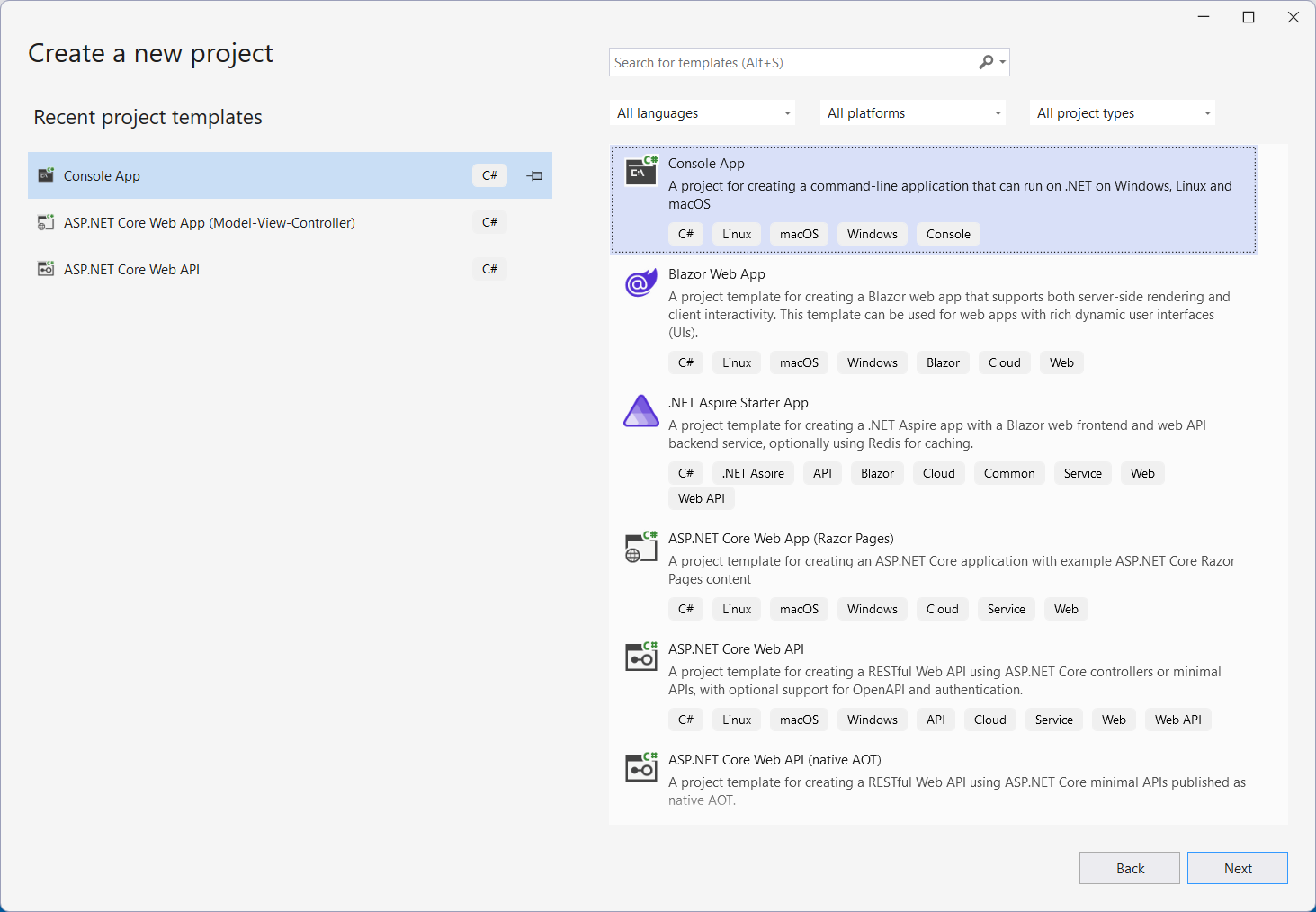
* Open Microsoft Visual Studio and **Create a New Project**
* Install **DS.Documents.Pdf** and **DS.Documents.Pdf.AI** packages

* Include the package name, add the following lines of code and complete it with your **OpenAI** or **AzureOpenAI** tokens and endpoint
```csharp
using GrapeCity.Documents.Pdf.AI;
//Using OpenAI
var openAiToken = @"...";
var a = new OpenAIDocumentAssistant(openAiToken);
```
>type=note
> **Note:** You can use the same with [AzureOpenAIDocumentAssistant](https://developer.mescius.com/document-solutions/dot-net-pdf-api/api/online/DS.Documents.Pdf.AI/GrapeCity.Documents.Pdf.AI.AzureOpenAIDocumentAssistant.html) class as well.
### Generating a document summary and abstract
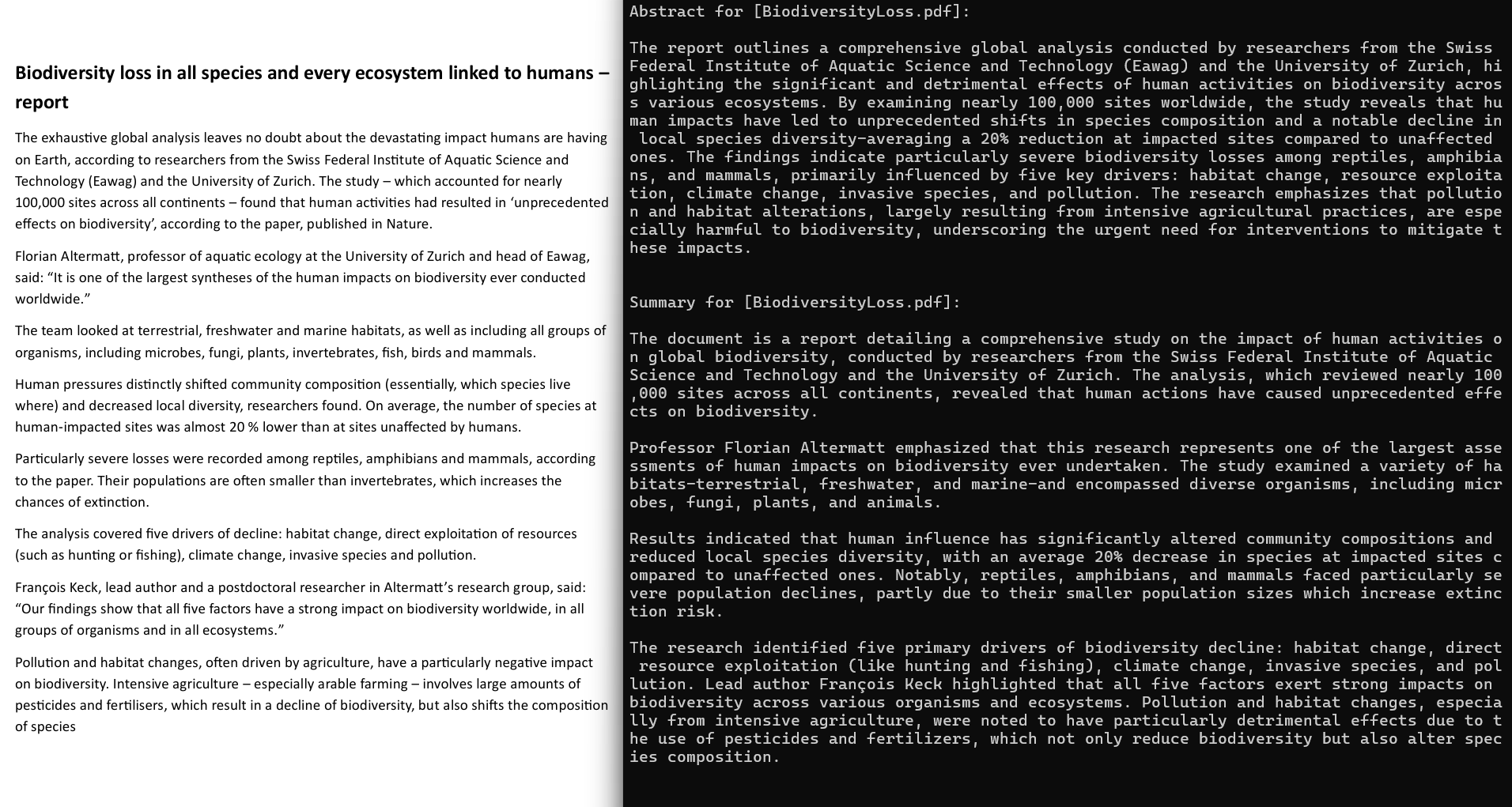
DsPdfAI provides the [GetAbstract](https://developer.mescius.com/document-solutions/dot-net-pdf-api/api/online/DS.Documents.Pdf.AI/GrapeCity.Documents.Pdf.AI.OpenAIDocumentAssistantBase.GetAbstract.html) and [GetSummary](https://developer.mescius.com/document-solutions/dot-net-pdf-api/api/online/DS.Documents.Pdf.AI/GrapeCity.Documents.Pdf.AI.OpenAIDocumentAssistantBase.GetSummary.html) methods for generating a document's summary and abstract. Two string properties [GetAbstractMessage](https://developer.mescius.com/document-solutions/dot-net-pdf-api/api/online/DS.Documents.Pdf.AI/GrapeCity.Documents.Pdf.AI.OpenAIDocumentAssistantBase.GetAbstractMessage.html) and [GetSummaryMessage](https://developer.mescius.com/document-solutions/dot-net-pdf-api/api/online/DS.Documents.Pdf.AI/GrapeCity.Documents.Pdf.AI.OpenAIDocumentAssistantBase.GetSummaryMessage.html) are provided for customizing the requests to the AI engine. Also, you can use the [OutputRange](https://developer.mescius.com/document-solutions/dot-net-pdf-api/api/online/DS.Documents.Imaging/GrapeCity.Documents.Common.OutputRange.html) parameter to specify the range of pages included in the request to the AI. This parameter is null by default, implying that all document pages will be summarized.
Refer to the code snippet below for the usage of GetAbstract and GetSummary methods:
```csharp
var doc = new GcPdfDocument();
using var fs = File.OpenRead("myDocument.pdf");
doc.Load(fs);
// Set the abstract message:
a.GetAbstractMessage = "Please analyze the PDF and return a brief abstract of the document.";
// Get the abstract for a PDF:
string @abstract = await a.GetAbstract(doc/*, pageRange*/);
//pageRange is Null by default
// Set the summary message:
a.GetSummaryMessage = "Please analyze the PDF and return a summary of the document.";
// Set the page range to be summarized, in this case pages 1 to 5
OutputRange o1 = new OutputRange("1-5");
// Get the summary:
string summary = await a.GetSummary(doc, pageRange: o1);
```
**Limitations:**
* AI-generated results may not always be accurate. Since methods like [GetTable](https://developer.mescius.com/document-solutions/dot-net-pdf-api/api/online/DS.Documents.Pdf.AI/GrapeCity.Documents.Pdf.AI.OpenAIDocumentAssistantBase.GetTable.html) and [BuildOutlines](https://developer.mescius.com/document-solutions/dot-net-pdf-api/api/online/DS.Documents.Pdf.AI/GrapeCity.Documents.Pdf.AI.OpenAIDocumentAssistantBase.BuildOutlines.html) in DsPdfAI rely on AI-driven processes, their output can vary in accuracy and reliability.
>type=warning
> **Note:** You can customize the AI Assistant for DsPdf by explicitly specifying options such as endpoint, model, and others. For details, please refer to [this demo](https://developer.mescius.com/document-solutions/dot-net-pdf-api/demos/ai-assistant/ai-client-options/code-cs).
### Building a document outline tree
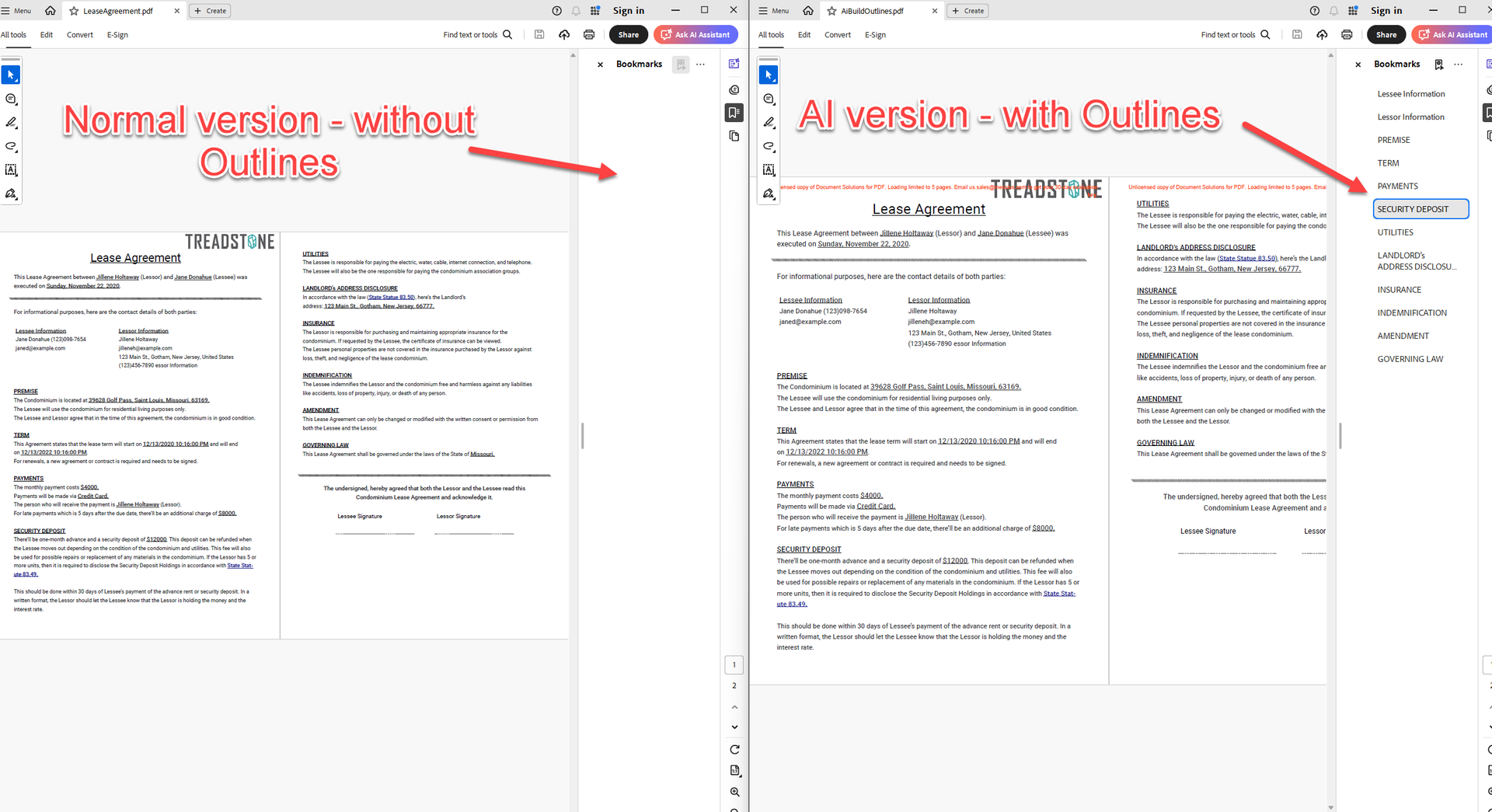
DsPdfAI provides the [BuildOutlines](https://developer.mescius.com/document-solutions/dot-net-pdf-api/api/online/DS.Documents.Pdf.AI/GrapeCity.Documents.Pdf.AI.OpenAIDocumentAssistantBase.BuildOutlines.html) method for building outlines for a pdf document. The AI-generated outline includes **only the outline text**, without any coordinate information. The string property [BuildOutlinesMessage](https://developer.mescius.com/document-solutions/dot-net-pdf-api/api/online/DS.Documents.Pdf.AI/GrapeCity.Documents.Pdf.AI.OpenAIDocumentAssistantBase.BuildOutlinesMessage.html) is provided for customizing the request to the AI engine.
A parameter [OutlineNodeCollection](https://developer.mescius.com/document-solutions/dot-net-pdf-api/api/online/DS.Documents.Pdf/GrapeCity.Documents.Pdf.OutlineNodeCollection.html) is provided for specifying whether the resulting document should have additional outlines other than the ones built by the AI engine. You can use the [OutputRange](https://developer.mescius.com/document-solutions/dot-net-pdf-api/api/online/DS.Documents.Imaging/GrapeCity.Documents.Common.OutputRange.html) parameter to specify the range of pages included in the request to the AI.
Refer to the code snippet below for the usage of BuildOutlines method:
```csharp
//Build outlines:
await a.BuildOutlines(doc);
doc.Save("myDocumentWithOutlines.pdf");
```
**Limitations:**
* This matching process may occasionally fail if the text returned by the AI engine doesn't exactly match the text in the PDF. Variations in formatting, whitespace, or paraphrasing can cause mismatches.
* The AI engine returns the outline tree it built as JSON. In rare cases, the [BuildOutlines](https://developer.mescius.com/document-solutions/dot-net-pdf-api/api/online/DS.Documents.Pdf.AI/GrapeCity.Documents.Pdf.AI.OpenAIDocumentAssistantBase.BuildOutlines.html) method may receive malformed JSON and throw an ‘invalid JSON response’ exception.
### Extracting tables from a document
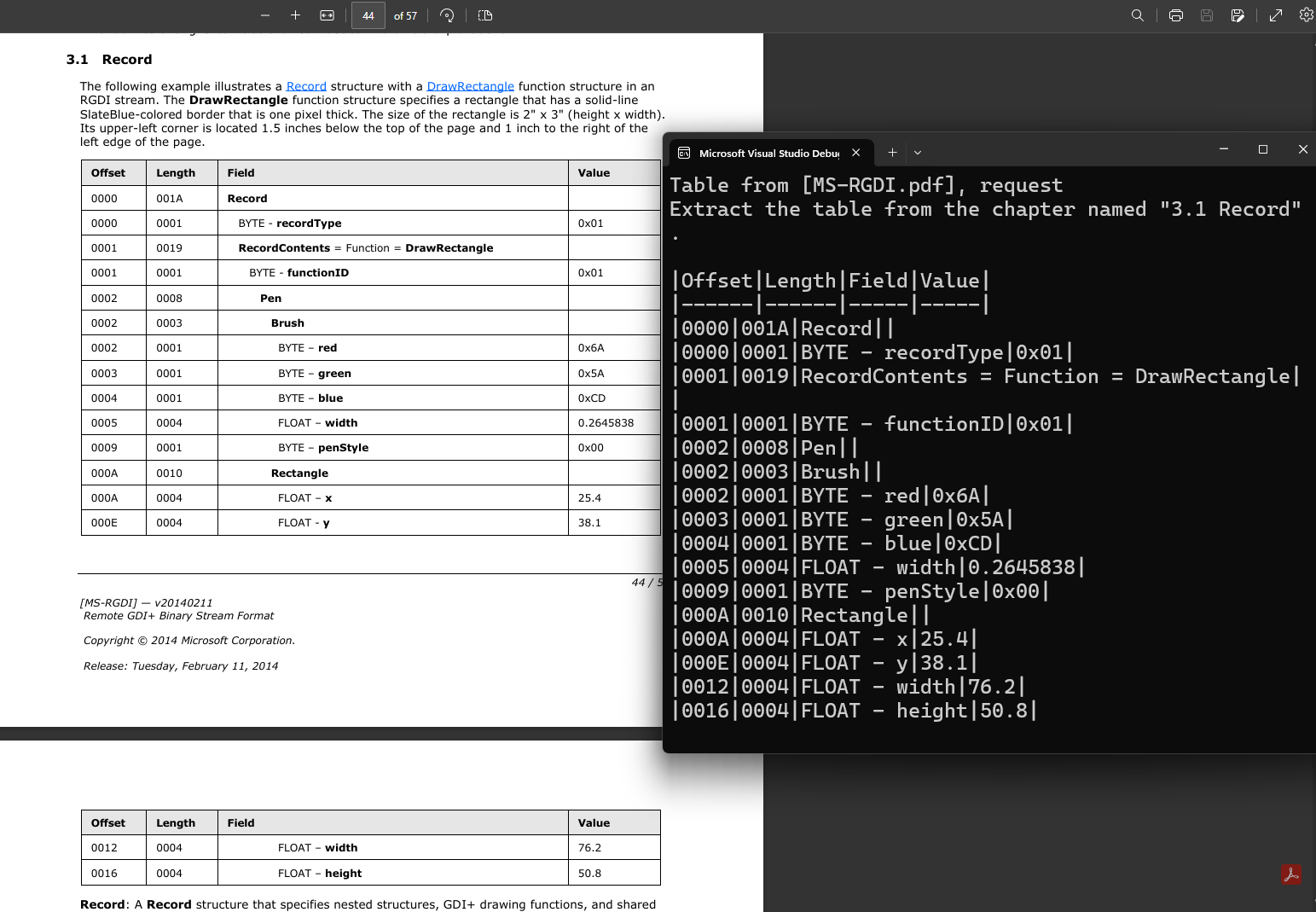
DsPdfAI provides the [GetTable](https://developer.mescius.com/document-solutions/dot-net-pdf-api/api/online/DS.Documents.Pdf.AI/GrapeCity.Documents.Pdf.AI.OpenAIDocumentAssistantBase.GetTable.html) method for extracting a table located in the pdf document. The Table helper class in the GrapeCity.Documents.Pdf.AI namespace defines the Table object that the method returns. This table is constructed based on the AI's response.
You can use a string [tableRequest](https://developer.mescius.com/document-solutions/dot-net-pdf-api/api/online/DS.Documents.Pdf.AI/GrapeCity.Documents.Pdf.AI.OpenAIDocumentAssistantBase.GetTable.html#null) parameter to describe the specific table to fetch, so that the AI engine can find it in the document. Send a natural language prompt through this parameter, such as:
> *"Extract the table from the chapter titled '3.1 Record'."*
The property [GetTableMessageFmt](https://developer.mescius.com/document-solutions/dot-net-pdf-api/api/online/DS.Documents.Pdf.AI/GrapeCity.Documents.Pdf.AI.OpenAIDocumentAssistantBase.GetTableMessageFmt.html) is provided for customizing the general request to the AI engine. You can use the [OutputRange](https://developer.mescius.com/document-solutions/dot-net-pdf-api/api/online/DS.Documents.Imaging/GrapeCity.Documents.Common.OutputRange.html) parameter to specify the range of pages included in the request to the AI.
Refer to the code snippet below for the usage of GetTable method:
```csharp
// Get a GrapeCity.Documents.AI.Table object from the PDF
//GetTableMessageFmt is the general request to the AI, the following is its default value
a.GetTableMessageFmt = "Please analyze the PDF. {0}. Return the table only without additional information.";
// (the second argument is the tableRequest):
var t = await a.GetTable(doc, "Extract the table from the chapter named \"3.1 Record\".");
```
>type=note
> **Note:** It's recommended to structure AI prompts by referencing the chapter where the table is located. The PDF is passed to the AI engine as a single stream of text without any page breaks, so specifying page numbers will never work (except by chance).