# HSTACK
## Content
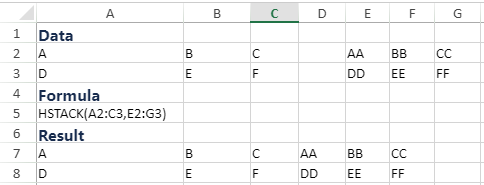
The function appends arrays horizontally and in sequence to return a larger array.
>type=note
> **Note**: HSTACK is a dynamic array formula, and you need to enable the dynamic array feature in the Workbook.
## Syntax
`HSTACK(array1, [array2], ...)`
## Arguments
This function has these arguments:
| Argument | Description |
| -------- | ----------- |
| *array1* | [Required] First array to append |
| *array2, ...* | [Optional] Additional arrays to append |
## Remarks
The function returns the array formed by appending each of the array arguments in a column-wise fashion. The resulting array will as follows:
* **Rows**: The maximum of the row count from each of the array arguments.
* **Columns**: The combined count of all the columns from each of the array arguments.
## Examples