# VAR
## Content
This function returns the variance based on a sample of a population, which uses only numeric values.
## Syntax
`VAR(number1,[number2],...)`
## Arguments
This function has these arguments:
| Argument | Description |
| -------- | ----------- |
| *number1* | [Required] The first number argument corresponding to a sample of a population. |
| *number2, ...* | [Optional] Additional numeric arguments (2 to 255) representing a sample from a population. You can also use a single array or a reference to an array instead of arguments separated by commas. |
## Remarks
The variance returns how spread out a set of data is.
* This function uses the following equation to calculate the variance, where *n* is the number of values.
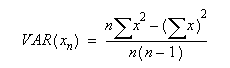
where x is the value and n is the number of values.
This function assumes that its arguments are a sample of the population. If your data represents the entire population, then compute the variance using the [VARP](/document-solutions/dot-net-excel-api/docs/online/formula-reference/compatibility-functions/varp) function.
This function differs from VARP, which accepts text and logical values as well as numeric values.
## Data Types
Accepts numeric data for all arguments. Returns numeric data.
## Examples
`VAR(B3,C4,B2,D10,E5)`
`VAR(A1:A9)`
`VAR(R1C2,100,R2C5,102)`
`VAR(R1C1:R9C1)`
`VAR(R1C1:R1C9)`
`VAR(98,85,76,87,92,89,90)` gives the result 45.8095238095