# Export Form Controls to Form Fields
DsExcel is a Document Solutions product that offers a comprehensive library to create, manipulate, convert, and share Microsoft Excel-compatible spreadsheets.
## Content
Sometimes you need the Excel form containing form controls as an interactive PDF form (or AcroForms). Form controls are objects that can be added to a worksheet to enable interaction with a cell or a data range available in the worksheet. With **FormFields** property of **PdfSaveOptions** class, DsExcel allows you to export the form controls as form fields to the PDF document, which will be interactive for the user.
Refer to the following example code to export Excel form controls as PDF form fields:
```csharp
// Initialize Workbook.
var workbook = new Workbook();
// Create worksheet.
IWorksheet ws = workbook.Worksheets["Sheet1"];
// Add three checkboxes.
var checkBox1 = ws.Controls.AddCheckBox(62.4, 16.8, 69, 19.2);
checkBox1.Value = false;
var checkBox2 = ws.Controls.AddCheckBox(62.4, 36.6, 69, 19.2);
checkBox2.Value = true;
var checkBox3 = ws.Controls.AddCheckBox(62.4, 57, 69, 19.2);
checkBox3.Value = false;
// Add dropdown.
var dropDown = ws.Controls.AddDropDown(28.8, 81.8, 103.8, 31.4);
dropDown.PrintObject = true;
dropDown.Items.Add(new DropDownItem("Item 1"));
dropDown.Items.Add(new DropDownItem("Item 2"));
dropDown.Items.Add(new DropDownItem("Item 3"));
dropDown.SelectedIndex = 0;
// Add listbox.
var lstBox1 = ws.Controls.AddListBox(51.6, 134.2, 135, 99.6);
for (int i = 0; i < 6; i++)
{
lstBox1.Items.Add(new ListBoxItem("Item " + (i + 1)));
}
lstBox1.SelectedIndex = 2;
// Add option button groups.
ws.Controls.AddGroupBox(234.2, 8.4, 222.6, 138.6);
ws.Controls.AddOptionButton(261.2, 29.4, 71.4, 16.8);
ws.Controls.AddOptionButton(267.8, 70.8, 71.4, 16.8);
ws.Controls.AddOptionButton(275.6, 111.6, 71.4, 16.8);
ws.Controls.AddGroupBox(244.4, 187.6, 176.4, 143.4);
ws.Controls.AddOptionButton(274.4, 216.6, 71.4, 16.8);
ws.Controls.AddOptionButton(279.8, 255, 71.4, 16.8);
ws.Controls.AddOptionButton(286.4, 295.2, 71.4, 16.8);
// Set FormFields to true to export Excel form controls as PDF form fields.
var options = new PdfSaveOptions { FormFields = true };
// Save the PDF document.
workbook.Save("PdfFormFieldExample.pdf", options);
```
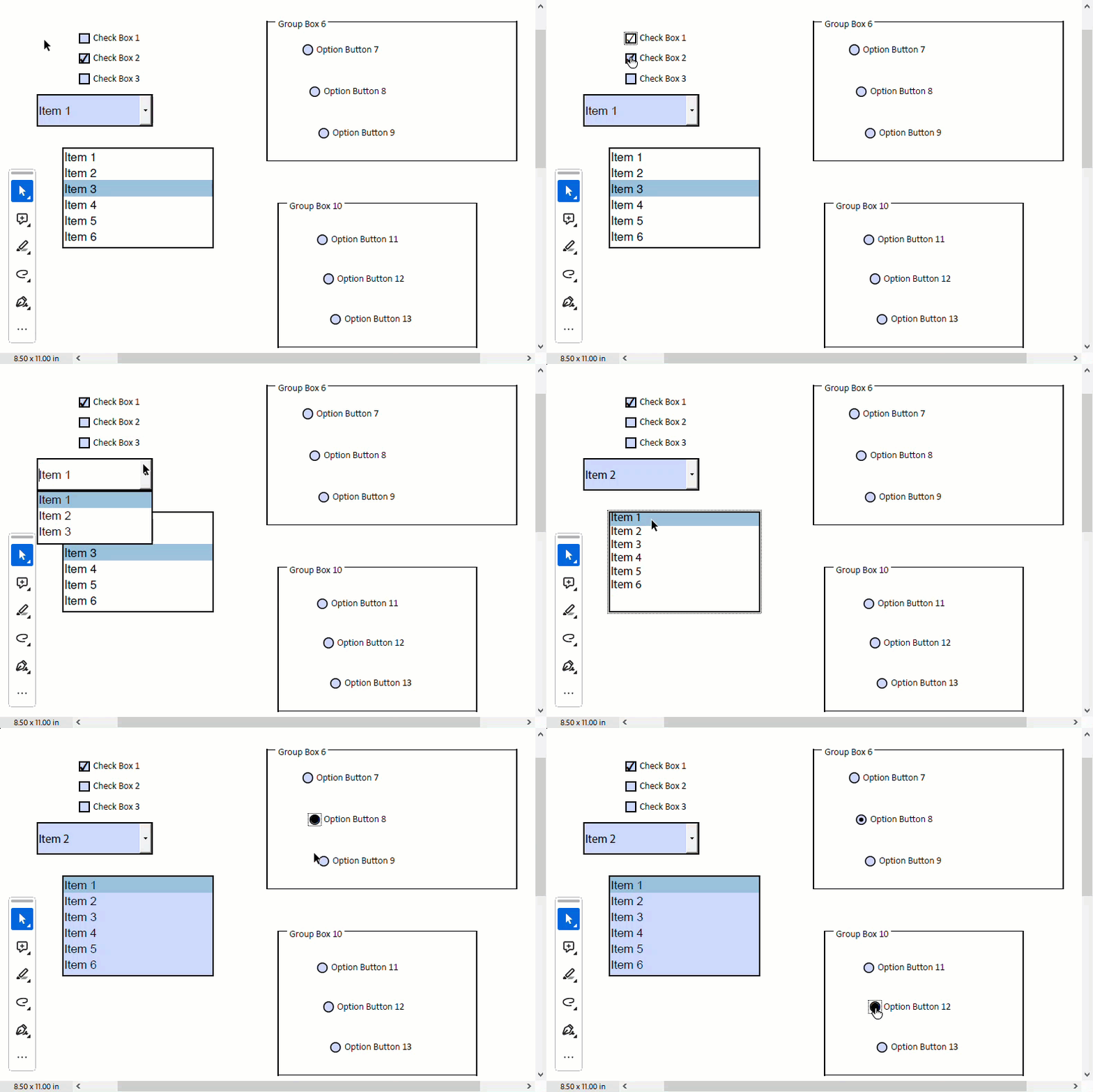
>type=note
> **Note:** The ZIndex of mapped PDF form fields is always higher than other shapes.
If form controls are not present in the exported PDF document, then check and enable [PrintObject](/document-solutions/dot-net-excel-api/api/online/DS.Documents.Excel/GrapeCity.Documents.Excel.Forms.IControl.PrintObject.html) setting of the specific form control. By default, the value of this property is **true** for all form controls except the Button form control.
Refer to the following example code to print a Button form control while saving it as a PDF:
```csharp
// Initialize Workbook.
Workbook workbook = new Workbook();
IWorksheet worksheet = workbook.Worksheets[0];
// Add a button control to worksheet and set its PrintObject property
var btn = worksheet.Controls.AddButton(360 * ColScale, 91.8, 103.94 * WidthScale, 19.79);
btn.Text = "Test settings";
btn.PrintObject = true;
// Save to a pdf file
workbook.Save("FormControlPdf.pdf");
```
## **Mapping of Excel Controls to PDF Form Fields**
When exporting an Excel file to PDF, DsExcel maps the supported Excel form controls to PDF form fields. The properties that DsExcel supports for mapping are listed in the table below.
| @cols=1:**Control Type** | @cols=1:**Interface** | @cols=1:**Mapped Members and Description** |
| ------------ | --------- | ------------------------------ |
| @cols=1:@rows=1:Check Box | @cols=1:@rows=1:[GrapeCity.Documents.Excel.Forms.ICheckBox](/document-solutions/dot-net-excel-api/api/online/DS.Documents.Excel/GrapeCity.Documents.Excel.Forms.ICheckBox.html) | @cols=1:@rows=1:When exporting to PDF, the following members of the check box are mapped:- [GrapeCity.Documents.Excel.Forms.IContentControl.Text](/document-solutions/dot-net-excel-api/api/online/DS.Documents.Excel/GrapeCity.Documents.Excel.Forms.IContentControl.Text.html): The label of the check box.
- [GrapeCity.Documents.Excel.Forms.ICheckBox.IsChecked](/document-solutions/dot-net-excel-api/api/online/DS.Documents.Excel/GrapeCity.Documents.Excel.Forms.ICheckBox.IsChecked.html): The checked state of the check box. Only **true** and **false** are supported. **null** cannot be set in a PDF form; if it is **null**, the PDF form will display **false** after export.
|
| @cols=1:@rows=1:Combo Box | @cols=1:@rows=1:[GrapeCity.Documents.Excel.Forms.IDropDown](/document-solutions/dot-net-excel-api/api/online/DS.Documents.Excel/GrapeCity.Documents.Excel.Forms.IDropDown.html) | @cols=1:@rows=1:When exporting to PDF, the following members of the combo box are mapped:- [GrapeCity.Documents.Excel.Forms.ISelector.SelectedIndex](/document-solutions/dot-net-excel-api/api/online/DS.Documents.Excel/GrapeCity.Documents.Excel.Forms.ISelector.SelectedIndex.html)
- [GrapeCity.Documents.Excel.Forms.ISelector.ItemsSourceRange](/document-solutions/dot-net-excel-api/api/online/DS.Documents.Excel/GrapeCity.Documents.Excel.Forms.ISelector.ItemsSourceRange.html)
- [GrapeCity.Documents.Excel.Forms.ISelector.Items](/document-solutions/dot-net-excel-api/api/online/DS.Documents.Excel/GrapeCity.Documents.Excel.Forms.ISelector-1.Items.html)
- [GrapeCity.Documents.Excel.Forms.ISelector.SelectedItem](/document-solutions/dot-net-excel-api/api/online/DS.Documents.Excel/GrapeCity.Documents.Excel.Forms.ISelector-1.SelectedItem.html)
|
| @cols=1:@rows=1:List Box | @cols=1:@rows=1:[GrapeCity.Documents.Excel.Forms.IListBox](/document-solutions/dot-net-excel-api/api/online/DS.Documents.Excel/GrapeCity.Documents.Excel.Forms.IListBox.html) | @cols=1:@rows=1:When exporting to PDF, the following members of the list box are mapped:- [GrapeCity.Documents.Excel.Forms.ISelector.SelectedIndex](/document-solutions/dot-net-excel-api/api/online/DS.Documents.Excel/GrapeCity.Documents.Excel.Forms.ISelector.SelectedIndex.html)
- [GrapeCity.Documents.Excel.Forms.ISelector.ItemsSourceRange](/document-solutions/dot-net-excel-api/api/online/DS.Documents.Excel/GrapeCity.Documents.Excel.Forms.ISelector.ItemsSourceRange.html)
- [GrapeCity.Documents.Excel.Forms.ISelector.Items](/document-solutions/dot-net-excel-api/api/online/DS.Documents.Excel/GrapeCity.Documents.Excel.Forms.ISelector-1.Items.html)
- [GrapeCity.Documents.Excel.Forms.ISelector.SelectedItem](/document-solutions/dot-net-excel-api/api/online/DS.Documents.Excel/GrapeCity.Documents.Excel.Forms.ISelector-1.SelectedItem.html)
- [GrapeCity.Documents.Excel.Forms.IListBox.SelectedItems](/document-solutions/dot-net-excel-api/api/online/DS.Documents.Excel/GrapeCity.Documents.Excel.Forms.IListBox.SelectedItems.html)
- [GrapeCity.Documents.Excel.Forms.IListBox.SelectionMode](/document-solutions/dot-net-excel-api/api/online/DS.Documents.Excel/GrapeCity.Documents.Excel.Forms.IListBox.SelectionMode.html): Only the **Multiple** and **Single** values of the [SelectionMode](/document-solutions/dot-net-excel-api/api/online/DS.Documents.Excel/GrapeCity.Documents.Excel.Forms.SelectionMode.html) enumeration are supported when exporting to PDF. **Extended** cannot be set in a PDF form; if the property is set to **Extended**, the exported PDF form will use **Multiple** instead.
|
| @cols=1:@rows=1:Option Button | @cols=1:@rows=1:[GrapeCity.Documents.Excel.Forms.IOptionButton](/document-solutions/dot-net-excel-api/api/online/DS.Documents.Excel/GrapeCity.Documents.Excel.Forms.IOptionButton.html) | @cols=1:@rows=1:When exporting to PDF, the following members of the option button are mapped:- [GrapeCity.Documents.Excel.Forms.IContentControl.Text](/document-solutions/dot-net-excel-api/api/online/DS.Documents.Excel/GrapeCity.Documents.Excel.Forms.IContentControl.Text.html): The label of the option button.
- [GrapeCity.Documents.Excel.Forms.IOptionButton.IsChecked](/document-solutions/dot-net-excel-api/api/online/DS.Documents.Excel/GrapeCity.Documents.Excel.Forms.IOptionButton.IsChecked.html): The checked state of the option button.
- [GrapeCity.Documents.Excel.Forms.IOptionButton.GroupBox](/document-solutions/dot-net-excel-api/api/online/DS.Documents.Excel/GrapeCity.Documents.Excel.Forms.IOptionButton.GroupBox.html): The name of the group box to which the option button belongs.
|
**Limitations**
* Since PDF does not support running Excel VBA code, buttons ([IButton](/document-solutions/dot-net-excel-api/api/online/DS.Documents.Excel/GrapeCity.Documents.Excel.Forms.IButton.html)) are displayed as static content when exported as PDF forms and are not interactive.
* Group boxes ([IGroupBox](/document-solutions/dot-net-excel-api/api/online/DS.Documents.Excel/GrapeCity.Documents.Excel.Forms.IGroupBox.html)), labels ([ILabel](/document-solutions/dot-net-excel-api/api/online/DS.Documents.Excel/GrapeCity.Documents.Excel.Forms.ILabel.html)), scroll bars ([IScrollBar](/document-solutions/dot-net-excel-api/api/online/DS.Documents.Excel/GrapeCity.Documents.Excel.Forms.IScrollBar.html)), and spinners ([ISpinner](/document-solutions/dot-net-excel-api/api/online/DS.Documents.Excel/GrapeCity.Documents.Excel.Forms.ISpinner.html)) are not available as PDF form fields. When exported as PDF forms, these controls are displayed as static content and are not interactive.
* Linked cells for controls cannot be set in PDF forms. When exported as PDF forms, the cell link will be invalid.
* The colors and lines of check boxes ([ICheckBox](/document-solutions/dot-net-excel-api/api/online/DS.Documents.Excel/GrapeCity.Documents.Excel.Forms.ICheckBox.html)) and option buttons ([IOptionButton](/document-solutions/dot-net-excel-api/api/online/DS.Documents.Excel/GrapeCity.Documents.Excel.Forms.IOptionButton.html)) cannot be set in PDF forms. When exported as PDF forms, the default appearance will be used.
* When form controls are grouped and exported as PDF forms, controls within the group will not be displayed.
For more information on exporting form controls to PDF document, see [Simulate UI with PDF form fields](https://developer.mescius.com/document-solutions/dot-net-excel-api/demos/formcontrolmappdfformfield).