# Customize Chart Objects
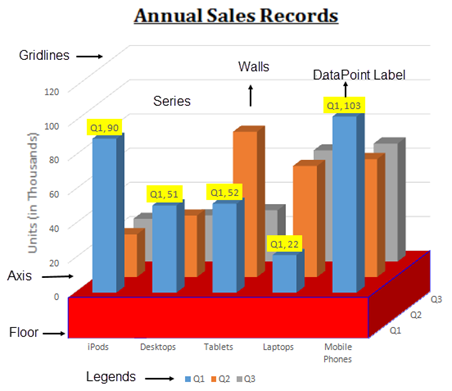
DsExcel allows you to modify the chart objects in a worksheet such as series, walls, legends, floor, data label, etc.
## Content
In DsExcel .NET, the chart feature provides extensive support for creating various types of charts including both 2-D and 3-D views.
Chart objects are fully customizable. Shared below is a list of charting objects that can be modified in charts created using DsExcel .NET:
1. [Series](/document-solutions/dot-net-excel-api/docs/online/Features/UseChart/CustomizeChartObjects/Series)
2. [Walls](/document-solutions/dot-net-excel-api/docs/online/Features/UseChart/CustomizeChartObjects/Walls)
3. [Axis and other Lines](/document-solutions/dot-net-excel-api/docs/online/Features/UseChart/CustomizeChartObjects/AxisAndOtherLines)
4. [Floor](/document-solutions/dot-net-excel-api/docs/online/Features/UseChart/CustomizeChartObjects/Floor)
5. [Data Label](/document-solutions/dot-net-excel-api/docs/online/Features/UseChart/CustomizeChartObjects/data-label)
6. [Legends](/document-solutions/dot-net-excel-api/docs/online/Features/UseChart/CustomizeChartObjects/Legends)
The following diagram displays a sample chart depicting the annual sales records of different electronic gadgets per quarter along with the chart objects that can be customized in a worksheet.