# Creating a New Xamarin.Forms App
## Content
This topic demonstrates how to create a new cross platform app in Visual Studio or Visual Studio for MAC. See the [System Requirements](/componentone/docs/xamarin/online-forms/overview/SystemRequirements) before proceeding.
To know more about Sharing Code Options in Xamarin, visit:
[https://docs.microsoft.com/en-us/xamarin/cross-platform/app-fundamentals/code-sharing](https://docs.microsoft.com/en-us/xamarin/cross-platform/app-fundamentals/code-sharing)
Complete the following steps to create a new Xamarin.Forms Portable or Shared App:
### Visual Studio
1. Select **File | New | Project**.
2. Under **Installed** templates, select **Visual C# | Cross-Platform**.
3. In the center pane, select **Mobile App** (**Xamarin.Forms**).
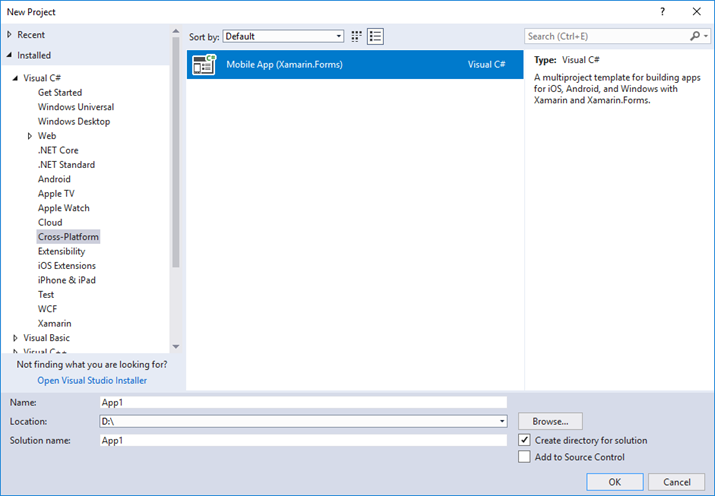
4. Add a name for your app and select a location to save it.
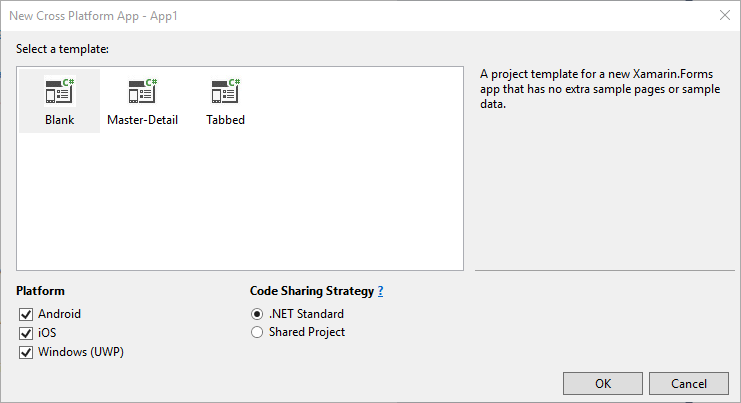
5. Click **OK**. A **New Cross Platform App** dialog appears.
6. Select **Blank** from the available templates and choose either **.NET Standard** or **Shared Project** from the **Code Sharing Strategy** options.
7. Click **OK**.
****
### Visual Studio for Mac
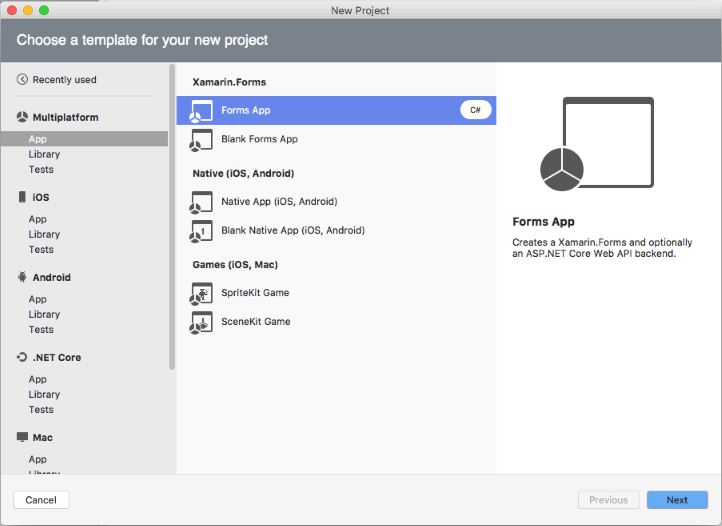
1. Select **New Project.**
2. In the New Project window, select **Multiplatform | App**.
3. In the right pane, select **Forms App** or **Blank Forms App**, and then click **Next**.
4. Enter an **App Name** for your Forms App.
5. Click **Create** to create a new Forms App.
## See Also
[Adding Xamarin Components using C#](/componentone/docs/xamarin/online-forms/overview/AddingComponentstoanApp)
[Adding Xamarin Components using XAML](/componentone/docs/xamarin/online-forms/overview/AddComponentsusingXAML)