# Pull To Refresh
## Content
Pull-to-refresh is a touch screen gesture that consists of touching the screen of a handheld device with a finger, dragging the screen downward with the finger, and then releasing it, to refresh the contents of the screen. This feature is useful when the grid contains items, which may change after the initial load.
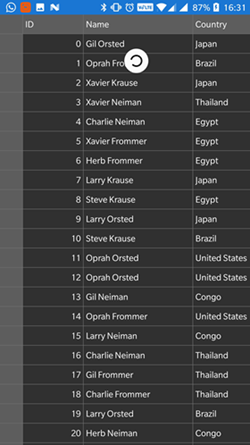
FlexGrid allows you to enable the PullToRefresh feature by setting the **AllowRefreshing** to true and creating a new class that implements the **C1CursorCollectionView** to simulate the dynamic data. In this sample, we have set the **ItemSource** property of the grid to **MyCollectionView()** method that defines **PageSize** and no of items to be displayed in the grid.
The below image shows how you can use pull down gesture to refresh the data on the page.
The following code examples demonstrate how to set this property in C#. This example uses **Customer.cs** data model created in the [Quick Start](/componentone/docs/xamarin/online-forms/controls/chartOverview/chartQuickStart) section.
#### In Code
Add the following code in the **QuickStart.cs** file to display line marker for FlexChart control.
```csharp
class QuickStart
{
public static FlexGrid GetGridControl()
{
//Create an instance of the Control and set its properties
FlexGrid grid = new FlexGrid();
grid.ItemsSource = new MyCollectionView();
grid.AllowRefreshing = true;
return grid;
}
}
```
### MyCollectionView.cs
```csharp
public class MyCollectionView : C1CursorCollectionView
{
ObservableCollection items;
public MyCollectionView()
{
PageSize = 50;
items = Customer.GetCustomerList(300);
}
public int PageSize { get; set; }
protected override async Task>> GetPageAsync(int startingIndex, string pageToken, int? count = null, CancellationToken cancellationToken = default(CancellationToken))
{
return await Task.Run(() =>
{
var moreItems = new ObservableCollection(items.Skip(startingIndex).Take(PageSize));
return new Tuple>("Token not used", moreItems);
});
}
}
```