# Toolbar DropDown
## Content
The [C1ToolbarDropDown](/componentone/api/wpf/online-toolbar/dotnet-framework-api/C1.WPF.Toolbar.4.6.2/C1.WPF.Toolbar.C1ToolbarDropDown.html) control represents a drop-down button on the [C1ToolbarStrip](/componentone/api/wpf/online-toolbar/dotnet-framework-api/C1.WPF.Toolbar.4.6.2/C1.WPF.Toolbar.C1ToolbarStrip.html). When clicking it displays popup panel with **Content** property or context menu set by **Menu** property. A drop-down button provides users with a list of options. When you click on a **C1ToolBarDropDown** button the **Click** event always fires and the drop down list appears.
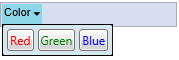
**Example 1: Drop-down with popup stack panel with buttons**
```xml
```
**Example 2: Dropdown with popup menu**
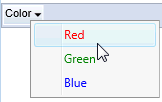
```xml
```
The **C1ToolBarDropDown** includes the following unique properties:
| **Property** | **Definition** |
| --- | --- |
| [ContentBackground](/componentone/api/wpf/online-toolbar/dotnet-framework-api/C1.WPF.Toolbar.4.6.2/C1.WPF.Toolbar.C1ToolbarDropDown.ContentBackground.html) | Gets or sets the content background. |
| [Menu](/componentone/api/wpf/online-toolbar/dotnet-framework-api/C1.WPF.Toolbar.4.6.2/C1.WPF.Toolbar.C1ToolbarDropDown.Menu.html) | Gets or sets the context menu which is displayed when the control is clicked. |
| [MouseOverBrush](/componentone/api/wpf/online-toolbar/dotnet-framework-api/C1.WPF.Toolbar.4.6.2/C1.WPF.Toolbar.C1ToolbarDropDown.MouseOverBrush.html) | Gets or sets the Brush used to highlight the control when it has the mouse over. |
| [PressedBrush](/componentone/api/wpf/online-toolbar/dotnet-framework-api/C1.WPF.Toolbar.4.6.2/C1.WPF.Toolbar.C1ToolbarDropDown.PressedBrush.html) | Gets or sets the Brush used to paint a button when it is pressed. |