# Understanding C1TextPointer
## Content
The **C1TextPointer** class represents a position inside a **C1Document**. It is intended to facilitate traversal and manipulation of C1Documents. The functionality is analogous to WPF's **TextPointer** class, although the object model has many differences.
A **C1TextPointer** is defined by a **C1TextElement** and an offset inside of it. Let's take this document as an example:
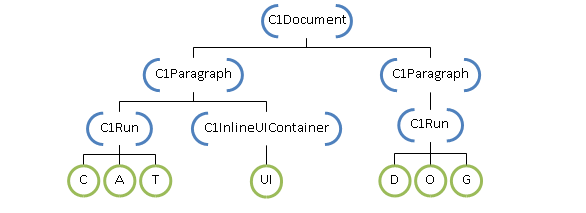
The blue bracketed nodes above are C1TextElements; the offset of a **C1TextPointer** indicates between which children the position is located. For instance, a position that points to the **C1Document** above with offset 0 is just before the first **C1Paragraph**, offset 1 is between the two paragraphs, and offset 2 is after the second paragraph. When a **C1TextPointer** points to a **C1Run**, each character in its text is considered a child of **C1Run**, so the offset indicates a position inside the text. A **C1InlineUIContainer** is considered to have a single child (the **UIElement** it displays) so it has two positions, one before and one after the child.
### .NET Framework
An alternative way to visualize a document is as a sequence of symbols, where a symbol can be either an element tag or some type of content. An element tag indicates the start or end of an element. In XML, the above document would be written as:
```XML
CAT
DOG
```
Viewing the document like this, a **C1TextPointer** points to a position between tags or content. This view also gives a clear order to **C1TextPointer**. In fact, **C1TextPointer** implements **IComparable**, and also overloads the comparison operators for convenience.
The symbol that is after a **C1TextPointer** can be obtained using the C1TextPointer.**Symbol** property. This property returns an object that can be of type StartTag, EndTag, char or **UIElement**.
If you want to iterate through the positions in a document, there are two methods available: **GetPositionAtOffset** and **Enumerate**. **GetPositionAtOffset** is the low-level method; it just returns the position at a specified integer offset. **Enumerate** is the recommended way to iterate through positions. It returns an **IEnumerable**\ that iterates through all the positions in a specified direction. For instance, this returns all the positions in a document:
document.ContentStart.Enumerate()
Note that **ContentStart** returns the first **C1TextPointer** in a **C1TextElement**; there is also a **ContentEnd** property that returns the last position.
The interesting thing about **Enumerate** is that it returns a lazy enumeration. That is, **C1TextPointer** objects are only created when the **IEnumerable** is iterated. This allows for efficient use of LINQ extensions methods for filtering, finding, selecting, and so on. As an example, let's say you want to get the C1TextRange for the word contained under a **C1TextPointer**. You can do the following:
```vbnet
Private Function ExpandToWord(pos As C1TextPointer) As C1TextRange
' Find word start
Dim wordStart = If(pos.IsWordStart, pos, pos.Enumerate(LogicalDirection.Backward).First(Function(p) p.IsWordStart))
' Find word end
Dim wordEnd = If(pos.IsWordEnd, pos, pos.Enumerate(LogicalDirection.Forward).First(Function(p) p.IsWordEnd))
' Return new range from word start to word end
Return New C1TextRange(wordStart, wordEnd)
End Function
```
```csharp
C1TextRange ExpandToWord(C1TextPointer pos)
{
// Find word start
var wordStart = pos.IsWordStart
? pos
: pos.Enumerate(LogicalDirection.Backward).First(p => p.IsWordStart);
// Find word end
var wordEnd = pos.IsWordEnd
? pos
: pos.Enumerate(LogicalDirection.Forward).First(p => p.IsWordEnd);
// Return new range from word start to word end
return new C1TextRange(wordStart, wordEnd);
}
```
The **Enumerate** method returns the positions in a specified direction, but it doesn't include the current position. So the code first checks if the parameter position is a word start, and if not, searches backward for a position that is a word start. Likewise for the word end, it checks the parameter position and then searches forward. We want to find the word that contains the parameter position, so we need the first word end moving forward and the first word start moving backward. **C1TextPointer** already contains the properties **IsWordStart** and **IsWordEnd** that tells you whether a position is a word start or end depending on the surrounding symbols. We use the First LINQ extension method to find the first position that satisfies our required predicate. And finally we create a **C1TextRange** from the two positions.
LINQ extension methods can be very useful when working with positions. As another example we can count the words in a document like this:
```vbnet
document.ContentStart.Enumerate().Count(Function(p) p.IsWordStart AndAlso TypeOf p.Symbol Is Char)
```
```csharp
document.ContentStart.Enumerate().Count(p => p.IsWordStart && p.Symbol is char)
```
Note that we need to check that the symbol following a word start is a char because **IsWordStart** returns **True** for positions that are not exactly at the start of a word. For instance the position just before a **C1Run** start tag is considered a word start if the first position of the **C1Run** is a word start.
Let's implement a **Find** method as another example:
```vbnet
Private Function FindWordFromPosition(position As C1TextPointer, word As String) As C1TextRange
' Get all ranges whose text length is equal to word.Length
Dim ranges = position.Enumerate().[Select](Function(pos)
' Get a position that is at word.Length offset
' but ignoring tags that do not change the text flow
Dim [end] = pos.GetPositionAtOffset(word.Length, C1TextRange.TextTagFilter)
Return New C1TextRange(pos, [end])
End Function)
' returned value will be null if word is not found.
Return ranges.FirstOrDefault(Function(range) range.Text = word)
End Function
```
```csharp
C1TextRange FindWordFromPosition(C1TextPointer position, string word)
{
// Get all ranges whose text length is equal to word.Length
var ranges = position.Enumerate().Select(pos =>
{
// Get a position that is at word.Length offset
// but ignoring tags that do not change the text flow
var end = pos.GetPositionAtOffset(word.Length, C1TextRange.TextTagFilter);
return new C1TextRange(pos, end);
});
// returned value will be null if word is not found.
return ranges.FirstOrDefault(range => range.Text == word);
}
```
We want to find the word from a specified position, so we enumerate all positions forward, and select all ranges whose text length is **word.Length**. For each position we need to find the position that is at **word.Length** distance. For this we use the **GetPositionAtOffset** method. This method returns a position at a specified offset, but it also counts all inline tags as valid positions, we need to ignore this to account for the case when a word is split between two C1Run elements. That is why we use C1TextRange.**TextTagFilter**; this is the same filter method used by the internal logic that translates document trees into text. As a final step we search for the range whose text matches the searched word.
As a last example let's replace the first occurrence of a word:
```vbnet
Dim wordRange = FindWordFromPosition(document.ContentStart, "cat")
If wordRange IsNot Nothing Then
wordRange.Text = "dog"
End If
```
```csharp
var wordRange = FindWordFromPosition(document.ContentStart, "cat");
if (wordRange != null)
{
wordRange.Text = "dog";
}
```
We can use the previous example to first find the word, and then replace the text by just assigning to [C1TextRange.Text](/componentone/api/wpf/online-richtextbox/dotnet-api/C1.WPF.RichTextBox/C1.WPF.RichTextBox.Documents.C1TextRange.Text.html) property.
### .NET
An alternative way to visualize a document is as a sequence of symbols, where a symbol can be either an element tag or some type of content. An element tag indicates the start or end of an element. In XML, the above document would be written as:
```XML
CAT
DOG
```
Viewing the document like this, a **C1TextPointer** points to a position between tags or content. This view also gives a clear order to **C1TextPointer**. In fact, **C1TextPointer** implements **IComparable**, and also overloads the comparison operators for convenience.
The symbol that is after a **C1TextPointer** can be obtained using the C1TextPointer.**Symbol** property. This property returns an object that can be of type StartTag, EndTag, char or **UIElement**.
If you want to iterate through the positions in a document, there are two methods available: **GetPositionAtOffset** and **Enumerate**. **GetPositionAtOffset** is the low-level method; it just returns the position at a specified integer offset. **Enumerate** is the recommended way to iterate through positions. It returns an **IEnumerable**\ that iterates through all the positions in a specified direction. For instance, this returns all the positions in a document.
document.ContentStart.Enumerate()
Note that **ContentStart** returns the first **C1TextPointer** in a **C1TextElement**; there is also a **ContentEnd** property that returns the last position.
The interesting thing about **Enumerate** is that it returns a lazy enumeration. That is, **C1TextPointer** objects are only created when the **IEnumerable** is iterated. This allows for efficient use of LINQ extensions methods for filtering, finding, selecting, and so on. As an example, let's say you want to get the C1TextRange for the word contained under a **C1TextPointer.**
The **Enumerate** method returns the positions in a specified direction, but it doesn't include the current position. So the code first checks if the parameter position is a word start, and if not, searches backward for a position that is a word start. Likewise for the word end, it checks the parameter position and then searches forward. We want to find the word that contains the parameter position, so we need the first word end moving forward and the first word start moving backward. **C1TextPointer** already contains the properties **IsWordStart** and **IsWordEnd** that tells you whether a position is a word start or end depending on the surrounding symbols. We use the First LINQ extension method to find the first position that satisfies our required predicate. And finally we create a **C1TextRange** from the two positions.
Follow the below code implementation:
```csharp
private C1TextRange FindWordFromPosition(C1TextPointer position, string word)
{
// Get all ranges whose text length is equal to word.Length
var ranges = position.Enumerate().Select(pos =>
{
// Get a position that is at word.Length offset
// but ignoring tags that do not change the text flow
var end = pos.GetPositionAtOffset(word.Length, C1TextRange.TextTagFilter);
if (end == null)
return null;
return new C1TextRange(pos, end);
});
// returned value will be null if word is not found.
return ranges.FirstOrDefault(range => range == null ? false : range.Text == word);
}
private void ReplaceClick(object sender, RoutedEventArgs e)
{
var wordRange = FindWordFromPosition(rixhTextBox.Document.ContentStart, txtSearch.Text);
if (wordRange != null)
{
wordRange.Text = txtReplace.Text;
}
else
{
MessageBox.Show("Word not found", "Status", MessageBoxButton.OK, MessageBoxImage.Information);
}
}
```
Note that we need to check that the symbol following a word start is a char because **IsWordStart** returns **True** for positions that are not exactly at the start of a word. For instance the position just before a **C1Run** start tag is considered a word start if the first position of the **C1Run** is a word start.
We want to find the word from a specified position, so we enumerate all positions forward, and select all ranges whose text length is **word.Length**. For each position we need to find the position that is at **word.Length** distance. For this we use the **GetPositionAtOffset** method. This method returns a position at a specified offset, but it also counts all inline tags as valid positions, we need to ignore this to account for the case when a word is split between two C1Run elements. That is why we use C1TextRange.**TextTagFilter**; this is the same filter method used by the internal logic that translates document trees into text. As a final step we search for the range whose text matches the searched word.
We can use the previous example to first find the word, and then replace the text by just assigning to C1TextRange.**Text** property.