# Toggle Button

## Content


The toggle button is a button that allows the user to switch between two states. When a user clicks on a toggle button, it switches to the pressed/active state and on consecutive clicking, it returns back to the unpressed/inactive state. The toggle button is represented using the [C1ToggleButtonTool](/componentone/api/wpf/online-ribbon5/dotnet-api/C1.WPF.Ribbon/C1.WPF.Ribbon.C1ToggleButtonTool.html) class.
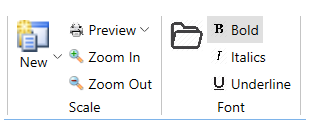
![](https://cdn.mescius.io/document-site-files/images/ff434f23-5223-494e-9580-3dd8a227b884/images/toggle-button-tool.png)

In the image above, the Bold, Italics and Underline buttons in the Font group are all toggle buttons. Note that the Bold toggle button is in checked state using the [IsChecked](/componentone/api/wpf/online-ribbon5/dotnet-api/C1.WPF.Ribbon/C1.WPF.Ribbon.C1ToggleButtonTool.IsChecked.html) property.

The code snippet shows how to add toggle buttons:

```xml
<c1:C1ToggleButtonTool Label="Bold" IsChecked="True">
                        <c1:C1ToggleButtonTool.IconTemplate>
                            <c1:C1IconTemplate>
                                <c1:C1BitmapIcon Source="/bold.png"/>
                            </c1:C1IconTemplate>
                        </c1:C1ToggleButtonTool.IconTemplate>
                    </c1:C1ToggleButtonTool>
                    <c1:C1ToggleButtonTool Label="Italics">
                        <c1:C1ToggleButtonTool.IconTemplate>
                            <c1:C1IconTemplate>
                                <c1:C1BitmapIcon Source="/italic.png"/>
                            </c1:C1IconTemplate>
                        </c1:C1ToggleButtonTool.IconTemplate>
                    </c1:C1ToggleButtonTool>
                    <c1:C1ToggleButtonTool Label="Underline">
                        <c1:C1ToggleButtonTool.IconTemplate>
                            <c1:C1IconTemplate>
                                <c1:C1BitmapIcon Source="/underline.png"/>
                            </c1:C1IconTemplate>
                        </c1:C1ToggleButtonTool.IconTemplate>
                    </c1:C1ToggleButtonTool>
```