# Collapsing Direction
## Content
**C1OutlookBar** supports collapsing in both left (default) and right directions. When the [C1OutlookBar](/componentone/api/wpf/online-outlookbar/dotnet-framework-api/C1.WPF.OutlookBar.4.6.2/C1.WPF.OutlookBar.C1OutlookBar.html) is set to dock **Left**, the default, the collasping arrow appears on the right side of the control. When the [C1OutlookBar](/componentone/api/wpf/online-outlookbar/dotnet-framework-api/C1.WPF.OutlookBar.4.6.2/C1.WPF.OutlookBar.C1OutlookBar.html) is set to dock **Right**, the collasping arrow appears on the left side of the control.
| [Dock](/componentone/api/wpf/online-outlookbar/dotnet-framework-api/C1.WPF.OutlookBar.4.6.2/C1.WPF.OutlookBar.C1OutlookBar.Dock.html) = **Left
**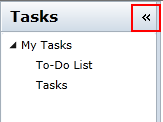 | [Dock](/componentone/api/wpf/online-outlookbar/dotnet-framework-api/C1.WPF.OutlookBar.4.6.2/C1.WPF.OutlookBar.C1OutlookBar.Dock.html) = Right
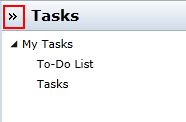 |
| --- | --- |
To specify which direction to collapse the [C1OutlookBar](/componentone/api/wpf/online-outlookbar/dotnet-framework-api/C1.WPF.OutlookBar.4.6.2/C1.WPF.OutlookBar.C1OutlookBar.html), use the [Dock](/componentone/api/wpf/online-outlookbar/dotnet-framework-api/C1.WPF.OutlookBar.4.6.2/C1.WPF.OutlookBar.C1OutlookBar.Dock.html) property.
```auto
```
You can also set [Dock](/componentone/api/wpf/online-outlookbar/dotnet-framework-api/C1.WPF.OutlookBar.4.6.2/C1.WPF.OutlookBar.C1OutlookBar.Dock.html) property in the Visual Studio Properties window.