# Collapsed Content
## Content
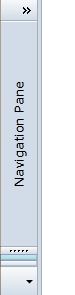
When a [C1OutlookBar](/componentone/api/wpf/online-outlookbar/dotnet-framework-api/C1.WPF.OutlookBar.4.6.2/C1.WPF.OutlookBar.C1OutlookBar.html) is collapsed, the central content region can display customized collapsed content. In Microsoft Outlook 2007-2010, this area is simply vertical text that reads "**Navigation Pane**". This region can be associated with a selected item for added flexibility, but this is not a requirement. There are two options for showing collapsed content.
**Option A**: Use the [CollapsedContent](/componentone/api/wpf/online-outlookbar/dotnet-framework-api/C1.WPF.OutlookBar.4.6.2/C1.WPF.OutlookBar.C1OutlookBar.CollapsedContent.html) property to display text when the [C1OutlookBar](/componentone/api/wpf/online-outlookbar/dotnet-framework-api/C1.WPF.OutlookBar.4.6.2/C1.WPF.OutlookBar.C1OutlookBar.html) is collapsed.
```auto
```
**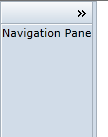**
**Option B**: Use the [CollapsedContent](/componentone/api/wpf/online-outlookbar/dotnet-framework-api/C1.WPF.OutlookBar.4.6.2/C1.WPF.OutlookBar.C1OutlookBar.CollapsedContent.html) property to display the same collasped content no matter which item is selected.
```xml
�c
```
For example, see the following XAML displays "**Navigation Pane**" vertically.
```xml
```
****