# Templates
## Content
You can customize the look of each [C1OutlookItem](/componentone/api/wpf/online-outlookbar/dotnet-framework-api/C1.WPF.OutlookBar.4.6.2/C1.WPF.OutlookBar.C1OutlookItem.html) by setting some of the basic [C1OutlookBar](/componentone/api/wpf/online-outlookbar/dotnet-framework-api/C1.WPF.OutlookBar.4.6.2/C1.WPF.OutlookBar.C1OutlookBar.html) and [C1OutlookItem](/componentone/api/wpf/online-outlookbar/dotnet-framework-api/C1.WPF.OutlookBar.4.6.2/C1.WPF.OutlookBar.C1OutlookItem.html) properties. Each of these properties has a corresponding **Template** property that binds them together.
| **Property** | **Correpsonding Template Property** | **Description** |
| --- | --- | --- |
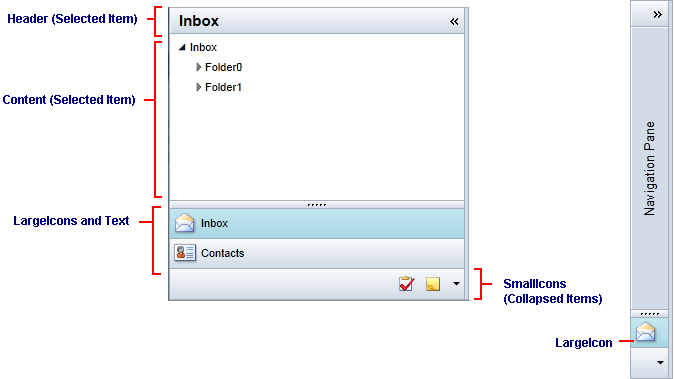
| Header | HeaderTemplate | When the bar is expanded, the **Header** is shown to the right of the **LargeIcon** and above the content in the Office 2007 style. |
| Content | ContentTemplate | Gets or sets the content to display in the **Item** **Content** section when this item is selected. |
| LargeIcon | LargeIconTemplate | **LargeIcon** represents the **C1OutlookItem** image that appears in the vertical stack when **C1OutlookBar** is collapsed. |
| SmallIcon | SmallIconTemplate | Items above the [FirstOverflowIndex](/componentone/api/wpf/online-outlookbar/dotnet-framework-api/C1.WPF.OutlookBar.4.6.2/C1.WPF.OutlookBar.C1OutlookBar.FirstOverflowIndex.html) or items that do not fit in the **Item Buttons** list are placed in a single horizontal line below the **LargeIcons** using **SmallIcon**. |
> type=note
> **Note**: A menu that uses a **SmallIcon** and **Header** allows hiding and showing individual items. Because the properties are displayed in several places, do not assign them a UIElement.
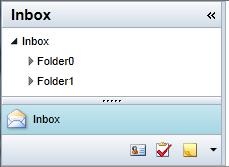
Here's an example of a [C1OutlookBar](/componentone/api/wpf/online-outlookbar/dotnet-framework-api/C1.WPF.OutlookBar.4.6.2/C1.WPF.OutlookBar.C1OutlookBar.html) containing a [C1OutlookItem](/componentone/api/wpf/online-outlookbar/dotnet-framework-api/C1.WPF.OutlookBar.4.6.2/C1.WPF.OutlookBar.C1OutlookItem.html) that has "**Inbox**" as the **Header** and a small and large icon bound through the corresponding templates.
```xml
```
The [C1OutlookBar](/componentone/api/wpf/online-outlookbar/dotnet-framework-api/C1.WPF.OutlookBar.4.6.2/C1.WPF.OutlookBar.C1OutlookBar.html) looks like this: