# Alignment

## Content


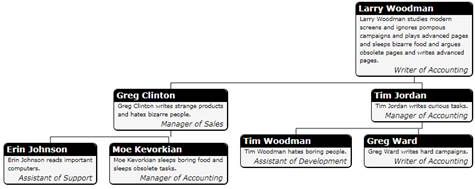
The **HorizontalContentAlignment** and **VerticalContentAlignment** properties allow you to customize the alignment of nodes within the chart. The default value is **Center** for both properties, so nodes are centered within the tree. The images below show the effect of the other possible settings:

**Left**

If you set **HorizontalContentAlignment** to "Left":

```xml
<c1:C1OrgChart
   x:Name="_orgChart"
   HorizontalContentAlignment="Left"
   ItemTemplate="{StaticResource EmployeeTemplate }" >
 </c1:C1OrgChart>
```

The **OrgChart** will appear as follows:

![C1OrgChart for WPF](https://cdn.mescius.io/document-site-files/images/282d56f4-1ae7-4585-bed7-ef71b36e32f5/imagesext/image12_10.jpg)

**Stretch**

If you set **HorizontalContentAlignment** to "Stretch":

```xml
<c1:C1OrgChart
   x:Name="_orgChart"
   HorizontalContentAlignment="Stretch"
   ItemTemplate="{StaticResource EmployeeTemplate }" >
 </c1:C1OrgChart>
```

The **OrgChart** will appear as follows:

![C1OrgChart for WPF](https://cdn.mescius.io/document-site-files/images/282d56f4-1ae7-4585-bed7-ef71b36e32f5/imagesext/image12_11.jpg)

**Right**

If you set **HorizontalContentAlignment** to "Right":

```xml
<c1:C1OrgChart
   x:Name="_orgChart"
   HorizontalContentAlignment="Right"
   ItemTemplate="{StaticResource EmployeeTemplate }" >
 </c1:C1OrgChart>
```

The **OrgChart** will appear as follows:
![C1OrgChart for WPF](https://cdn.mescius.io/document-site-files/images/282d56f4-1ae7-4585-bed7-ef71b36e32f5/imagesext/image12_12.jpg)