# Quick Start
## Content
This quick start will guide you through the steps of adding C1MultiSelect to a project and binding the control to a data source.
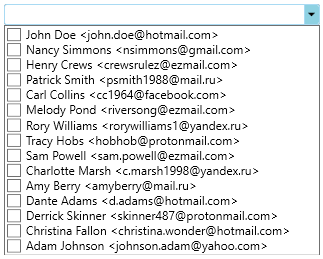
Complete the steps given below to see how the MultiSelect control appears after data binding.
1. [Adding MultiSelect control to the Application](/componentone/docs/wpf/online-multiselect/quickstart#step-1-adding-multiselect-control-to-the-application)
2. [Binding MultiSelect to a list](/componentone/docs/wpf/online-multiselect/quickstart#step-2-binding-multiselect-to-a-list)
The following image shows how the MultiSelect control appears after data binding.
### Step 1: Adding MultiSelect control to the Application
1. Create a new **WPF App** in **Visual Studio**.
2. Drag and Drop the **C1MultiSelect** control from the toolbox onto the form. The following references automatically get added to the **References**.
* C1.WPF.Input.4.dll
* C1.WPF.4.dll
3. Open **MainWindow.xaml** and replace the existing XAML with the following code.
```xml
```
### Step 2: Binding MultiSelect to a list
1. Switch to the code view and add following code to **Window\_Loaded** event.
```vbnet
Dim addressBook As IList(Of String) = New List(Of String)() From {
"John Doe ",
"Nancy Simmons ",
"Henry Crews ",
"Patrick Smith ",
"Carl Collins ",
"Melody Pond ",
"Rory Williams ",
"Tracy Hobs ",
"Sam Powell ",
"Charlotte Marsh ",
"Amy Berry ",
"Dante Adams ",
"Derrick Skinner ",
"Christina Fallon ",
"Adam Johnson "
}
mselect.ItemsSource = addressBook
```
```csharp
IList addressBook = new List()
{
"John Doe ",
"Nancy Simmons ",
"Henry Crews ",
"Patrick Smith ",
"Carl Collins ",
"Melody Pond ",
"Rory Williams ",
"Tracy Hobs ",
"Sam Powell ",
"Charlotte Marsh ",
"Amy Berry ",
"Dante Adams ",
"Derrick Skinner ",
"Christina Fallon ",
"Adam Johnson "
};
mselect.ItemsSource = addressBook;
```
2. Build and run the application.