# Hotkeys
## Content
Menu-driven software applications commonly include shortcut keys (or hotkeys) to allow users to navigate through the menus using keyboard itself. Hotkeys not only help in quickly accessing menu items using keyboard but also reduce the reliance on mouse. This can significantly speed up tasks for application users who prefer keyboard interaction over mouse interaction. Common hotkeys such as Ctrl + N for New, Ctrl + O for Open, Ctrl + C for Copy, etc. are widely recognized and expected by users in a menu-based software application.
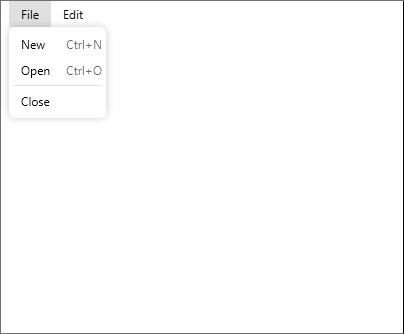
The **Menu** control supports hotkeys to make the interaction easier and faster with WPF applications. You can set the hotkeys for various menu items in the Menu control using **HotKey** property of the **C1MenuItem** class, as showcased in the following steps:
1. In the XAML view, create two main menus i.e., File and Edit menu along with their child menu items. For complete code and information on how to create File and Edit menu with their child items, see [Quick Start](/componentone/docs/wpf/online-menu5/overview/flat-menu/MenuContextMenuQuickStart).
2. Set the **HotKey** property for **New** and **Open** menu items of the **File** menu to Ctrl + N and Ctrl + O respectively. Also, set the **Command** property for **New** and **Open** menu items to **New** and **Open** respectively:
```xml
```
3. Define the collection of commands using the CommandBinding class within the **\\** tags in the XAML view above the Grid tag. Further, specify event handlers using the **CommandBinding** class which trigger and perform specific functions whenever you press the related hot keys. In the following code, we have created **CommandBinding\_Executed\_New** and **CommandBinding\_Open\_Executed** event handlers which trigger on pressing the hot keys, such as Ctrl + N and Ctrl + O, respectively.
```xml
```
4. Add the definitions of **CommandBinding\_Executed\_New** and **CommandBinding\_Open\_Executed** event handler methods. Now, when the user presses the CTRL + N hotkey, the related **CommandBinding\_Executed\_New** event handler gets triggered and displays a message. Similarly, when the user presses the CTRL + O hotkey, the **CommandBinding\_Open\_Executed** event handler gets triggered and displays a message:
**csharp**
```csharp
private void CommandBinding_Executed_New(object sender, ExecutedRoutedEventArgs e)
{
MessageBox.Show("New Menuitem is selected");
Keyboard.Focus(this);
}
private void CommandBinding_Open_Executed(object sender, ExecutedRoutedEventArgs e)
{
MessageBox.Show("Open Menuitem is selected");
Keyboard.Focus(this);
}
```
**vbnet**
```vbnet
Private Sub CommandBinding_Executed_New(sender As Object, e As ExecutedRoutedEventArgs)
MessageBox.Show("New Menuitem is selected")
Keyboard.Focus(Me)
End Sub
Private Sub CommandBinding_Open_Executed(sender As Object, e As ExecutedRoutedEventArgs)
MessageBox.Show("Open Menuitem is selected")
Keyboard.Focus(Me)
End Sub
```