# Item List
## Content
The item list is a directory of the content that has been added to the media player. You can use the up or down buttons to scroll through the list and then click on one of the media files to select it. The item list looks as follows:
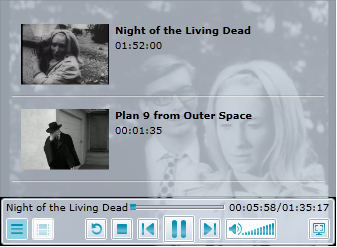
A few properties will have to be set to achieve the look and behavior of an item list such as the one above. To title a media item, you have to set the [C1MediaItem.Title](/componentone/api/wpf/online-mediaplayer/dotnet-framework-api/C1.WPF.MediaPlayer.4.6.2/C1.WPF.MediaPlayer.C1MediaItem.Title.html) property of a [C1MediaItem](/componentone/api/wpf/online-mediaplayer/dotnet-framework-api/C1.WPF.MediaPlayer.4.6.2/C1.WPF.MediaPlayer.C1MediaItem.html) to a string. To add a time stamp to the video, set the [C1MediaItem.NaturalDuration](/componentone/api/wpf/online-mediaplayer/dotnet-framework-api/C1.WPF.MediaPlayer.4.6.2/C1.WPF.MediaPlayer.C1MediaItem.NaturalDuration.html) property. You can add the thumbnail by setting the [C1MediaItem.ThumbnailSource](/componentone/api/wpf/online-mediaplayer/dotnet-framework-api/C1.WPF.MediaPlayer.4.6.2/C1.WPF.MediaPlayer.C1MediaItem.ThumbnailSource.html) property to the location of an image file
The following XAML was used to create the first item in this list.
```xml
```
Once your media item is created, you can create chapters for it, which will then be added to a chapter list. For more information on chapter lists, see the [Chapter List](/componentone/docs/wpf/online-mediaplayer/Using_C1MediaPlayer/C1MediaPlayer_Elements/Chapter_List) topic.
**Accessing the Item List**
You can access the item list by pressing the **Item List** button  on the [C1MediaPlayer](/componentone/api/wpf/online-mediaplayer/dotnet-framework-api/C1.WPF.MediaPlayer.4.6.2/C1.WPF.MediaPlayer.C1MediaPlayer.html) control. If you prefer to have the item list opened at startup, you can set the [IsItemListVisible](/componentone/api/wpf/online-mediaplayer/dotnet-framework-api/C1.WPF.MediaPlayer.4.6.2/C1.WPF.MediaPlayer.C1MediaPlayer.IsItemListVisible.html) property to **True**.