# Chapter List
## Content
The chapter list displays all of the chapters added to the current media item. You can use the right and left arrow buttons to scroll through the list of chapters and then click on a chapter to select it. The chapter list looks as follows:
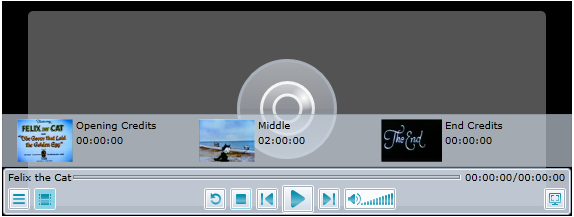
A few properties will have to be set to achieve the look and behavior of a chapter list such as the one above. To title a media item, you have to set the [C1MediaChapter.Title](/componentone/api/wpf/online-mediaplayer/dotnet-framework-api/C1.WPF.MediaPlayer.4.6.2/C1.WPF.MediaPlayer.C1MediaChapter.Title.html) property to a string. You can add the thumbnail by setting the [C1MediaChapter.ThumbnailSource](/componentone/api/wpf/online-mediaplayer/dotnet-framework-api/C1.WPF.MediaPlayer.4.6.2/C1.WPF.MediaPlayer.C1MediaChapter.ThumbnailSource.html) property to an image file. Finally, you will need to specify the time that the chapter starts at by setting the [C1MediaChapter.Position](/componentone/api/wpf/online-mediaplayer/dotnet-framework-api/C1.WPF.MediaPlayer.4.6.2/C1.WPF.MediaPlayer.C1MediaChapter.Position.html) property to a time.
To create a chapter list like the one in the image above, you would use the following XAML:
```xml
```
For task-based help about adding chapters to a media item, see [Creating Chapters](/componentone/docs/wpf/online-mediaplayer/C1MediaPlayer_Task-Based_Help/Creating_Chapters).
**Accessing the Chapter List**
You can access the item list by pressing the **Chapter List** button  on the **C1MediaPlayer** control. If you prefer to have the item list opened at startup, you can set the [C1MediaPlayer.IsChapterListVisible](/componentone/api/wpf/online-mediaplayer/dotnet-framework-api/C1.WPF.MediaPlayer.4.6.2/C1.WPF.MediaPlayer.C1MediaPlayer.IsChapterListVisible.html) property to **True**.