# Selection
## Content
MultiSelect allows you to modify the way of selection of items in multiple ways. Let us explore these ways in the following sections.
## Selection Modes
MultiSelect provides [SelectionMode](/componentone/api/wpf/online-input-net/dotnet-api/C1.WPF.Input/C1.WPF.Input.C1MultiSelect.SelectionMode.html) property to determine whether you can select one or more than one item from the header. This property lets you choose between the following selection modes through **C1SelectionMode** enumeration:
* **Single**: Allows you to select only one item at a time.
* **Multiple**: Allows you to select multiple items without holding down a modifier key.
* **Extended**: Allows you to select multiple consecutive items while holding down the corresponding modifier key.
* **None**: Does not allow you to select any item.
The following GIF showcases the MultiSelect control with SelectionMode set as Single.

To set the selection mode to single, use the following code:
**xml**
```xml
```
**csharp**
```csharp
mselect.SelectionMode = C1SelectionMode.Single;
```
## Show SelectAll
MultiSelect allows you to select all items from the dropdown list at once simply by setting the [ShowSelectAll](/componentone/api/wpf/online-input-net/dotnet-api/C1.WPF.Input/C1.WPF.Input.C1MultiSelect.ShowSelectAll.html) property to **true**. Setting this property displays a "SelectAll' check box in the dropdown list of the MultiSelect control as shown in the following image.
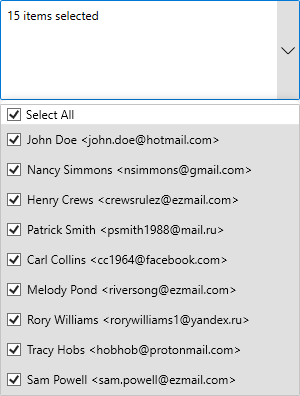
The following example uses the Products table from NWind to show the list of products in the MultiSelectListBox control.
**xml**
```xml
```
**csharp**
```csharp
mselect.ShowSelectAll = true;
```