# Quick Start
## Content
This quick start is intended to get you up and running with the TagEditor control. It guides you through the steps of adding the MultiSelect control to a project and binding it to a data source.
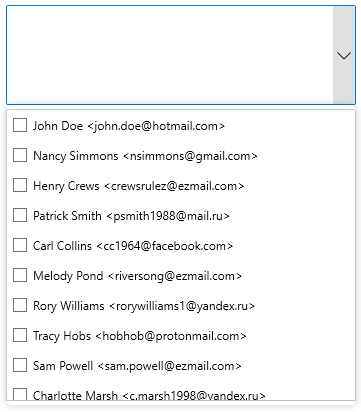
The following image shows how the MultiSelect control appears after data binding.
## Set up the Application
1. Create a new **WPF App** in **Visual Studio**.
2. In the **Solution Explorer**, right click **Dependencies** and select **Manage NuGet Packages**.
3. In **NuGet Package Manager**, select **nuget.org** as the **Package source**.
4. Search and select the following package and click **Install**.
* **C1.WPF.Input**
## Adding MultiSelect control to the Application
1. In XAML Design, drag and drop the **C1MultiSelect** control from the toolbox onto the window.
2. In the XAML code, add the following namespace in the \\ tag.
```xml
xmlns:c1="http://schemas.componentone.com/winfx/2006/xaml"
```
3. Set the **Name** property for the MultiSelect control along with the desired height and width to make the code looks similar to the following.
```xml
```
## Binding MultiSelect to a list
1. In the **Properties** window, navigate to the Window\_Loaded event and double click to create it for the window.
2. Switch to the code view and add following code to **Window\_Loaded** event.
```csharp
IList addressBook = new List()
{
"John Doe ",
"Nancy Simmons ",
"Henry Crews ",
"Patrick Smith ",
"Carl Collins ",
"Melody Pond ",
"Rory Williams ",
"Tracy Hobs ",
"Sam Powell ",
"Charlotte Marsh ",
"Amy Berry ",
Dante Adams ",
"Derrick Skinner ",
"Christina Fallon ",
"Adam Johnson "
};
mselect.ItemsSource = addressBook;
```
## Build and Run the Project
1. Click **Build | Build Solution** to build the project.
2. Press **F5** to run the project.