# Linear Gauge Features
With Gauge controls for WinForms (GaugeControl) you can visualize your date in beautiful and meaningful ways. This API provides different gauges as Linear Gauge, Radial Gauge, BulletGraph Gauge to create simple and practical usecases.
## Content
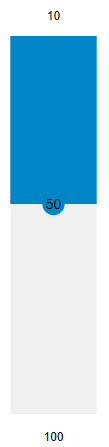
The **LinearGauge** control uses a linear pointer to show a value along a linear scale. You can set the value across the linear frame using the [Value](/componentone/api/wpf/online-gauges-net/dotnet-api/C1.WPF.Gauge/C1.WPF.Gauge.C1Gauge.Value.html) property to display the value you want to display.
You can also set the **Min** and **Max** properties of the Linear Gauge to mark the minimum value and maximum gauge values.

**xml**
```xml
```
**csharp**
```csharp
linearGauge.Min = 10;
linearGauge.Max = 100;
```
Further, you can also set the direction of the Linear Gauge using the [Direction](/componentone/api/wpf/online-gauges-net/dotnet-api/C1.WPF.Gauge/C1.WPF.Gauge.C1LinearGauge.Direction.html) property to create vertical Linear Gauge. For more information about gauge direction, see [Direction](/componentone/docs/wpf/online-gauges-net/direction).