# Task Start and Finish

## Content


GanttView facilitates you to schedule your project from finish date or start date as per your convenience. To do so, you can use [ScheduleFrom](/componentone/api/wpf/online-ganttview/dotnet-api/C1.WPF.GanttView/C1.GanttView.Project.ScheduleFrom.html) property of the **Project** class. After scheduling your project, you can specify the start date and finish date of your task by using <span data-popup-content="This property is available in \u003ca href=\u0022/componentone/api/wpf/online-ganttview/dotnet-api/C1.WPF.GanttView/C1.GanttView.Task.Start.html\u0022\u003e.NET\u003c/a\u003e and \u003ca href=\u0022/componentone/api/wpf/online-ganttview/dotnet-api/C1.WPF.GanttView/C1.GanttView.Task.Start.html\u0022\u003e.NET Framework\u003c/a\u003e." data-popup-title="Start" data-popup-theme="ui-tooltip-green qtip-green">Start</span> and <span data-popup-content="This property is available in \u003ca href=\u0022/componentone/api/wpf/online-ganttview/dotnet-api/C1.WPF.GanttView/C1.GanttView.Task.Finish.html\u0022\u003e.NET\u003c/a\u003e and \u003ca href=\u0022/componentone/api/wpf/online-ganttview/dotnet-api/C1.WPF.GanttView/C1.GanttView.Task.Finish.html\u0022\u003e.NET Framework\u003c/a\u003e." data-popup-title="Finish" data-popup-theme="ui-tooltip-green qtip-green">Finish</span> properties of the <span data-popup-content="This class is available in \u003ca href=\u0022/componentone/api/wpf/online-ganttview/dotnet-api/C1.WPF.GanttView/C1.GanttView.Task.html\u0022\u003e.NET\u003c/a\u003e and \u003ca href=\u0022/componentone/api/wpf/online-ganttview/dotnet-api/C1.WPF.GanttView/C1.GanttView.Task.html\u0022\u003e.NET Framework\u003c/a\u003e." data-popup-title="Task" data-popup-theme="ui-tooltip-green qtip-green">Task</span> class.

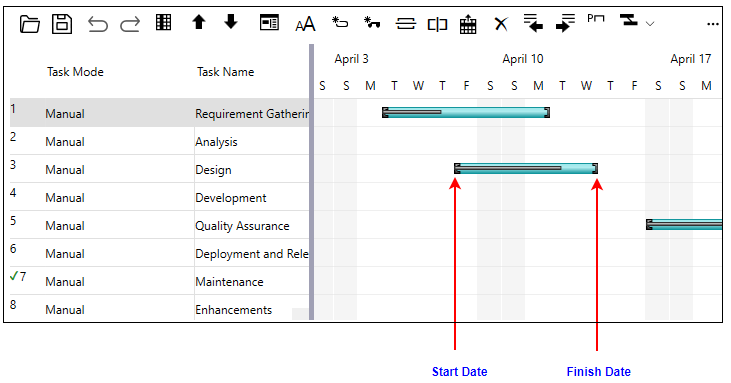
The following image represents the start and finish dates of a task in GanttView.
![](https://cdn.mescius.io/document-site-files/images/14a478dc-2b0f-437a-969b-b17e430e375e/images/task-startfinish.png)

To set the start and finish dates for your task, use the following code. This example uses the sample created in [Quick Start](/componentone/docs/wpf/online-ganttview/GanttView-QuickStart).

```csharp
//Define start date of Task1
t1.Start = new DateTime(2022, 04, 5);
t1.Finish = new DateTime(2022, 04, 12);
```

Alternatively, you can use the **Task Collection Editor** to set the start and finish date. For more information, see [Task Collection Editor](/componentone/docs/wpf/online-ganttview/Design-Time-Support#task-collection).