# Task Deadline
## Content
Task deadline enables you to monitor each and every activity involved within a project. GanttView supports deadlines that allow you to keep a track of tasks exceeding their set deadline dates by displaying a red indicator. This indicator appears next to the tasks which have exceeded their deadline and displays a message upon hovering. In addition to a red indicator, GanttView also displays a downward arrow in the task bar as shown in the following image.
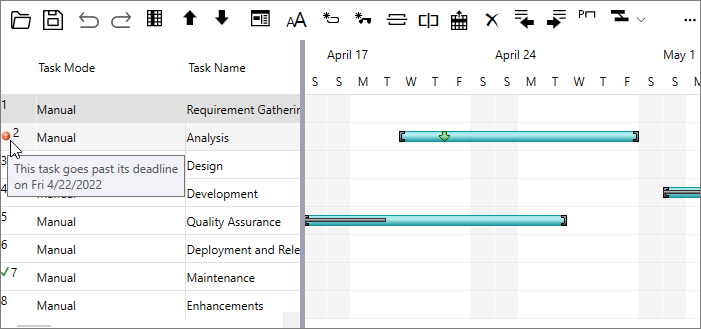
To set the deadline for a particular task, you can use Deadline property provided by the Task class. The **Deadline** property accepts an object of the DateTime class to set the deadline date as demonstrated in the following code. This example uses the sample created in [Quick Start](/componentone/docs/wpf/online-ganttview/GanttView-QuickStart).
```csharp
//Setting deadline
t.Deadline = new DateTime (2022, 4, 22);
```
Alternatively, task deadlines can be set at runtime through the [Task Information dialog](/componentone/docs/wpf/online-ganttview/dialogboxes/Task-Information-Dialog), which can be accessed by clicking the **Task Information** button from the [Toolbar](/componentone/docs/wpf/online-ganttview/GanttView-Toolbar).