# Task Resources
## Content
GanttView supports three kinds of resources namely work, material, and cost as described in the following table:
| **Resource Type** | **Description** |
| --- | --- |
| Work Resource | Refers to the people and equipment required to accomplish a set of tasks defined in a project. |
| Material Resource | Refers to the exhaustible raw material and goods required to accomplish a set of tasks in a project. |
| Cost Resource | Refers to the financial cost associated to a task that needs to be accounted for in a project such as expenditures on travel, entertainment, and other overheads. |
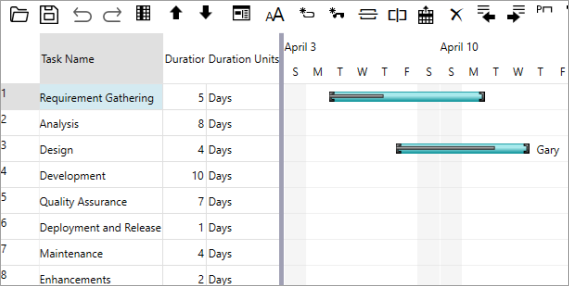
The following image shows a resource named "Gary" assigned to a task in GanttView.
### Add Resource
GanttView provides the Resource class for handling resources. To create and manage resources, you need to create an instance of the **Resource** class and set its name and cost using [Name](/componentone/api/wpf/online-ganttview/dotnet-api/C1.WPF.GanttView/C1.GanttView.Resource.Name.html) and [Cost](/componentone/api/wpf/online-ganttview/dotnet-api/C1.WPF.GanttView/C1.GanttView.Resource.Cost.html) properties, respectively. Besides, you can use [ResourceType](/componentone/api/wpf/online-ganttview/dotnet-api/C1.WPF.GanttView/C1.GanttView.Resource.ResourceType.html) property of the Resource class which uses the [ResourceType](/componentone/api/wpf/online-ganttview/dotnet-api/C1.WPF.GanttView/C1.WPF.GanttView.ResourceType.html) enumeration to set the resource type.
The Resources class provides **Add** method to add the resources to a locally-defined resource dictionary. However, simply creating a resource is of no use until it is assigned to a task for which the GanttView control provides the ResourceRef class.
The following code example illustrates creating and adding a resource and, then assigning a task to it. This example uses the sample created in [Quick Start](/componentone/docs/wpf/online-ganttview/GanttView-QuickStart).
```csharp
//Creating a resource
Resource r = new Resource();
r.ResourceType = ResourceType.Work;
r.Name = "Gary";
r.Cost = 300m;
//Adding the resource to GanttView
gv.TaskResources.Add(r, "Gary");
//Assigning the resource to task 't1'
Task t1 = gv.Tasks.Search("Requirement Gathering");
if (t1 != null && t1.ResourceRefs.Count == 0)
{
ResourceRef rRef = new ResourceRef();
rRef.Resource = r;
rRef.Amount = 0.5;
t1.ResourceRefs.Add(rRef);
}
```