# Percent Complete
## Content
GanttView provides percent complete feature to specify the completion status of a task in percentage. This feature helps you keep a track of all the tasks within a project schedule.
The task percent complete visually appears as a dark colored bar inside the task bar. Also, a 100% completed task is represented by an indicator, a green tick mark, which appears next to it in the GanttView control as shown in the following image.
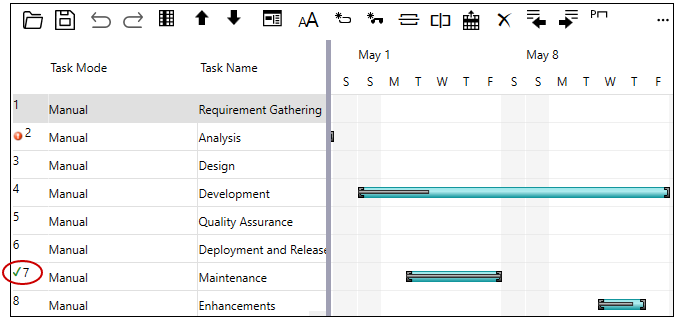
The Task class provides PercentComplete property to set percent completion status for a task. The **PercentComplete** property accepts any positive double type integer value between 0 and 1, where 0 denotes that the task is not started while 1 denotes the task is complete.
The following code illustrates how to set the PercentComplete property for a task. Here, the task completion percentage is set to 60%. This example uses the sample created in [Quick Start](/componentone/docs/wpf/online-ganttview/GanttView-QuickStart).
```csharp
//PercentComplete value 0.6 means the Task is 60% complete
t.PercentComplete = 0.6;
```
Alternatively, the completion percentage for a task can be set through the [Task Information Dialog](/componentone/docs/wpf/online-ganttview/dialogboxes/Task-Information-Dialog), which can be accessed by clicking the **Task Information** button from the [Toolbar](/componentone/docs/wpf/online-ganttview/GanttView-Toolbar).