# Timescale
## Content
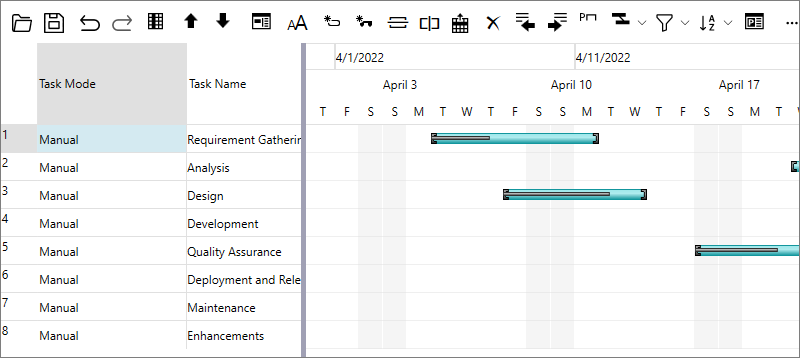
Timescale represents the dates on which you need to do a particular task. GanttView supports a timescale along the horizontal timeline, which is displayed in three different tiers namely bottom, middle, and top. The bottom tier displays abbreviated names of days in a week, while the middle tier displays work week. The top tier, which is hidden by default, displays month or year.
The following image shows a GanttView with all the three tiers visible in the timescale.
### Timescale Formats
GanttView provides a variety of timescale formats to suit your requirements.The following table describes the available format specifiers for the timescale labels.
| **Format Specifier** | **Description** |
| --- | --- |
| **Standard Date/Time Formats** | |
| s | s is the standard date/time format specifier. Ex: s(x) where 'x' is a placeholder for one of the following letters: d, D, f, g, m, t, y. |
| sd | Short date pattern (11/1/2021). |
| sD | Long date pattern (Thursday, November 01, 2021). |
| sf | Full date/time pattern (Thursday, November 01, 2021 6:30 AM). |
| sg | General date/time pattern (11/1/2021 6:30 AM). |
| sm | Month day pattern (November 1). |
| st | Short time pattern (6:30 AM). |
| sy | Year month pattern (November, 2021). |
| **Year Formats** | |
| yy | Represents the year as a two-digit number. |
| yyy | Represents the year with a minimum of three digits. |
| yyyy | Represents the year as a four-digit number. |
| **Half Year Formats** | |
| h | Represents a half-year as a number 1 or 2. |
| h{N1,N2} | Custom half-year name. |
| **Quarterly Formats** | |
| q | Represents a quarter as a number from 1 through 4. |
| q{N1,N2,N3,N4} | Custom quarter name. |
| **Calendar Month Formats** | |
| m | Represents the month as a number from 1 through 12. |
| mm | Represents the month as a number from 01 through 12. |
| n | Single-letter month name. |
| nnn | Use DateTimeFormatInfo.GetAbbreviatedMonthName. |
| nnnn | Use DateTimeFormatInfo.GetMonthName. |
| n{N1,N2,N3,N4,N5,N6,N7,N8,N9,N10,N11,N12} | Custom month name. |
| e{N1,N2,N3} | Custom thirds-of-month name. |
| **Week of the Year Number Formats** | |
| k | Represents the week of the year number from 1 to 53. |
| kk | Represents the week of the year number from 01 to 53. |
| **Day of the Month Number Formats** | |
| d | Represents the day of the month as a number from 1 through 31. |
| dd | Represents the day of the month as a number from 01 through 31. |
| **Day of the Year Number Formats** | |
| b | Represents the day of the year as a number from 1 through 366. |
| bbb | Represents the day of the year as a number from 001 through 366. |
| **Single Letter Week Day Formats** | |
| w | Single-letter week day (S, M, T, W,...) |
| ww | Use DateTimeFormatInfo.GetShortestDayName. |
| www | Use DateTimeFormatInfo.GetAbbreviatedDayName. |
| wwww | Use DateTimeFormatInfo.GetDayName. |
| w{N1,N2,N3,N4,N5,N6,N7} | Custom week day name. |
| **Time Formats** | |
| a | Represents the hour as a number from 1 through 12. |
| aa | Represents the hour as a number from 01 through 12. |
| u | Represents the hour as a number from 0 through 23. |
| uu | Represents the hour as a number from 00 through 23. |
| i | Represents the minute as a number from 0 through 59. |
| ii | Represents the minute as a number from 00 through 59. |
| t | Represents the first character of the AM/PM designator. |
| tt | Represents the AM/PM designator. |
| t{N1,N2} | Custom AM/PM designator. |
| **Other Specifiers** | |
| : | Separates the components of a time (use DateTimeFormatInfo.TimeSeparator) |
| / | Separates the components of a date (use DateTimeFormatInfo.DateSeparator) |
| " | Starts/ends a double quoted string (quotation mark). |
| ' | Represents a quoted string (apostrophe). |
| \\c | Displays the character 'c' as a literal. |
| Other character | Copies to the result string literally. |
### Set Timescale
GanttView provides the Timescale class to adjust the display settings of timescale. The **Timescale** class provides [TopTier](/componentone/api/wpf/online-ganttview/dotnet-api/C1.WPF.GanttView/C1.GanttView.Timescale.TopTier.html), [MiddleTier](/componentone/api/wpf/online-ganttview/dotnet-api/C1.WPF.GanttView/C1.GanttView.Timescale.MiddleTier.html), and [BottomTier](/componentone/api/wpf/online-ganttview/dotnet-api/C1.WPF.GanttView/C1.GanttView.Timescale.BottomTier.html) properties which can be used to specify settings for each tier. You can choose to hide or display these tiers by using [Visible](/componentone/api/wpf/online-ganttview/dotnet-api/C1.WPF.GanttView/C1.GanttView.ScaleTier.Visible.html) property of the ScaleTier class. Additionally, you can set the format and units for each tier by using the Format and [Units](/componentone/api/wpf/online-ganttview/dotnet-api/C1.WPF.GanttView/C1.GanttView.ScaleTier.Units.html) properties, respectively.
The following example uses the [Timescale](/componentone/api/wpf/online-ganttview/dotnet-api/C1.WPF.GanttView/C1.WPF.GanttView.C1GanttView.Timescale.html) property to specify settings for TopTier and then set the tier's visibility, format and unit.
```csharp
//Setting the visibility and format for TopTier
ScaleTier st1 = gv.Timescale.TopTier;
st1.Units = TimescaleUnits.ThirdsOfMonths;
st1.Format = "sd";
st1.Visible = true;
```
Similarly, you can use the **Timescale** property to specify settings for bottom and middle tiers, respectively.
### Remove a Tier from Timescale
You can remove a Tier from Timescale by setting **Visible** property of the ScaleTier class to **false**. For instance, the following code demonstrates how to remove the Top Tier from timescale programmatically.
```csharp
//Remove the TopTier from timescale
gv.Timescale.TopTier.Visible = false;
```