# Using Formulas
## Content
To perform calculations in cells, you can enter formulas in the FormulaBar control bound with the FlexSheet control. Binding the [C1FormulaBar](/componentone/api/wpf/online-flexsheet/dotnet-framework-api/C1.WPF.FlexSheet.4.6.2/C1.WPF.FlexGrid.C1FormulaBar.html) with [C1FlexSheet](/componentone/api/wpf/online-flexsheet/dotnet-framework-api/C1.WPF.FlexSheet.4.6.2/C1.WPF.FlexGrid.C1FlexSheet.html) enables you to perform calculations using Excel-style formulas.
You can bind [C1FormulaBar](/componentone/api/wpf/online-flexsheet/dotnet-framework-api/C1.WPF.FlexSheet.4.6.2/C1.WPF.FlexGrid.C1FormulaBar.html) with [C1FlexSheet](/componentone/api/wpf/online-flexsheet/dotnet-framework-api/C1.WPF.FlexSheet.4.6.2/C1.WPF.FlexGrid.C1FlexSheet.html) using the following code:
```xml
```
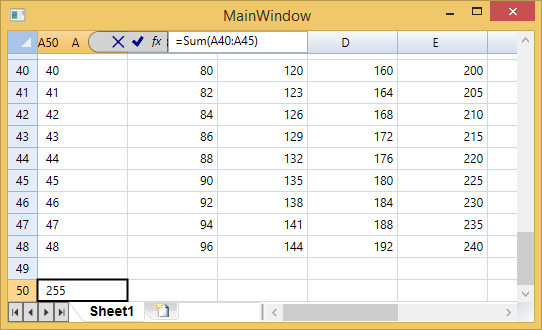
Enter a simple function such as SUM at run time to add values of different cells and see the use of formulas as shown in the image below: