# Customizing Edit Options
## Content
**FlexSheet for WPF** provides various edit options on a multi-tabbed spreadsheet control. The edit options are as follows:
* **None**: Does not show context menu of FlexSheet tabs
* **Insert**: Shows context menu that inserts a new sheet
* **Delete**: Shows context menu that deletes a selected sheet
* **Rename**: Shows context menu that renames a selected sheet
* **Hide**: Shows context menu that hide a selected sheet
* **Unhide**: Shows context menu that unhide all the hidden sheet
* **AllowDrag**: Allows to drag the sheet tabs
* **All**: Shows all edit options in context menu and allows to drag the sheet tabs
These edit options can be set using [EditOptions](/componentone/api/wpf/online-flexsheet/dotnet-framework-api/C1.WPF.FlexSheet.4.6.2/C1.WPF.FlexGrid.C1FlexSheet.EditOptions.html) property and are displayed when you right-click any sheet tab at run time. [EditOptions](/componentone/api/wpf/online-flexsheet/dotnet-framework-api/C1.WPF.FlexSheet.4.6.2/C1.WPF.FlexGrid.C1FlexSheet.EditOptions.html) property controls which context menu should be shown when you right-click on the tab strip.
### In Design View
1. In Design view, select the FlexSheet control.
2. Navigate to the **Properties window** and locate the **EditOptions** property in **Miscellaneous** drop-down section.
3. Click the **EditOptions** drop-down menu and select the edit options you want to add in the context menu. By default, the **EditOptions** property is set to **All**. Here, we have selected **Rename** to only display rename option in the context menu.
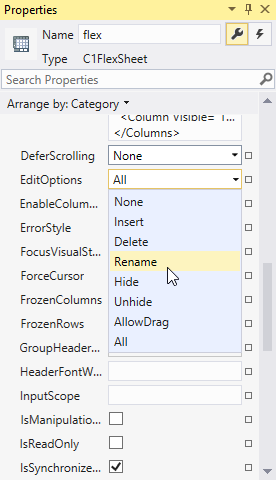
As you can see in the image, [EditOptions](/componentone/api/wpf/online-flexsheet/dotnet-framework-api/C1.WPF.FlexSheet.4.6.2/C1.WPF.FlexGrid.C1FlexSheet.EditOptions.html) has 8 values, None, Insert, Delete, Rename, Hide, Unhide, AllowDrag and All. These values are specified in [FlexSheetEditOptions](/componentone/api/wpf/online-flexsheet/dotnet-framework-api/C1.WPF.FlexSheet.4.6.2/C1.WPF.FlexGrid.FlexSheetEditOptions.html) enum that defines the edit options.
> type=note
> **Note**: The **AllowDrag** property does not appear in the context menu but once applied it allows you to drag or move sheets in tab strip.
### In XAML
You can also customize the **EditOptions** appearing in the context menu by setting the [EditOptions](/componentone/api/wpf/online-flexsheet/dotnet-framework-api/C1.WPF.FlexSheet.4.6.2/C1.WPF.FlexGrid.C1FlexSheet.EditOptions.html) property in XAML View using the following code:
```xml
```
### In Code
You can choose to show the [EditOptions](/componentone/api/wpf/online-flexsheet/dotnet-framework-api/C1.WPF.FlexSheet.4.6.2/C1.WPF.FlexGrid.C1FlexSheet.EditOptions.html) context menu options using the following code:
**vbnet**
```vbnet
flexsheet1.EditOptions = FlexSheetEditOptions.Rename
```
**csharp**
```csharp
flexsheet1.EditOptions = FlexSheetEditOptions.Rename;
```