# Quick Start
## Content
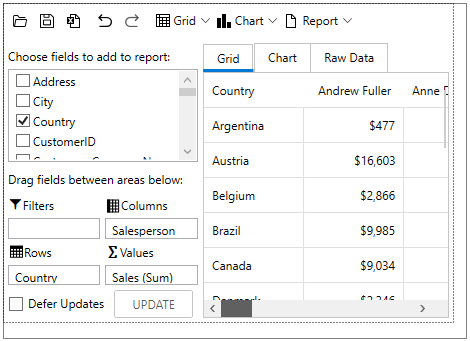
This quick start guide is intended to get you up and running with FlexPivot. In this section, you begin by connecting the **FlexPivotPage** control to C1NWind database. You also understand how to bind **FlexPivotPage** control to a local data source, and then continue exploring various features available in the control at runtime.
## Set up the Application
1. Create a **WPF App** in Visual Studio.
2. From the **ToolBox**, double-click the **FlexPivotPage** to add it to the Grid.
The reference assemblies get automatically added to the Dependencies.
## Bind FlexPivotPage to DataSource
1. Invoke the Window\_Loaded event, and switch to the code view.
2. Add the following code to the Window\_Loaded event to establish connection to the C1NWind database and fetch data from it using the following code:
```csharp
//Establish connection to database and fetch data
OleDbConnection oconn = new OleDbConnection();
oconn.ConnectionString = @"Provider=Microsoft.ACE.OLEDB.12.0;Data Source=..\..\Documents\ComponentOne Samples\Common\C1NWind.mdb";
var da = new OleDbDataAdapter("select * from invoices", oconn);
var dt = new DataTable();
da.Fill(dt);
```
3. Bind the datatable to FlexPivot's C1PivotEngine in the Window\_Loaded event using the [FlexPivotPanel.C1PivotEngine](/componentone/api/wpf/online-flexpivot5/dotnet-api/C1.WPF.Pivot/C1.WPF.Pivot.FlexPivotPanel.C1PivotEngine.html) property as shown in the following code:
```csharp
//Bind the datatable to FlexPivot's C1PivotEngine
var fpEngine = flexPivotPage.FlexPivotPanel.C1PivotEngine;
fpEngine.DataSource = dt.DefaultView;
```
## Create and Add Views
To create a view, add row, column and value fields to the C1PivotEngine using **RowFields**, **ColumnFields** and **ValueFields** properties of the C1PivotEngine class, respectively, using the following code in the Window\_Loaded event:
```csharp
fpEngine.BeginUpdate();
//Add Row, Column and Value fields to create a view
fpEngine.RowFields.Add("Country");
fpEngine.ColumnFields.Add("Salesperson");
fpEngine.Fields["ExtendedPrice"].Caption = "Sales";
fpEngine.Fields["ExtendedPrice"].Format = "c0";
fpEngine.ValueFields.Add("ExtendedPrice");
fpEngine.EndUpdate();
```
> type=note
> **Note**: Since the **FlexPivotEngine** property is obsoleted, you can use the **C1PivotEngine** property instead.