# Advanced Printing
## Content
If you want more control over the printing process, use the [GetPageImages](/componentone/api/wpf/online-flexgrid/dotnet-framework-api/C1.WPF.FlexGrid.4.6.2/C1.WPF.FlexGrid.C1FlexGrid.GetPageImages.html) method to automatically break up the grid into images that can be rendered onto individual pages. Each image is a 100% accurate representation of a portion of the grid, including styles, custom elements, repeating row and column headers on every page, and so on.
The **GetPageImages** method also allows callers to scale the images so the entire grid renders in actual size, scales to fit onto a single page, or scales to the width of a single page.
Once you have obtained the page images, you can use the WPF printing support to render them into documents with complete flexibility. For example, you can create documents that contain several grids, charts, and other types of content. You can also customize headers and footers, add letterheads, and so on.
The following sections demonstrate how an application can render the **FlexGrid** using the **GetPageImages** onto a print document in either platform.
### Printing a C1FlexGrid in WPF
Printing documents in WPF requires the following steps:
1. Create a **PrintDialog** object.
2. If the dialog box’s **ShowDialog** method returns true, then:
3. Create a **Paginator** object that will provide the document content.
4. Call the dialog’s **Print** method.
The code below shows a sample implementation of this mechanism.
```csharp
// print the grid
void _btnPrint_Click(object sender, RoutedEventArgs e)
{
var pd = new PrintDialog();
if (pd.ShowDialog().Value)
{
// get margins, scale mode
var margin = 96.0;
var scaleMode =;
// get page size
var pageSize = new Size(pd.PrintableAreaWidth,
pd.PrintableAreaHeight);
// create paginator
var paginator = new FlexPaginator(
_flex, ScaleMode.PageWidth,
pageSize,
new Thickness(margin), 100);
// print the document
pd.PrintDocument(paginator, "C1FlexGrid printing example");
}
}
```
The **FlexPaginator** class provides the page images.
```csharp
///
/// DocumentPaginator class used to render C1FlexGrid controls.
///
public class FlexPaginator : DocumentPaginator
{
Thickness _margin;
Size _pageSize;
ScaleMode _scaleMode;
List _pages;
public FlexPaginator(C1FlexGrid flex,
ScaleMode scaleMode,
Size pageSize,
Thickness margin, int maxPages)
{
// save parameters
_margin = margin;
_scaleMode = scaleMode;
_pageSize = pageSize;
// adjust page size for margins before building grid images
pageSize.Width -= (margin.Left + margin.Right);
pageSize.Height -= (margin.Top + margin.Bottom);
// get grid images for each page
_pages = flex.GetPageImages(scaleMode, pageSize, maxPages);
}
```
The constructor creates the page images. They are later rendered onto pages when the printing framework invokes the paginator’s **GetPage** method:
```csharp
public override DocumentPage GetPage(int pageNumber)
{
// create page element
var pageTemplate = new PageTemplate();
// set margins
pageTemplate.SetPageMargin(_margin);
// set content
pageTemplate.PageContent.Child = _pages[pageNumber];
pageTemplate.PageContent.Stretch =
_scaleMode == ScaleMode.ActualSize
? System.Windows.Media.Stretch.None
: System.Windows.Media.Stretch.Uniform;
// set footer text
pageTemplate.FooterRight.Text = string.Format("Page {0} of {1}",
pageNumber + 1, _pages.Count);
// arrange the elements on the page
pageTemplate.Arrange(
new Rect(0, 0, _pageSize.Width, _pageSize.Height));
// return new document page
return new DocumentPage(pageTemplate);
}
```
A helper **PageTemplate** class is used to hold the grid images and to provide the margins, headers, and footers.
The remaining paginator methods have trivial implementations:
```csharp
public override int PageCount
{
get { return _pages.Count; }
}
public override IDocumentPaginatorSource Source
{
get { return null; }
}
public override Size PageSize
{
get { return _pageSize; }
set { throw new NotImplementedException(); }
}
public override bool IsPageCountValid
{
get { return true; }
}
}
```
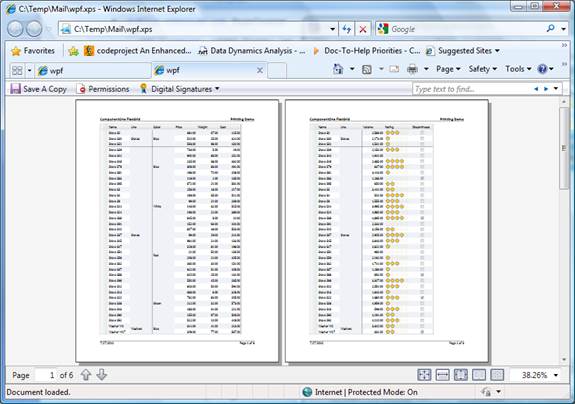
The image below shows the document created when the grid is rendered into an XPS file. The image is very accurate, including a custom rating cell used in the sample. Row and column headers are automatically included in every page, as well as a simple page header and the standard “Page n of m” page footers.
## See Also
[C1FlexGrid Class](/componentone/api/wpf/online-flexgrid/dotnet-framework-api/C1.WPF.FlexGrid.4.6.2/C1.WPF.FlexGrid.C1FlexGrid.html)
[Basic Printing](/componentone/docs/wpf/online-flexgrid/FlexGridFeatures/PrintSupport/BasicPrinting)